Choosing a SafeID hardware token depends on your Identity Provider's support for multi-factor authentication seed uploads.
- Pre-Programmed Tokens: Best for platforms supporting bulk OATH seed file imports (such as Microsoft Entra ID P1/P2, Okta, or Cisco Duo).
- Programmable Tokens: Ideal for platforms that restrict seed file uploads (like AWS, Google Workspace, or GitHub) or for using QR codes via NFC or USB.
Selecting between Pre-Programmed and Programmable Hardware Tokens for MFA
The following tables help show how the two types of hardware tokens are prepared, and used, when accessing a protected application:
Your Primary Goal | Recommended Token Type | Recommended SafeID Models |
|---|---|---|
Deploy to large teams on Microsoft Entra ID (P1/P2), Okta, or Cisco Duo with zero user setup. | Pre-Programmed TOTP Tokens | SafeID/Classic, SafeID/Enterprise |
Use hardware tokens on Microsoft Entra ID Free without paying for P1/P2 add-on licenses. | Programmable TOTP Tokens | SafeID/Diamond, SafeID/Pro |
Authenticate legacy on-premises VPNs or RADIUS gateways requiring counter-based codes. | Pre-Programmed HOTP Tokens | SafeID/Eco |
The following table lists the full range of these tokens (and their key features):
| Token Type | Product | Key Features |
|---|---|---|
Pre-Programmed Hardware Tokens (Factory-Seeded)Choose pre-programmed tokens when you want hardware authenticators that work straight out of the box with zero end-user setup. Your IT administrator uploads a factory-supplied seed file into your identity platform (such as Microsoft Entra ID, Okta, or Cisco Duo), assigns a serial number to each employee, and hands them the device. The pre-programmed lineup delivers a 5–7 year battery life (3–5 years for audio and card models) and supports both TOTP and HOTP protocols across rugged keyfob, slim card, and ADA-compliant audio form factors.
| Durable TOTP keyfobs for standard enterprise and remote staff. | |
| Ultra-compact TOTP keyfob (41 x 19 x 6 mm) for crowded keychains. | ||
| Button-less TOTP keyfob with a continuously displayed 6-digit code. | ||
| ADA Section 508-compliant TOTP keyfob that speaks codes aloud for visually impaired users. | ||
| Event-based (HOTP) keyfob for legacy VPNs featuring a replaceable battery. | ||
| Wallet or lanyard friendly credit card form factor (TOTP, 4–5 year battery). | ||
Programmable Hardware Tokens (NFC & USB Flashable)Choose programmable tokens when your platform blocks bulk seed-file uploads—or when you want to avoid expensive enterprise licensing tiers (such as Microsoft Entra ID P1/P2). They act as physical replacements for smartphone authenticator apps (like Google or Microsoft Authenticator) and can be provisioned in seconds by scanning a standard QR code via NFC or USB. The programmable lineup delivers a 3–7 year battery life and supports single-account keyfobs, multi-account PIN-protected tokens (up to 10 or 100 accounts), and slim credit-card designs.
| Single-account TOTP keyfobs serving as physical smartphone authenticator replacements (5–7 year battery). | |
| Multi-account keyfob (up to 10 accounts) with an optional hardware PIN lock. | ||
| High-capacity keyfob (up to 100 accounts) powered via USB that displays codes numerically or as QR codes. | ||
| Credit card and compact footprint options storing 1 account with a 3–5 year battery life. |
TOTP vs. HOTP: Choosing the Right Security Protocol
These days most applications that provide OTP authentication will provide access either by hardware tokens, or authentication apps, and whilst a few providers may require event based tokens (HOTP) , the majority will use time based tokens (TOTP).
If HOTP is required, then the SafeID/Eco token will be a natural choice, but in most cases (such as Microsoft), most providers will require TOTP tokens, and the choice will then come down to pre-programmed or programmable tokens.
As can be seen in the decision tree below, the selection between these two types mostly depends upon if seed file uploading is supported:
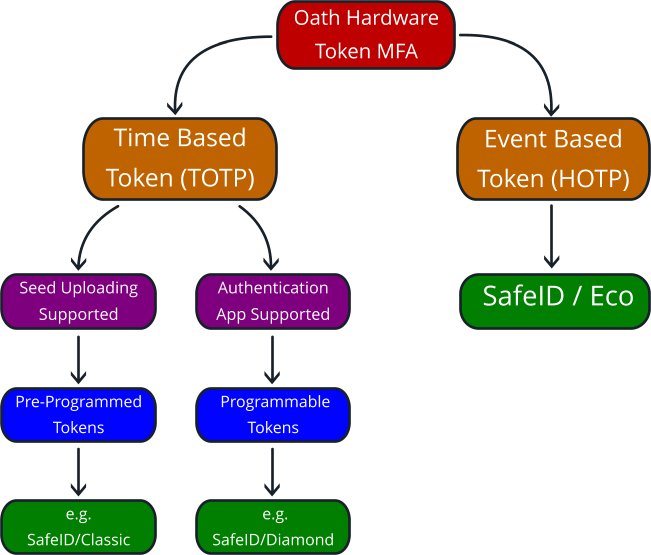
Many major service providers will allow uploading of seed files, but for those that do not, the vast majority will allow the use of authentication apps (and our programmable tokens can act as direct drop-in replacements for these apps)
Does Your Application Support Hardware Tokens ?
The compatibility matrix covers 25 enterprise software providers and identity services—including Amazon Web Services, Atlassian Cloud, Cisco Duo, Microsoft Entra ID, Okta, and Salesforce—detailing their level of native support for pre-programmed TOTP seed uploads, hardware HOTP, and programmable tokens.
Provider / Service | Pre-Programmed TOTP (seed upload) | Hardware HOTP | Programmable Token | Additional Information & Integration Rules |
Amazon Web Services (AWS) | Restricted | Not Supported | Highly Suitable | Central seed list uploads are blocked. Users bypass this by utilizing an NFC burner device to clone the console's virtual app setup layout onto a programmable token. |
Atlassian Cloud | Not Supported (No Seed Upload) | Not Supported | Highly Suitable | Centralized administration operates over Atlassian Access. Blocking backend database seed configurations makes user-programmed NFC key fobs necessary. |
Bitwarden Enterprise | Not Supported (No Seed Upload) | Not Supported (No Seed Upload) | Highly Suitable | Protects the centralized password storage layout. Processes modern time-synced keys along with legacy counter-driven (HOTP) hardware definitions. |
Cisco Duo | Native Support | Native Support | Supported | Processes bulk-imported seeds smoothly inside the administrator panel. Column attributes are mapped directly upon database upload in Hexadecimal or Base32 encoding modes. |
Cloudflare Dashboard | Not Supported (No Seed Upload) | Not Supported | Suitable | Secures critical DNS and network security matrices. Operates alongside web-authn passkeys, letting infrastructure teams register programmable fobs manually. |
Deepnet DualShield | Native Support | Native Support | Supported | Native server environment built directly for SafeID. Ingests password-encrypted or PGP-secured seed payloads to eliminate plaintext exposure during delivery transits. |
ESET Secure Authentication | Native Support | Native Support | Supported | Natively supports importing OATH-compliant TOTP and HOTP hard tokens. Administrators bulk-import tokens via seed files (often XML or CSV formats) directly through the ESET Management Console. |
GitHub Enterprise | Not Supported (No Seed Upload) | Not Supported | Highly Suitable | Enforces rigid multi-factor rules on code contributors. Hardware deployment is driven completely on a per-user account basis using programmable tokens. |
GitLab (SaaS & Host) | Not Supported (No Seed Upload) | Not Supported | Highly Suitable | Accommodates policy groups forcing mandatory 2FA. Users link their physical tokens by providing the standard text key sequence or scanning setup QR strings. |
Google Workspace / Cloud | Not Supported (No Seed Upload) | Not Supported | Highly Suitable | Central directory administration tools block seed file ingests. Physical deployment requires users or IT staff to clone individual profile setup QR codes over NFC. |
HashiCorp Vault | Native Support | Not Supported | Highly Suitable | Features a dedicated backend TOTP multi-factor engine built to programmatically verify rolling 6-digit hashes against internal database applications. |
Ivanti Connect Secure (Pulse Secure) | Native Support | Native Support | Highly Suitable | Natively handles OATH TOTP/HOTP configurations. Supports local user-to-seed assignment at the gateway layer or acts as an authentication proxy pointing to an external RADIUS AAA token infrastructure. |
Microsoft Entra ID | Native Support | Not Supported via CSV | Supported | Streamlines corporate deployments by offering native dashboard CSV handlers for uploading standard seed lists instantly to active user pools. |
miniOrange | Native Support | Native Support | Supported | Supports third-party OATH tokens via the admin console's Token Management tab. Administrators can add individual tokens manually using the serial number and secret key, or bulk-import multiple hardware tokens at once via a formatted CSV file. |
Okta | Native Support | Not Supported Natively | Supported | Handled completely via the Custom OTP factor configuration page. Requires populating structural CSV profiles detailing the unique physical serial hashes. |
OneLogin | Native Support | Not Supported | Supported | Relies purely on automated REST API configurations (/api/2/oath-tokens). Secret seed entries are encrypted instantly on transmission and permanently hidden in log metrics. |
Ping Identity | Native Support | Native Support | Supported | Tailored heavily for enterprise infrastructure scaling. Integrates factory-programmed tokens across local database matrices via PingOne/PingFederate directories. |
Salesforce | Not Supported (No Seed Upload) | Not Supported | Highly Suitable | Satisfies standard platform-wide compliance mandates. Lacking an admin seed layout requires deploying programmable fobs to serve as hardware authenticator app clones. |
SecureAuth | Native Support | Native Support | Supported | Includes a highly customizable validation layer parsing layout parameters like {oathSeed} or {deviceName}|{oathSeed}|{counter}. |
SecurEnvoy | Native Support | Not Supported | Supported | Hardware identities map directly to assigned directory attributes using space-separated TXT file data entries. |
Slack Enterprise Grid | Not Supported (No Seed Upload) | Not Supported | Suitable | Workspace administrative parameters can mandate active multi-factor access, which users clear by configuring a physical key fob profile. |
VPN Gateways (Fortinet/Cisco) | Native Support via RADIUS | Native Support via RADIUS | Supported | Integrates directly with core AAA/RADIUS authentication pathways, relying on classic server-side seed parsing to validate remote employees cleanly. |
WatchGuard AuthPoint | Native Support | Not Supported | Highly Suitable | AuthPoint supports importing third-party OATH-TOTP hardware tokens. Token files can be bulk-uploaded securely via the WatchGuard Cloud dashboard using CSV matrices containing the token secret keys. |
Zoom Workspace | Not Supported (No Seed Upload) | Not Supported | Suitable | User accounts use the standard virtual profile menu layout to pair time-synced rolling code key fobs to their corporate credentials. |
1Password Business | Not Supported (No Seed Upload) | Not Supported | Suitable | Hardens corporate master vault architecture using standard 6-digit TOTP key cycles paired to individual employee profiles. |
Using Pre-Programmed Tokens with Unsupported Apps (DualShield SAML Bridge)
The DualShield SAML Bridge integrates with various platforms across Cloud Infrastructure, IAM, Password Managers, Developer Tools, Security Hardware, and Business Productivity apps. Configuration involves importing token seeds, creating token-based logon procedures, exchanging metadata, and registering service providers. Refer to the official documentation for comprehensive integration steps and app-specific directories. If your application is not listed in this table but supports external identity providers (as most do), you can still integrate it using our general SAML solution or with assistance from our support team. Even if your specific application is not listed in our product-specific guides below, you can still use pre-programmed hardware tokens as long as the service supports SAML 2.0 Single Sign-On (SSO). For step-by-step instructions on configuring any SAML 2.0 service provider, refer to our core SAML Integration Tutorial.General SAML Solution (For Any SAML-Compatible Service)
Using Programmable Tokens
Programmable Hardware Token IntegrationsCategory
Salesforce ZeroTier BeyondTrust ClassLink Duo ID.me JumpCloud Login.gov Logto Microsoft Entra ID Okta OneLogin Ping Identity WatchGuard
Frequently Asked Questions (FAQ)
Can I use SafeID hardware tokens with Microsoft Entra ID Free?
Yes, via Programmable SafeID Tokens. While Entra ID requires a P1 or P2 license to bulk-upload CSV seed files, you can deploy programmable TOTP tokens (SafeID/Diamond, SafeID/Pro) on the Microsoft Entra ID Free tier by registering them as app-based authenticators.
What equipment do I need to program a SafeID token?
- An NFC-enabled smartphone (iOS/Android) with the free SafeID app.
- A Windows or macOS computer paired with a SafeID USB NFC Reader/Writer (recommended for bulk IT provisioning).
Can a programmable SafeID token be reset?
Yes. Unlike factory-locked pre-programmed tokens, programmable models can be overwritten with a new QR code or secret key if an employee transitions or changes accounts.
How long do SafeID hardware token batteries last?
Most keyfob models (SafeID/Classic, SafeID/Enterprise, SafeID/Pro, SafeID/Diamond) last 5 to 7 years. Slim card models last 3 to 5 years, and the SafeID/Eco includes a user-replaceable battery.
What if my application doesn't support OATH seed file uploads?
- Use a Programmable SafeID Token to clone the platform's standard MFA QR code.
- Route authentication through Deepnet DualShield via SAML 2.0 to use pre-programmed tokens.