Choosing a SafeID hardware token depends on your Identity Provider's support for multi-factor authentication seed uploads.
The following tables help show how the two types of hardware tokens are prepared, and used, when accessing a protected application:
Your Primary Goal | Recommended Token Type | Recommended SafeID Models |
|---|---|---|
Deploy to large teams on Microsoft Entra ID (P1/P2), Okta, or Cisco Duo with zero user setup. | Pre-Programmed TOTP Tokens | SafeID/Classic, SafeID/Enterprise |
Use hardware tokens on Microsoft Entra ID Free without paying for P1/P2 add-on licenses. | Programmable TOTP Tokens | SafeID/Diamond, SafeID/Pro |
Authenticate legacy on-premises VPNs or RADIUS gateways requiring counter-based codes. | Pre-Programmed HOTP Tokens | SafeID/Eco |
The following table lists the full range of these tokens (and their key features):
| Token Type | Product | Key Features |
|---|---|---|
Pre-Programmed Hardware Tokens (Factory-Seeded)Choose pre-programmed tokens when you want hardware authenticators that work straight out of the box with zero end-user setup. Your IT administrator uploads a factory-supplied seed file into your identity platform (such as Microsoft Entra ID, Okta, or Cisco Duo), assigns a serial number to each employee, and hands them the device. The pre-programmed lineup delivers a 5–7 year battery life (3–5 years for audio and card models) and supports both TOTP and HOTP protocols across rugged keyfob, slim card, and ADA-compliant audio form factors.
| Durable TOTP keyfobs for standard enterprise and remote staff. | |
| Ultra-compact TOTP keyfob (41 x 19 x 6 mm) for crowded keychains. | ||
| Button-less TOTP keyfob with a continuously displayed 6-digit code. | ||
| ADA Section 508-compliant TOTP keyfob that speaks codes aloud for visually impaired users. | ||
| Event-based (HOTP) keyfob for legacy VPNs featuring a replaceable battery. | ||
| Wallet or lanyard friendly credit card form factor (TOTP, 4–5 year battery). | ||
Programmable Hardware Tokens (NFC & USB Flashable)Choose programmable tokens when your platform blocks bulk seed-file uploads—or when you want to avoid expensive enterprise licensing tiers (such as Microsoft Entra ID P1/P2). They act as physical replacements for smartphone authenticator apps (like Google or Microsoft Authenticator) and can be provisioned in seconds by scanning a standard QR code via NFC or USB. The programmable lineup delivers a 3–7 year battery life and supports single-account keyfobs, multi-account PIN-protected tokens (up to 10 or 100 accounts), and slim credit-card designs.
| Single-account TOTP keyfobs serving as physical smartphone authenticator replacements (5–7 year battery). | |
| Multi-account keyfob (up to 10 accounts) with an optional hardware PIN lock. | ||
| High-capacity keyfob (up to 100 accounts) powered via USB that displays codes numerically or as QR codes. | ||
| Credit card and compact footprint options storing 1 account with a 3–5 year battery life. |
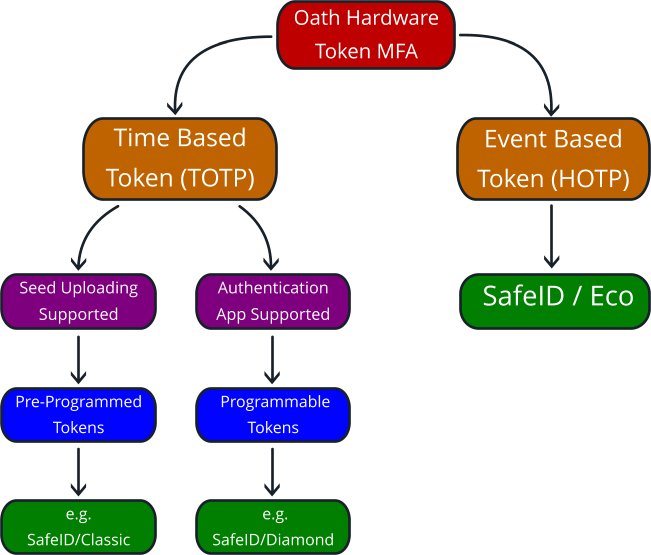
These days most applications that provide OTP authentication will provide access either by hardware tokens, or authentication apps, and whilst a few providers may require event based tokens (HOTP) , the majority will use time based tokens (TOTP).
If HOTP is required, then the SafeID/Eco token will be a natural choice, but in most cases (such as Microsoft), most providers will require TOTP tokens, and the choice will then come down to pre-programmed or programmable tokens.
As can be seen in the decision tree below, the selection between these two types mostly depends upon if seed file uploading is supported:
Many major service providers will allow uploading of seed files, but for those that do not, the vast majority will allow the use of authentication apps (and our programmable tokens can act as direct drop-in replacements for these apps)
Yes, via Programmable SafeID Tokens. While Entra ID requires a P1 or P2 license to bulk-upload CSV seed files, you can deploy programmable TOTP tokens (SafeID/Diamond, SafeID/Pro) on the Microsoft Entra ID Free tier by registering them as app-based authenticators.
Yes. Unlike factory-locked pre-programmed tokens, programmable models can be overwritten with a new QR code or secret key if an employee transitions or changes accounts.
Most keyfob models (SafeID/Classic, SafeID/Enterprise, SafeID/Pro, SafeID/Diamond) last 5 to 7 years. Slim card models last 3 to 5 years, and the SafeID/Eco includes a user-replaceable battery.