...
| Expand |
|---|
| title | Prepare an SSL certificate for RADIUS server |
|---|
|
| Include Page |
|---|
| Prepare an SSL certificate for RADIUS server |
|---|
| Prepare an SSL certificate for RADIUS server |
|---|
|
|
Once the certificate has been prepared, you will need to configure the RADIUS server for Fortigate IPSec integration
| Section |
|---|
|
| Column |
|---|
In the main menu select Radius>Radius Servers |
| Column |
|---|
|
| Panel |
|---|
| borderColor | #9EBEE5 |
|---|
| bgColor | #FFFFFF |
|---|
| borderWidth | 1px |
|---|
| 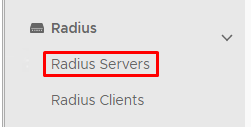 Image Added Image Added
|
|
|
| Section |
|---|
|
| Column |
|---|
Click on the  Image Added corresponding to the RADIUS Server and select EAP Options Image Added corresponding to the RADIUS Server and select EAP Options
|
| Column |
|---|
|
| Panel |
|---|
| borderColor | #9EBEE5 |
|---|
| bgColor | #FFFFFF |
|---|
| borderWidth | 1px |
|---|
| 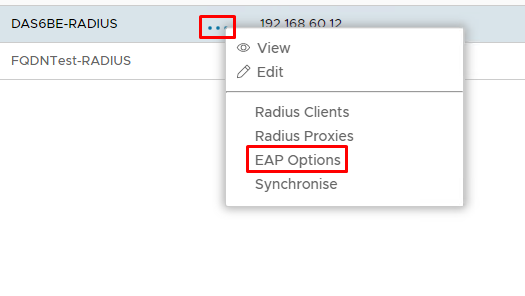 Image Added Image Added
|
|
|
| Section |
|---|
|
| Column |
|---|
Specify the following values in the EAP Options | Options | Value |
|---|
| Enabled | Make sure this is checked! | | Default EAP Type: | Tunnel Based(PEAP) | | Server Certificate | Select a SSL Certificate to be used as the RADIUS service | | Inner EAP Type | MSCHAP2 | | Max Session: | 4096 | | Max Time To Live(seconds): | 1200 | | Max Time To Idle: | 60 |
Click Save |
| Column |
|---|
|
| Panel |
|---|
| borderColor | #9EBEE5 |
|---|
| bgColor | #FFFFFF |
|---|
| borderWidth | 1px |
|---|
| 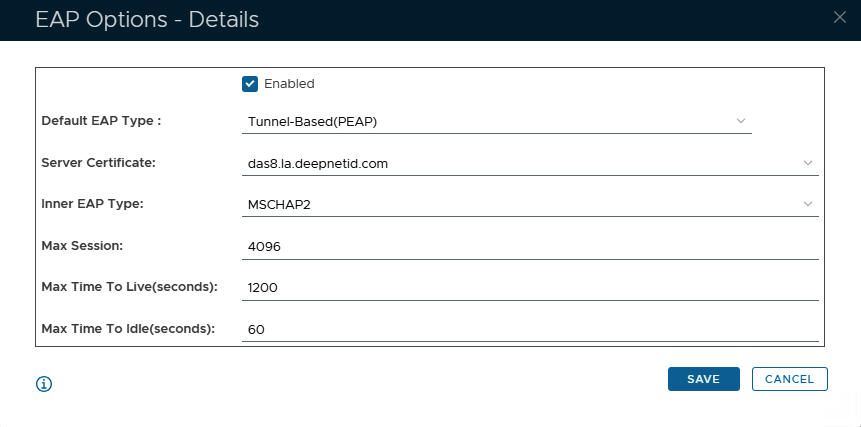 Image Added Image Added
|
|
|