EAP-MSCHAPv2 is a password-based authentication method that integrates the Microsoft Challenge Handshake Authentication Protocol version 2 into the EAP framework.
PEAP (Protected EAP) creates a secure TLS tunnel before the MSCHAPv2 exchange happens, protecting your credentials from eavesdropping and offline dictionary attacks.
To enable PEAP, you will need a valid SSL certificate. You can either register for a new one or you can use an existing one, for example, the one you use to protect your DualShield Service Consoles.
Once the certificate has been prepared, you will need to configure the RADIUS server for Fortigate IPSec integration
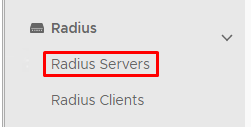
In the main menu select Radius>Radius Servers |
|
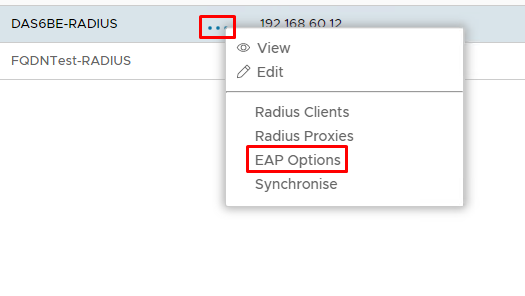
Click on the  corresponding to the RADIUS Server and select EAP Options corresponding to the RADIUS Server and select EAP Options
|
|
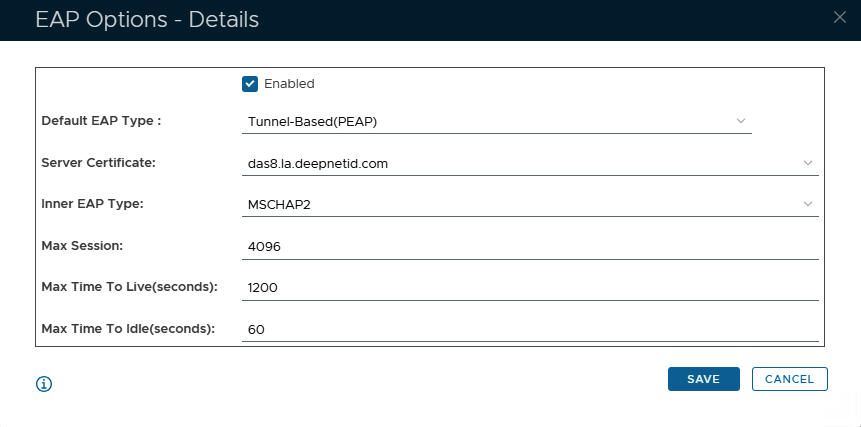
Specify the following values in the EAP Options | Options | Value |
|---|
| Enabled | Make sure this is checked! | | Default EAP Type: | Tunnel Based(PEAP) | | Server Certificate | Select a SSL Certificate to be used as the RADIUS service | | Inner EAP Type | MSCHAP2 | | Max Session: | 4096 | | Max Time To Live(seconds): | 1200 | | Max Time To Idle: | 60 |
Click Save |
|