An OTP token can optionally have a PIN. This is the so-called “Token PIN” or “Server PIN”, not the “User PIN” or “Client PIN”.
A User/Client PIN is a PIN that the user set up on the client to lock the GridGo client software from being accessed by unauthorised people. A User/Client is not a part of the token and is never submitted to the server in the authentication process.
A Token/Server PIN is a PIN that the user set up on the server as an extra password to be attached to an OTP (one-time password) generated from his/her GridGo token each time at logon. For instance, if an OTP is 123456 and PIN is 0987 then the password submitted in the authentication process is 1234560987, assuming that the PIN is set to be appended to OTP by the PIN policy.
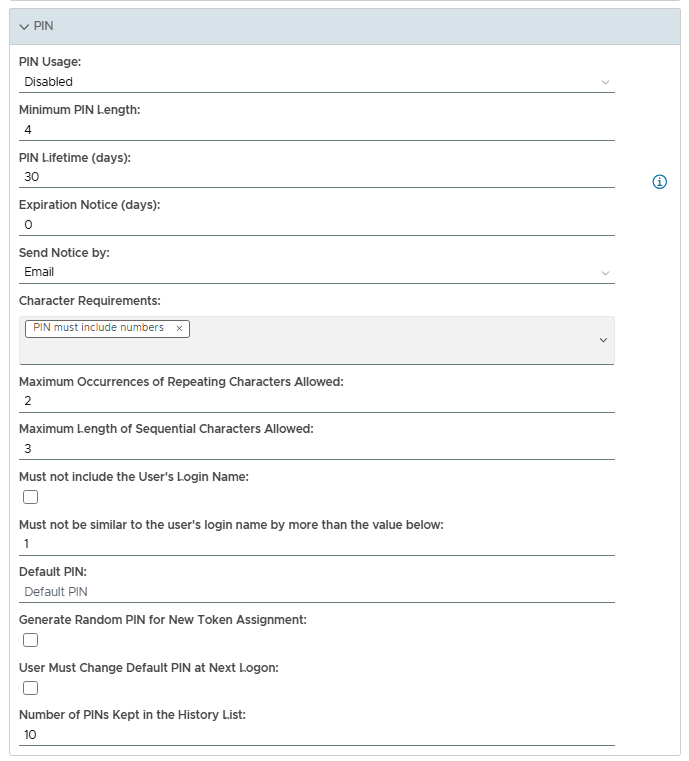
┌─ PIN──────────────────────────────────────────┐
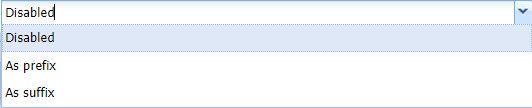
This option allows the systems administrator to determine how the PIN is used;
Disabled If this option is selected the PIN feature is disabled.
As prefix If this option is selected the PIN is used as a prefix.
As suffix. If this option is selected the PIN is used as a suffix
This option specifies the minimum length (in characters) of the PIN.
This option specifies how many days the PIN will be active (before it is automatically expired).
States the number of days before the token expires (if this is set to 0, then the token will not expire).
This option allows you to specify how notice of token expiry is sent to the user (either by SMS or Email).
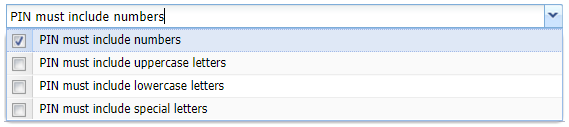
This option states the obligatory components of the PIN (zero, 1, many or all options may be selected)
Specify how many how many times a pair of characters may repeat (default = 2).
e.g. "ABCAB" will be 2 repeating pairs.
Specify how many ascending or descending character will be allowed (default = 3).
e.g. "ALKSDFABCFKL" is 3 ascending sequential characters.
If this checkbox is selected the PIN cannot include the user's login name (default = false).
This option allows you to specify to what extent the PIN includes the user's login name.
If supplied, this PIN will be used when the token is created (until the PIN is changed by the user).
If this option is selected, then all newly assigned tokens will have a random PIN generated for them.
If this option is selected, then when the user next logs in they will be forced to change the PIN.
The PIN history list prevents duplicate PINS being used within recent history (as defined by the size of the list).