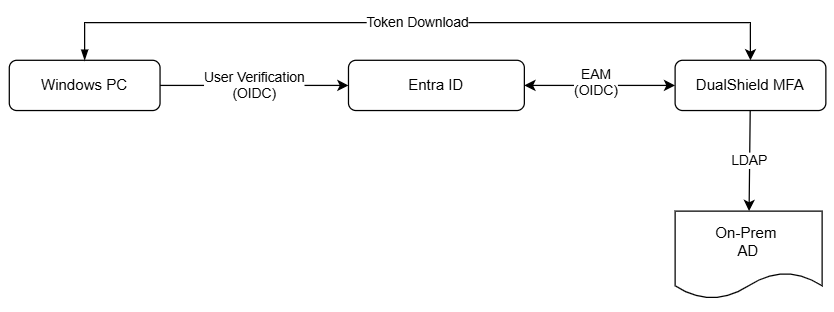
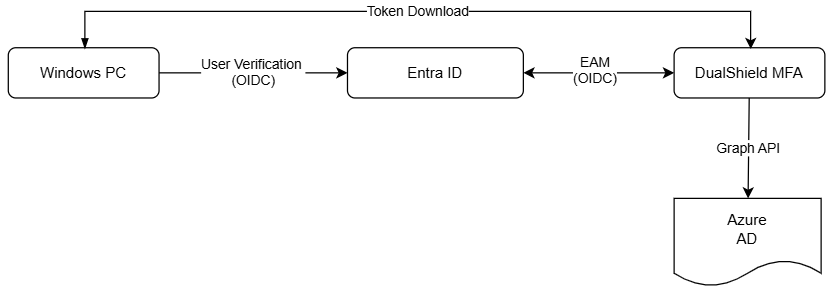
You can configure Entra joined PCs to use Entra ID as the user authentication server, and configure Entra ID to delegate MFA to the DualShield MFA server.
Below is the architecture and data flow in this type of system:
D1 - Using On-Prem AD as the Identity Source
E1- Using Azure AD as the Identity Source
To set up this type of system, follow the steps below:
Configure Entra ID EAM with DualShield MFA
Configure Computer Logon MA Agent with Entra ID
For Entra ID joined PCs, you can use Entra ID to authenticate users with MFA. Below is the architecture and data flow of this setup:

To use Microsoft Entra ID MFA to authenticate users on Entra ID joined PCs, you must complete the following steps:
- Set up an enterprise application in Entra ID for Computer Logon MA
- Configure Computer Logon Modern Authentication
- Deploy Computer Logon Modern Authentication
In this setup, tokens cannot be automatically downloaded for offline MFA, as Entra ID does not support this function. There are 2 alternative options: