- Created by Adam Darwin, last modified by James Zeng on May 18, 2026
This tutorial guides you through the process of building a sample application using the REST API. The goals for the tutorial are to gain competence and familiarity with the process of developing a DualShield application.
Building a DualShield API application is actually quite simple. There are only 4 basic steps:
Register an API Agent
To register an agent, you must first create the following objects in DualShield:
- A domain
- A realm
- A logon procedure
- An application
The type of the logon procedure should be set as "Web SSO"
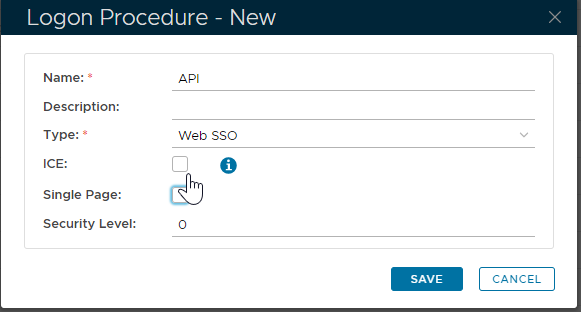
The logon procedure does not have to contain any logon steps.
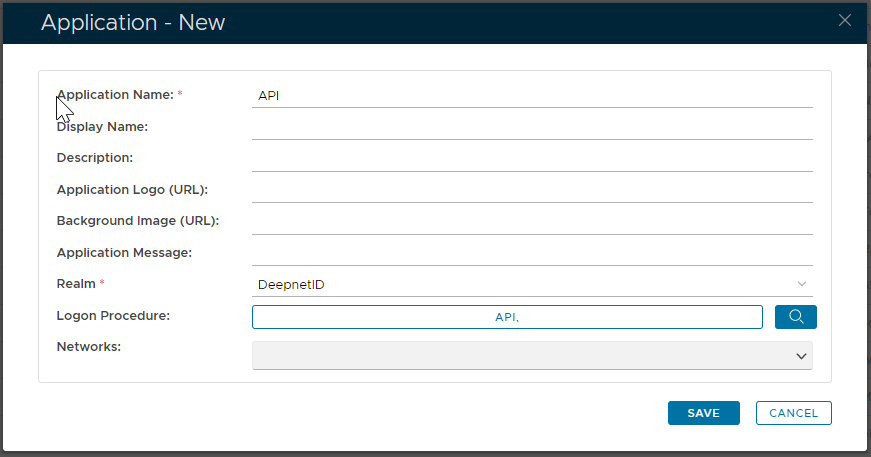
To register an API agent, select "Authentication | Agents" in the main menu, then click the "Registration" button in the toolbar. 
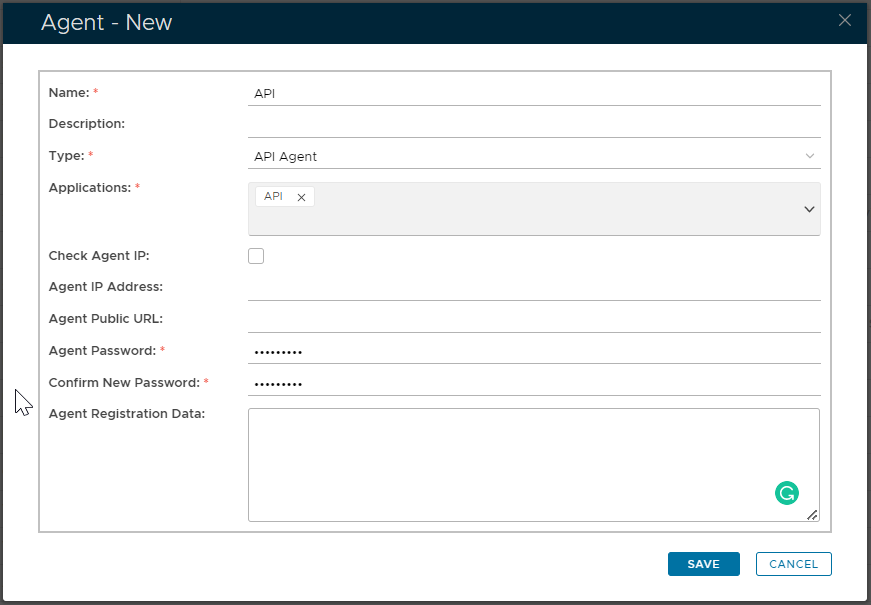
| Field | Value |
|---|---|
| Type | The type of the agent must be set to "API Agent". |
| Application | Select the application that you have created for the agent. |
| Check Agent IP | You can enable the "Check Agent IP" option for extra security. If this option is selected then you must provide the IP address of the machine where your application is running. |
| Agent Password | The communication protocol between the agent, i.e. your application and the DualShield is always HTTPS, therefore DualShield will create an SSL certificate for the agent. This is the password to be used to secure the agent SSL certificate. |
| Agent Registration Data | The Agent Registration Data is not required. |
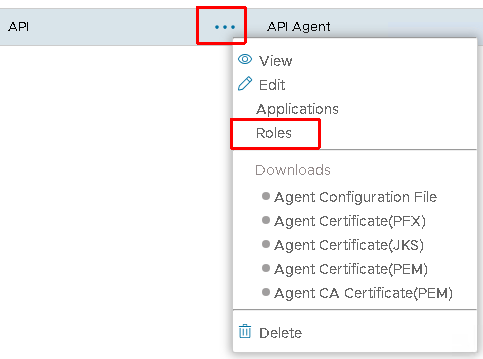
Assign the role to the API agent
- Click the context menu of the new agent
- Select "Roles"
- Select "API Agent", the click "Save" button to close the dialog.
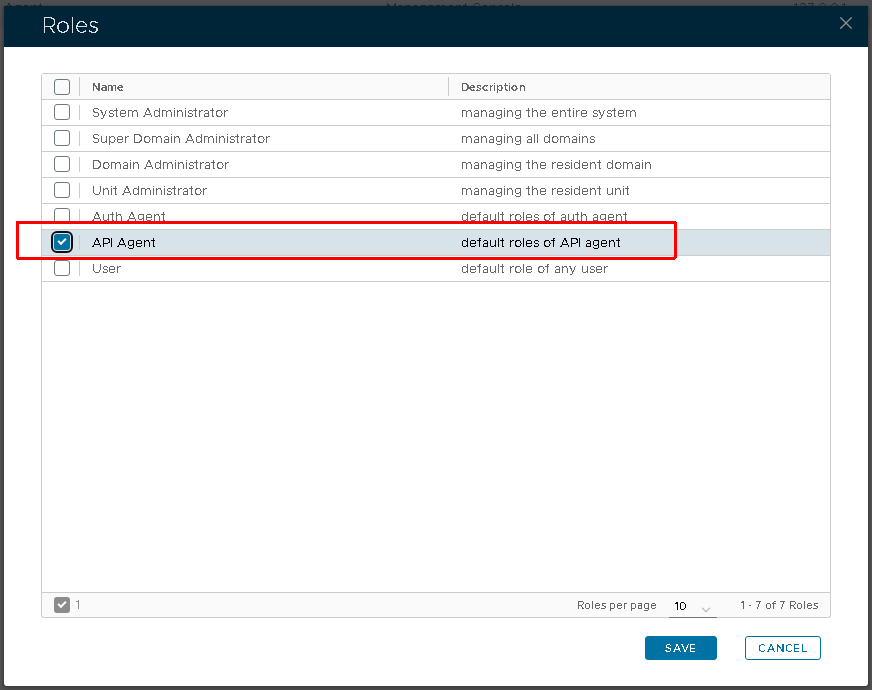
The default permission of the role is defined as:
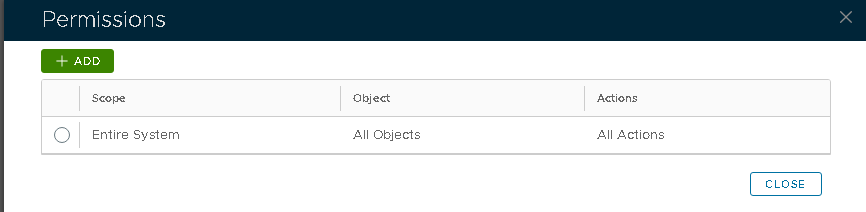
You may modify it as needed. If necessary, you can also create a custom role and assign it to the agent to achieve more granular permission control.
More information about role/permission control can be found in here: Roles
Setup Agent Authentication
You can choose to
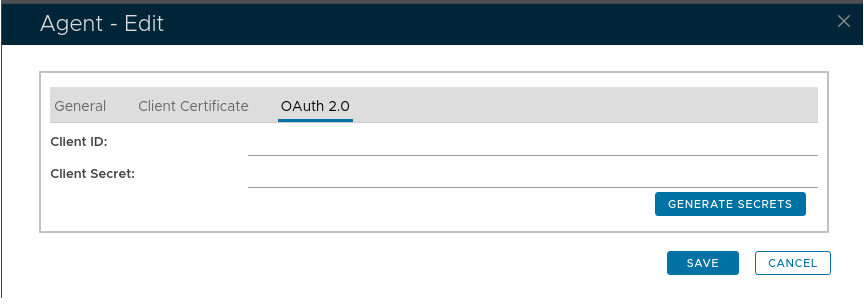
If the client id and client secret are blank, click "Generate Secrets" to generate them:
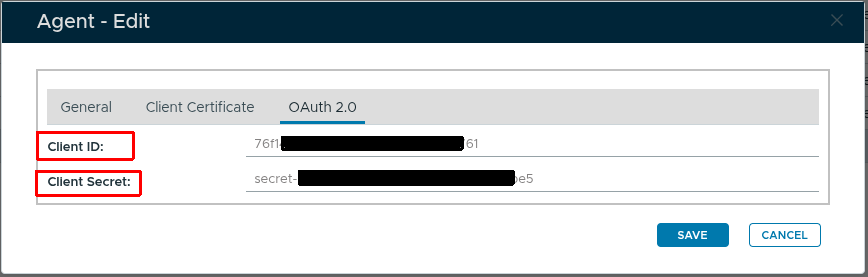
The values of "Client ID" and "Client Secret" can be used in your client code to perform the agent authentication.
Or
PEM Format Certificate
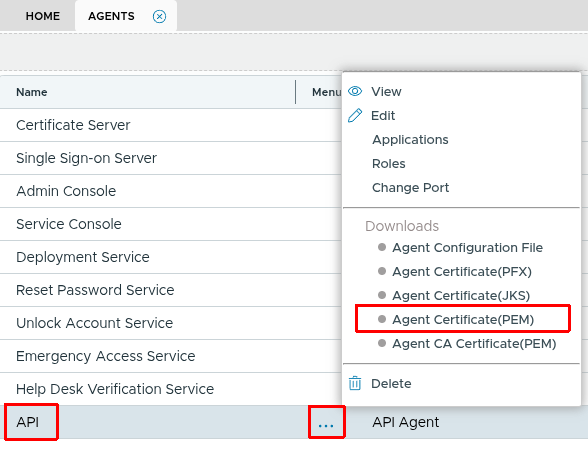
To download a PEM format certificate, in the Agents list, click the context menu of your agent and select "Downloads | Agent Certificate (PEM)". The certificate will be saved as "API.pem". This PEM certificate contains both the certificate and the private key.
If you are using some programming language, like python, you might want to extract the private key separately. You can use the OpenSSL tool:
openssl rsa -in API.pem -out apikey.pem
apikey.pem is the certificate's unencrypted private key.
PFX Format Certificate
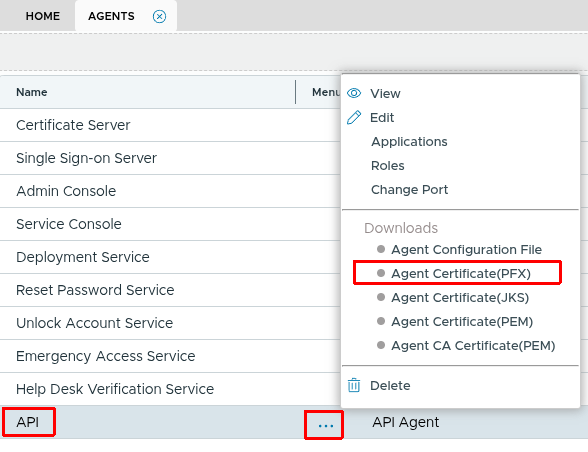
To download a PKCS12 format certificate, select "Downloads | Agent Certificate (PFX)". The certificate will be saved as "API.pfx". The agent password will be used to protect the pfx certificate.
JKS Format Certificate
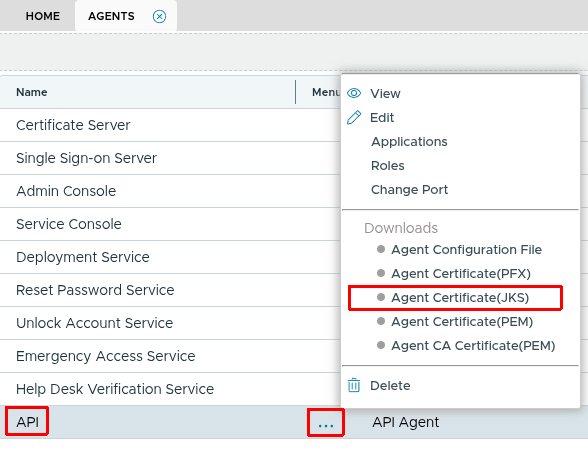
if your application code is in JAVA, you can download a JKS store directly by selecting "Downloads | Agent SSL Certificate (JKS)". The certificate will be saved as "API.jks".
Example Code
Use OAuth 2.0
"""
DualShield API client using OAuth 2.0 Client Credentials Flow.
The client fetches a Bearer token from /das5/rest/oauth/token on first use
and attaches it to all subsequent requests. The token is refreshed
automatically 60 seconds before it expires.
Requires: pip install requests
"""
import time
import requests
import urllib3
# Suppress InsecureRequestWarning for self-signed server certs
urllib3.disable_warnings(urllib3.exceptions.InsecureRequestWarning)
APP_CONTEXT = "/das5/rest/"
class DualShieldClient:
def __init__(self, host: str, port: int, client_id: str, client_secret: str):
self.base_url = f"https://{host}:{port}"
self.client_id = client_id
self.client_secret = client_secret
self.headers = {"Content-Type": "application/json"}
self._access_token: str | None = None
self._token_expiry: float = 0.0 # Unix timestamp
# -------------------------------------------------------------------------
# Token management
# -------------------------------------------------------------------------
def _ensure_valid_token(self):
if self._access_token is None or time.time() > self._token_expiry - 60:
self._fetch_token()
def _fetch_token(self):
body = {"client_id": self.client_id, "client_secret": self.client_secret}
response = requests.post(
self.base_url + APP_CONTEXT + "oauth/token",
json=body,
headers=self.headers,
verify=False,
)
response.raise_for_status()
data = response.json()
if data.get("error", 0) != 0:
raise RuntimeError(f"OAuth token request failed: {data.get('message')}")
self._access_token = data["access_token"]
self._token_expiry = time.time() + data["expires_in"]
# -------------------------------------------------------------------------
# HTTP execution
# -------------------------------------------------------------------------
def execute(self, method: str, body: dict) -> dict:
self._ensure_valid_token()
auth_headers = {**self.headers, "Authorization": f"Bearer {self._access_token}"}
response = requests.post(
self.base_url + APP_CONTEXT + method,
json=body,
headers=auth_headers,
verify=False,
)
response.raise_for_status()
return response.json()
@staticmethod
def _user(username: str, domain: str) -> dict:
return {"loginName": username, "domain.name": domain}
# -------------------------------------------------------------------------
# API methods
# -------------------------------------------------------------------------
def hello(self) -> dict:
return self.execute("auth/hello", {})
def verify_spass(self, username: str, domain: str, password: str) -> dict:
return self.execute("auth/verify", {
"user": self._user(username, domain),
"credential": {"method": "SPASS", "password": password},
})
def verify_otp(self, username: str, domain: str, otp: str) -> dict:
return self.execute("auth/verify", {
"user": self._user(username, domain),
"credential": {"method": "OTP", "password": otp},
})
def send_otp(self, username: str, domain: str) -> dict:
return self.execute("auth/sendOTP", {
"user": self._user(username, domain),
"credential": {"method": "OTPoD"},
"options": {"channel": "SMS"},
})
def verify_otpod(self, username: str, domain: str, otp: str) -> dict:
return self.execute("auth/verify", {
"user": self._user(username, domain),
"credential": {"method": "OTPoD", "password": otp},
})
# -------------------------------------------------------------------------
# Example usage
# -------------------------------------------------------------------------
if __name__ == "__main__":
import json
host = "your-dualshield-server.example.com"
port = 8071
client_id = "example-dea0b139e7bb45bda7054b39b00e021e"
client_secret = "example-secret-f07505e427f547418a7adeb394a69d29"
domain = "YourDomain"
username = "testuser"
client = DualShieldClient(host, port, client_id, client_secret)
# 1. Hello
print("hello: ", json.dumps(client.hello(), indent=2))
# 2. Static password
print("spass: ", json.dumps(client.verify_spass(username, domain, "s3cr3t"), indent=2))
# 3. OTP (SafeID)
print("otp: ", json.dumps(client.verify_otp(username, domain, "123456"), indent=2))
# 4. On-demand OTP – send first, then verify
print("sendOTP: ", json.dumps(client.send_otp(username, domain), indent=2))
otp = input("Enter the OTP you received: ")
print("otpod: ", json.dumps(client.verify_otpod(username, domain, otp), indent=2))
import com.fasterxml.jackson.databind.JsonNode;
import com.fasterxml.jackson.databind.ObjectMapper;
import com.fasterxml.jackson.databind.node.ObjectNode;
import javax.net.ssl.*;
import java.net.URI;
import java.net.http.HttpClient;
import java.net.http.HttpRequest;
import java.net.http.HttpResponse;
import java.security.SecureRandom;
import java.security.cert.X509Certificate;
import java.time.Instant;
/**
* Java DualShield API client using OAuth 2.0 Client Credentials Flow.
*
* The client fetches a Bearer token from /das5/rest/oauth/token on first use
* and attaches it to all subsequent requests. The token is refreshed
* automatically 60 seconds before it expires.
*
* Maven dependency:
* <dependency>
* <groupId>com.fasterxml.jackson.core</groupId>
* <artifactId>jackson-databind</artifactId>
* <version>2.17.0</version>
* </dependency>
*/
public class DualShieldClient {
private static final String APP_CONTEXT = "/das5/rest/";
private final String baseUrl;
private final String clientId;
private final String clientSecret;
private final HttpClient httpClient;
private final ObjectMapper mapper = new ObjectMapper();
private String accessToken;
private Instant tokenExpiry = Instant.EPOCH;
public DualShieldClient(String host, int port, String clientId, String clientSecret)
throws Exception {
this.baseUrl = "https://" + host + ":" + port;
this.clientId = clientId;
this.clientSecret = clientSecret;
// Accept self-signed server certs (adjust TrustManager for production)
TrustManager[] trustAll = new TrustManager[]{
new X509TrustManager() {
public X509Certificate[] getAcceptedIssuers() { return new X509Certificate[0]; }
public void checkClientTrusted(X509Certificate[] c, String t) {}
public void checkServerTrusted(X509Certificate[] c, String t) {}
}
};
SSLContext sslContext = SSLContext.getInstance("TLS");
sslContext.init(null, trustAll, new SecureRandom());
this.httpClient = HttpClient.newBuilder()
.sslContext(sslContext)
.build();
}
// -------------------------------------------------------------------------
// Token management
// -------------------------------------------------------------------------
private void ensureValidToken() throws Exception {
if (accessToken == null || Instant.now().isAfter(tokenExpiry.minusSeconds(60))) {
fetchToken();
}
}
private void fetchToken() throws Exception {
ObjectNode body = mapper.createObjectNode();
body.put("client_id", clientId);
body.put("client_secret", clientSecret);
HttpRequest request = HttpRequest.newBuilder()
.uri(URI.create(baseUrl + APP_CONTEXT + "oauth/token"))
.header("Content-Type", "application/json")
.POST(HttpRequest.BodyPublishers.ofString(mapper.writeValueAsString(body)))
.build();
HttpResponse<String> response = httpClient.send(request, HttpResponse.BodyHandlers.ofString());
JsonNode json = mapper.readTree(response.body());
if (json.path("error").asInt() != 0) {
throw new RuntimeException("OAuth token request failed: " + json.path("message").asText());
}
accessToken = json.path("access_token").asText();
long expiresIn = json.path("expires_in").asLong();
tokenExpiry = Instant.now().plusSeconds(expiresIn);
}
// -------------------------------------------------------------------------
// HTTP execution
// -------------------------------------------------------------------------
public JsonNode execute(String method, ObjectNode body) throws Exception {
ensureValidToken();
HttpRequest request = HttpRequest.newBuilder()
.uri(URI.create(baseUrl + APP_CONTEXT + method))
.header("Content-Type", "application/json")
.header("Authorization", "Bearer " + accessToken)
.POST(HttpRequest.BodyPublishers.ofString(mapper.writeValueAsString(body)))
.build();
HttpResponse<String> response = httpClient.send(request, HttpResponse.BodyHandlers.ofString());
return mapper.readTree(response.body());
}
private ObjectNode userNode(String username, String domain) {
ObjectNode user = mapper.createObjectNode();
user.put("loginName", username);
user.put("domain.name", domain);
return user;
}
// -------------------------------------------------------------------------
// API methods
// -------------------------------------------------------------------------
/** Verify connectivity to the DualShield server. */
public JsonNode hello() throws Exception {
return execute("auth/hello", mapper.createObjectNode());
}
/** Verify a static password (SPASS). */
public JsonNode verifySpass(String username, String domain, String password) throws Exception {
ObjectNode body = mapper.createObjectNode();
body.set("user", userNode(username, domain));
ObjectNode credential = mapper.createObjectNode();
credential.put("method", "SPASS");
credential.put("password", password);
body.set("credential", credential);
return execute("auth/verify", body);
}
/** Verify a one-time password (OTP, e.g. SafeID). */
public JsonNode verifyOtp(String username, String domain, String otp) throws Exception {
ObjectNode body = mapper.createObjectNode();
body.set("user", userNode(username, domain));
ObjectNode credential = mapper.createObjectNode();
credential.put("method", "OTP");
credential.put("password", otp);
body.set("credential", credential);
return execute("auth/verify", body);
}
/** Deliver an on-demand OTP via SMS. */
public JsonNode sendOtp(String username, String domain) throws Exception {
ObjectNode body = mapper.createObjectNode();
body.set("user", userNode(username, domain));
ObjectNode credential = mapper.createObjectNode();
credential.put("method", "OTPoD");
body.set("credential", credential);
// set SMS as the delivery channel
ObjectNode options = mapper.createObjectNode();
options.put("channel", "SMS");
body.set("options", options);
return execute("auth/sendOTP", body);
}
/** Verify an on-demand OTP (OTPoD). */
public JsonNode verifyOtpod(String username, String domain, String otp) throws Exception {
ObjectNode body = mapper.createObjectNode();
body.set("user", userNode(username, domain));
ObjectNode credential = mapper.createObjectNode();
credential.put("method", "OTPoD");
credential.put("password", otp);
body.set("credential", credential);
return execute("auth/verify", body);
}
// -------------------------------------------------------------------------
// Example usage
// -------------------------------------------------------------------------
public static void main(String[] args) throws Exception {
String host = "your-dualshield-server.example.com";
int port = 8071;
String clientId = "example-76f14240e7fc42c09867f2ef96f61761";
String clientSecret = "example-secret-503d45911d8f42e3bc85999f77c8ebe5";
String domain = "YourDomain";
String username = "testuser";
DualShieldClient client = new DualShieldClient(host, port, clientId, clientSecret);
// 1. Hello
System.out.println("hello: " + client.hello().toPrettyString());
// 2. Static password
System.out.println("spass: " + client.verifySpass(username, domain, "s3cr3t").toPrettyString());
// 3. OTP (SafeID)
System.out.println("otp: " + client.verifyOtp(username, domain, "123456").toPrettyString());
// 4. On-demand OTP – send first, then verify
System.out.println("sendOTP: " + client.sendOtp(username, domain).toPrettyString());
System.out.print("Enter the OTP you received: ");
String otpod = new java.util.Scanner(System.in).nextLine();
System.out.println("otpod: " + client.verifyOtpod(username, domain, otpod).toPrettyString());
}
}
Use Client Certificate Authentication
Create a DualShield Class
class DualShield:
headers = {"Content-Type": "application/json"}
app_context = "/das5/rest/"
def _init_(self, host, port, keyFile, certFile):
self.keyFile = keyFile
self.certFile = certFile
self.conn = HTTPSConnection(host, port, keyFile, certFile)
def execute(self, method, params):
data = json.dumps(params)
self.conn.request("POST", self.app_context + method, data, self.headers)
response = self.conn.getresponse()
data = response.read()
return json.loads(data.decode('utf-8'))
def close(self):
self.conn.close()
self.conn = None
Initialize DualShield Variables
host = 'dualshield.deepnetlabs.com' port = 8071 keyFile = 'apikey.pem' certFile = 'API.pem' domainname='deepnetlabs.com'
Replace the values of these variable with your own.
host: the host name (FQDN) of your DualShield server
port: the port number of the DualShield authentication server
keyFile: Your agent's private key file
certFile: Your agent's certificate file
domainname: The name of the domain that your agent is connected to
Create a Test Class
class TestDualShield(unittest.TestCase):
def setUp(self):
self.auth=DualShield(host, port, keyFile, certFile)
def tearDown(self):
self.auth.close()
Check the Connection
Call the"Hello" method in DualShield to check the connection
def test_1_hello(self):
r=self.auth.execute("auth/hello", {})
Static Password Authentication
The authentication method for verifying Static Password is "SPASS"
def test_2_staticpass(self):
#logon with 'static password' credential
username=raw_input('Please enter your login name:')
password=raw_input('Please enter your AD password:')
params = {
'user':{'loginName':username, 'domain.name':domainname},
'credential':{'method':'SPASS', 'password':password}
}
r=self.auth.execute("auth/verify", params)
One-Time Password Authentication
The authentication method for verifying Static Password is "OTP"
def test_3_verifySafeID(self):
otp=raw_input('Please enter you SafeIDotp:')
params = {
'user':{'loginName':username, 'domain.name':domainname},
'credential':{'method':'OTP', 'otp':otp}
}
r=self.auth.execute("auth/verify", params)
Deliver On-Demand Password
To deliver an on-demand password to a user via email message (SMTP)
def test_4_sendOTP(self):
username=raw_input('Please enter your login name:')
params = {
'user':{'loginName':username, 'domain.name':domainname},
'options':{'channel':'SMTP'}
}
r=self.auth.execute("auth/sendOTP", params)
On-Demand Password Authentication
The authentication method for verifying On-Demand Password is "OTPoD"
def test_5_verifyODP(self):
username=raw_input('Please enter your login name:')
otp=raw_input('Please enter you otp:')
params = {
'user':{'loginName':username, 'domain.name':domainname},
'credential':{'method':'OTPoD', 'otp':otp}
}
r=self.auth.execute("auth/verify", params)
import com.fasterxml.jackson.databind.JsonNode;
import com.fasterxml.jackson.databind.ObjectMapper;
import com.fasterxml.jackson.databind.node.ObjectNode;
import javax.net.ssl.*;
import java.io.FileInputStream;
import java.net.URI;
import java.net.http.HttpClient;
import java.net.http.HttpRequest;
import java.net.http.HttpResponse;
import java.security.KeyStore;
import java.security.SecureRandom;
import java.security.cert.X509Certificate;
/**
* Java example DualShield API client.
*
* Maven dependency:
* <dependency>
* <groupId>com.fasterxml.jackson.core</groupId>
* <artifactId>jackson-databind</artifactId>
* <version>2.17.0</version>
* </dependency>
*/
public class DualShieldClient {
private static final String APP_CONTEXT = "/das5/rest/";
private final String baseUrl;
private final HttpClient httpClient;
private final ObjectMapper mapper = new ObjectMapper();
public DualShieldClient(String host, int port, String keystorePath, String keystorePassword)
throws Exception {
this.baseUrl = "https://" + host + ":" + port;
KeyStore keyStore = KeyStore.getInstance("PKCS12");
try (FileInputStream fis = new FileInputStream(keystorePath)) {
keyStore.load(fis, keystorePassword.toCharArray());
}
KeyManagerFactory kmf = KeyManagerFactory.getInstance(KeyManagerFactory.getDefaultAlgorithm());
kmf.init(keyStore, keystorePassword.toCharArray());
// Accept self-signed server certs (adjust for production)
TrustManager[] trustAll = new TrustManager[]{
new X509TrustManager() {
public X509Certificate[] getAcceptedIssuers() { return new X509Certificate[0]; }
public void checkClientTrusted(X509Certificate[] c, String t) {}
public void checkServerTrusted(X509Certificate[] c, String t) {}
}
};
SSLContext sslContext = SSLContext.getInstance("TLS");
sslContext.init(kmf.getKeyManagers(), trustAll, new SecureRandom());
this.httpClient = HttpClient.newBuilder()
.sslContext(sslContext)
.build();
}
public JsonNode execute(String method, ObjectNode body) throws Exception {
HttpRequest request = HttpRequest.newBuilder()
.uri(URI.create(baseUrl + APP_CONTEXT + method))
.header("Content-Type", "application/json")
.POST(HttpRequest.BodyPublishers.ofString(mapper.writeValueAsString(body)))
.build();
HttpResponse<String> response = httpClient.send(request, HttpResponse.BodyHandlers.ofString());
return mapper.readTree(response.body());
}
private ObjectNode userNode(String username, String domain) {
ObjectNode user = mapper.createObjectNode();
user.put("loginName", username);
user.put("domain.name", domain);
return user;
}
// -------------------------------------------------------------------------
// API methods
// -------------------------------------------------------------------------
/** Verify connectivity to the DualShield server. */
public JsonNode hello() throws Exception {
return execute("auth/hello", mapper.createObjectNode());
}
/** Verify a static password (SPASS). */
public JsonNode verifySpass(String username, String domain, String password) throws Exception {
ObjectNode body = mapper.createObjectNode();
body.set("user", userNode(username, domain));
ObjectNode credential = mapper.createObjectNode();
credential.put("method", "SPASS");
credential.put("password", password);
body.set("credential", credential);
return execute("auth/verify", body);
}
/** Verify a one-time password (OTP, e.g. SafeID). */
public JsonNode verifyOtp(String username, String domain, String otp) throws Exception {
ObjectNode body = mapper.createObjectNode();
body.set("user", userNode(username, domain));
ObjectNode credential = mapper.createObjectNode();
credential.put("method", "OTP");
credential.put("password", otp);
body.set("credential", credential);
return execute("auth/verify", body);
}
/** Deliver an on-demand OTP via SMS. */
public JsonNode sendOtp(String username, String domain) throws Exception {
ObjectNode body = mapper.createObjectNode();
body.set("user", userNode(username, domain));
ObjectNode credential = mapper.createObjectNode();
credential.put("method", "OTPoD");
body.set("credential", credential);
// set SMS as the delivery channel
ObjectNode options = mapper.createObjectNode();
options.put("channel", "SMS");
body.set("options", options);
return execute("auth/sendOTP", body);
}
/** Verify an on-demand OTP (OTPoD). */
public JsonNode verifyOtpod(String username, String domain, String otp) throws Exception {
ObjectNode body = mapper.createObjectNode();
body.set("user", userNode(username, domain));
ObjectNode credential = mapper.createObjectNode();
credential.put("method", "OTPoD");
credential.put("password", otp);
body.set("credential", credential);
return execute("auth/verify", body);
}
// -------------------------------------------------------------------------
// Example usage
// -------------------------------------------------------------------------
public static void main(String[] args) throws Exception {
String host = "your-dualshield-server.example.com";
int port = 8071;
String keystore = "/path/to/agent.p12";
String password = "changeit";
String domain = "YourDomain";
String username = "testuser";
DualShieldClient client = new DualShieldClient(host, port, keystore, password);
// 1. Hello
System.out.println("hello: " + client.hello().toPrettyString());
// 2. Static password
System.out.println("spass: " + client.verifySpass(username, domain, "s3cr3t").toPrettyString());
// 3. OTP (SafeID)
System.out.println("otp: " + client.verifyOtp(username, domain, "123456").toPrettyString());
// 4. On-demand OTP – send first, then verify
System.out.println("sendOTP: " + client.sendOtp(username, domain).toPrettyString());
System.out.print("Enter the OTP you received: ");
String otpod = new java.util.Scanner(System.in).nextLine();
System.out.println("otpod: " + client.verifyOtpod(username, domain, otpod).toPrettyString());
}
}
Test API in Postman
- No labels