DualShield Computer Logon Agent is a bridge that connects DualShield Computer Logon clients and the DualShield Authentication Server.
The Windows Logon Agent can be installed on any Windows server machine in the network.
Prerequisites
Before you run the setup wizard, you must have your DualShield Authentication Server installed and operating, and make sure that the computer on which you are going to install the Windows Logon Agent meets the following minimum hardware and software requirements:
- A Windows 2008 R2, 2012 R2, 2016 or 2019 Server with the latest service pack installed.
- TCP/IP Networking
- TCP port 12841 must be available on the Windows server for use by the DualShield Computer Logon Agent.
Enable Agent Registration
In order to install a DualShield Windows Logon Agent, we need to first enable the Agent Registration option.
For security purposes, the agent registration function is disabled by default. You need to enable the Agent Auto Registration function in your DualShield authentication server.
From the management console, navigate to "Authentication | Agents", then click 
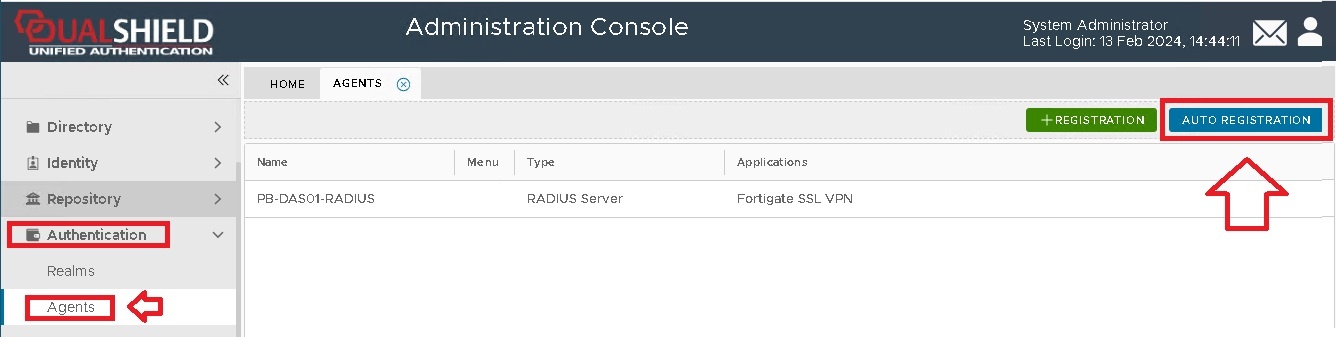
A new window will now open titled "Auto Registration", ensure the "Enabled" option is selected, then click ;
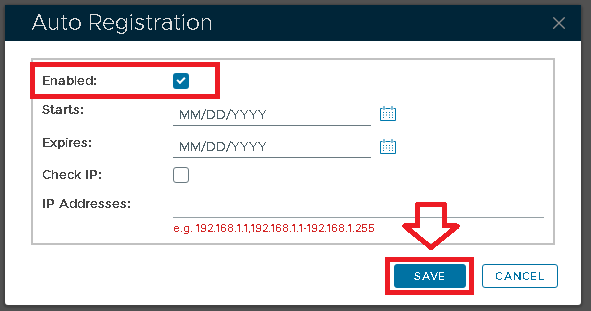
Tick the "Enabled" option first, then fill in the Starts and Expires date.
You may want to enable the "Check IP" option for extra security. If this option is enabled, then in the "IP Addresses" field you must enter the IP address of the machine where the authentication agent is being installed.
Click on the  button, and Auto-Registration will now take place during the installation of the RADIUS server.
Install DualShield Windows Logon Agent
To install the DualShield Windows Logon Agent, launch the installer SetupDSAgent-xxx.yyyy.exe (where xxx is the version number and yyyy the build number) and go through the following steps: