Copy the link address for the latest version of DualShield Framework update from our support page... https://support.deepnetsecurity.com/visit.asp?pg=download/dualshield/das-framework
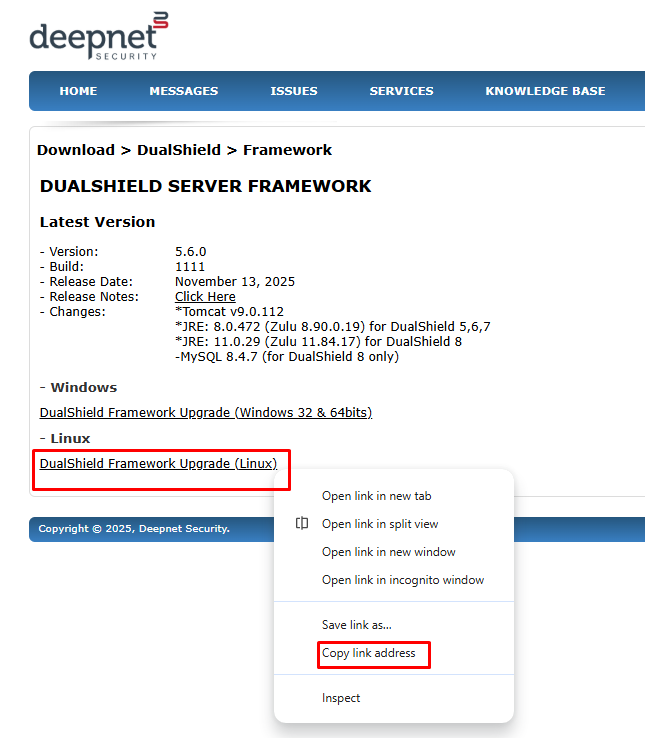
Paste the link into the wget command for example.
wget https://download.deepnetsecurity.com/dualshield6/Framework/DualShieldFrameworkUpgrade-5.6.0.1111.bin
Execute the command below to change and make the file executable
chmod a+x ./DualShieldFrameworkUpgrade-XXXX.YYYY.bin
(in which XXXX is the version number and YYYY is the build number.)
It is recommended that you stop the dualshield service before commencing
sudo systemctl stop dualshield
Finally, execute the command below to start the Update
sudo ./DualShieldFrameworkUpgrade-XXXX.YYYY.bin -- -console
The framework upgrade will begin:
Verifying archive integrity... All good.
Uncompressing DualShield Upgrade...................
This script will upgrade DualShield framework components, including Tomcat, JRE and MySQL.
Do you wish to continue(type yes)? yes
Answer yes
DualShield is installed at: /opt/dualshield
shell: /bin/bash
Installed DualShield: 8.0.5.20251209
Installed Tomcat: 9.0.110
Installed JRE: 11.0.28
Installed MySQL: 8.4.6
Do you wish to continue(type yes or no)? yes
Answer yes
You will now be asked which components to update. You can some or all of them. (If your are you are using an external SQL database, you will not be prompted to update MySQL)
Do you wish to continue(type yes or no)? yes
Do you wish to upgrade Tomcat from 9.0.110 to 9.0.113 (type yes or no)? yes
Do you wish to upgrade JRE from 11.0.28 to 11.0.29 (type yes or no)? yes
Do you wish to upgrade MySQL from 8.4.6 to 8.4.7 (type yes or no)? yes
Upgrading Tomcat: 9.0.110 -> 9.0.113?
Upgrading JRE: 11.0.28 -> 11.0.29?
Upgrading MySQL: 8.4.6 -> 8.4.7?
All required information collected, proceed upgrading? (type yes or no)? yes
Type yes for components you wish to update and/or no for the ones that you do not wish to update
The Framework update will now comence:
Stopping DualShield Service...
Stopping MySQL Service...
Upgrading MySQL to 8.4.7...
Starting MySQL Service...
Backing up the existing tomcat files...
Upgrading with new tomcat files...
org.apache.catalina.startup.VersionLoggerListener exists
org.apache.catalina.core.JreMemoryLeakPreventionListener exists
org.apache.catalina.core.ThreadLocalLeakPreventionListener exists
Backing up the existing JRE files...
Upgrading with new JRE files...
cp: cannot stat '/opt/dualshield/jre_bak_11.0.28/lib/ext/RXTXcomm.jar': No such file or directory
Importing keystore /opt/dualshield/jre_bak_11.0.28/lib/security/cacerts to /opt/dualshield/jre/lib/security/cacerts...

Warning:
The JKS keystore uses a proprietary format. It is recommended to migrate to PKCS12 which is an industry standard format using "keytool -importkeystore -srckeystore /opt/dualshield/jre/lib/security/cacerts -destkeystore /opt/dualshield/jre/lib/security/cacerts -deststoretype pkcs12".
Importing keystore /opt/dualshield/jre_bak_11.0.28/lib/security/cacerts to /opt/dualshield/jre/lib/security/cacerts...

Warning:
<deepnetownca> uses the SHA1withRSA signature algorithm which is considered a security risk. This algorithm will be disabled in a future update.
<deepnetownca> uses a 1024-bit RSA key which is considered a security risk. This key size will be disabled in a future update.
The JKS keystore uses a proprietary format. It is recommended to migrate to PKCS12 which is an industry standard format using "keytool -importkeystore -srckeystore /opt/dualshield/jre/lib/security/cacerts -destkeystore /opt/dualshield/jre/lib/security/cacerts -deststoretype pkcs12".
Updating jsvc...
Restaring DualShield Service...
Update finished