In the policy of "MobileID/Tine-Based", there is a section called "OOBA-Push". First of all, you need to make sure that the option "Enable OOBA" is enabled. Commonly, you do not need to change the default settings of other options.
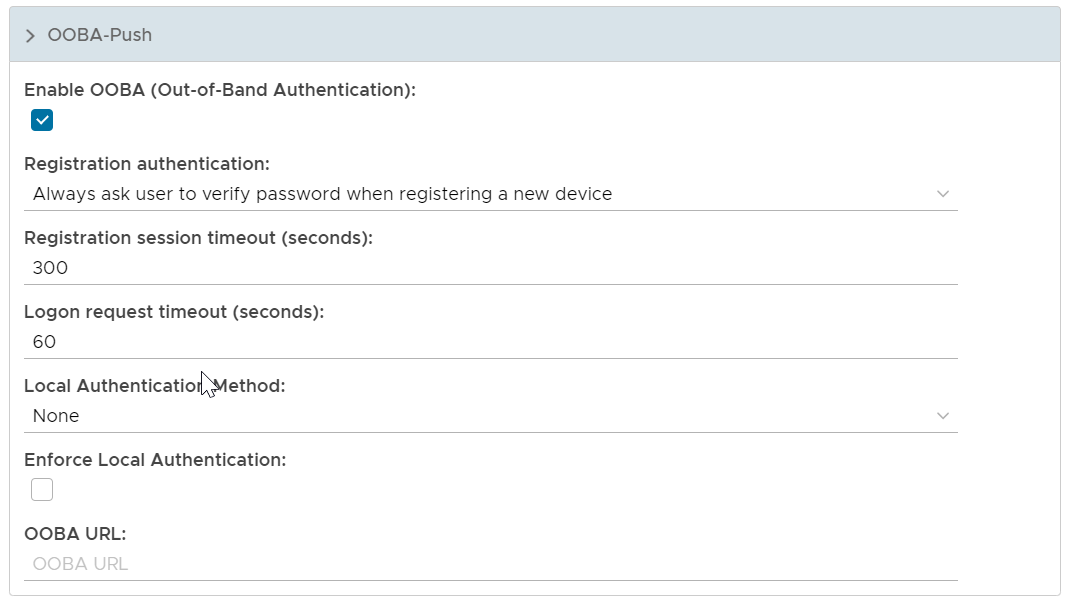
Enable OOBA (Out-of-Band Authentication)
To enable or Disable Out-of-Band Authentication
Registration Authentication
- Always ask the user to verify the password when registering a new device
When a user attempts to register a device for OOBA, password authentication is required.
- Only ask the user to verify if the link session timed out
When the registration link has timed out, password authentication is required.
Registration Session Timeout
Defines the timeout period of the registration link.
Logon Request Timeout
Defines the timeout period of the logon request.
Local Authentication Method
Define the local authentication method to be used to verify the user
Enforce Local Authentication
If this option is enabled, then users must be verified by the specified local authentication in order to approve a push authentication request
OOBA URL