Some VPN clients and VPN gateway devices such as CISCO and Checkpoint support RADIUS Challenge/Response authentication mode. When a user attempts to logon, the Radius server will send a challenge code to the Radius client and prompts the user to enter the response code. To support Challenge/Response, you will need to create a logon procedure with two logon steps.
DualShield supports RADIUS Challenge/Response in two modes, native and pseudo, depending on the the type of authenticators to be used.
Native Challenge/Response
DualShield providers authenticator tokens that support challenge/response (such as Deepnet MobileID and GridID). To implement RADIUS challenge/response with tokens that natively support Challenge/Response, you will create a logon procedue with two logon steps.
In the first logon step, you would normally place the Static Password.

In the second logon step, you would place the authenticator to be used and you must select the "Challenge & Response" option in the logon step.
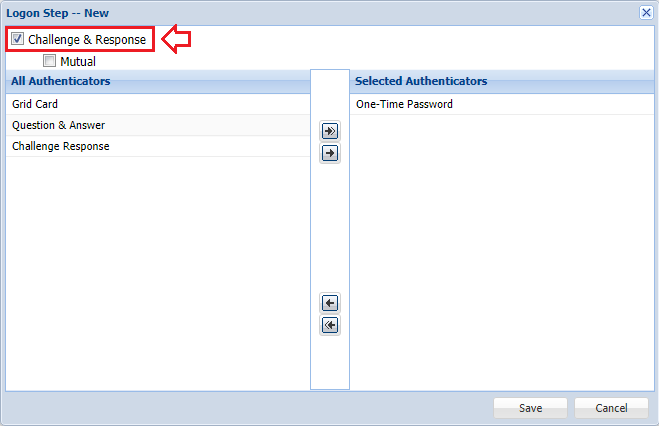
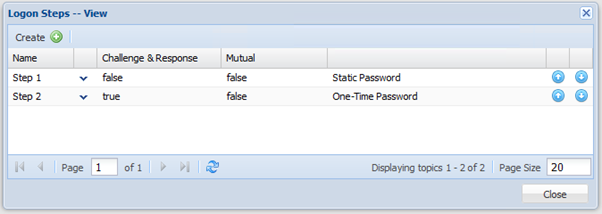
With the logon procedure shown above, the logon process will be as below:
- The VPN client will ask the user to enter their static password
- The users enters a static password
- The server checks the validity of the user’s static password.
- If the server verifies the user's static password, then it generates a challenge code, sends it to the user, then prompts the user to enter the response.
- The user will use their token to generate a response code by entering the challenge code, and enters it to continue.
Pseudo Challenge/Response
If the authenticator token to be used does not support challenge/response (such as Deepnet SafeID and T-Pass), DualShield can still support RADIUS challenge/response mode. In this mode, you will create a logon procedue with two logon steps. In the first logon step, you would normally place the Static Password. In the second logon step, you would place a token authenticator.
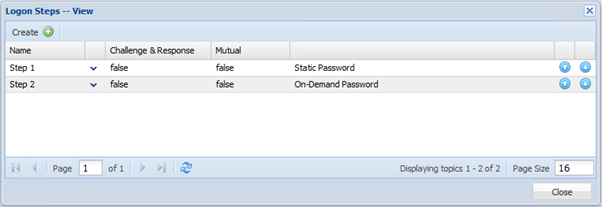
The pseudo challenge/response logon procedure is typically used for one-demand password such as T-Pass. With the logon procedure shown above, the logon process will be as below:
- The VPN client will ask the user to enter their static password
- The users enters a static password
- The server checks the validity of the user’s static password.
- If the server verifies the user's static password, then it generates an on-demand password, sends it to the user, then prompts the user to enter the password.
- The user receives the on-demand password, and enters it to continue.
NOTES
If you have a logon procedure with two or more logon steps, and you place more than one authenticator (including an on-demand password in a logon step), then the order of the authenticators is significant.
As soon as the server has successfully completed one step (the user has passed the step), the server will go through the authenticator list to the next step, one by one according to their order in the list. On each authenticator, it will check if the user has a token for this type of authenticator. If the user does not have a token of this type, then the authenticator is removed from the list.
If the first authenticator is an on-demand password, then the server will generate a password and send it out. If the first authenticator is an out of band anthentication, then the server will push out a logon request to the user's mobile phone.
Example:
A logon step has the following authenticators:
- One-Time Password
- On-Demand Password
User "A" has the following tokens
- MobileID
- T-Pass
User "B" has the following tokens:
- MobileID
User "C" has the following tokens:
- T-Pass
For User "A", the server will NOT send on-demand password, as the user has a MobileID which is listed to be preferred over T-Pass.
For User "B", the server will NOT send on-demand password, as there is no such token at all.
For User "C", the server WILL send on-demand password, as the user does not have MobileID but has the T-Pass.