Copy the link address for the latest version of DualShield Framework update from our support page... https://support.deepnetsecurity.com/visit.asp?pg=download/dualshield/das-framework
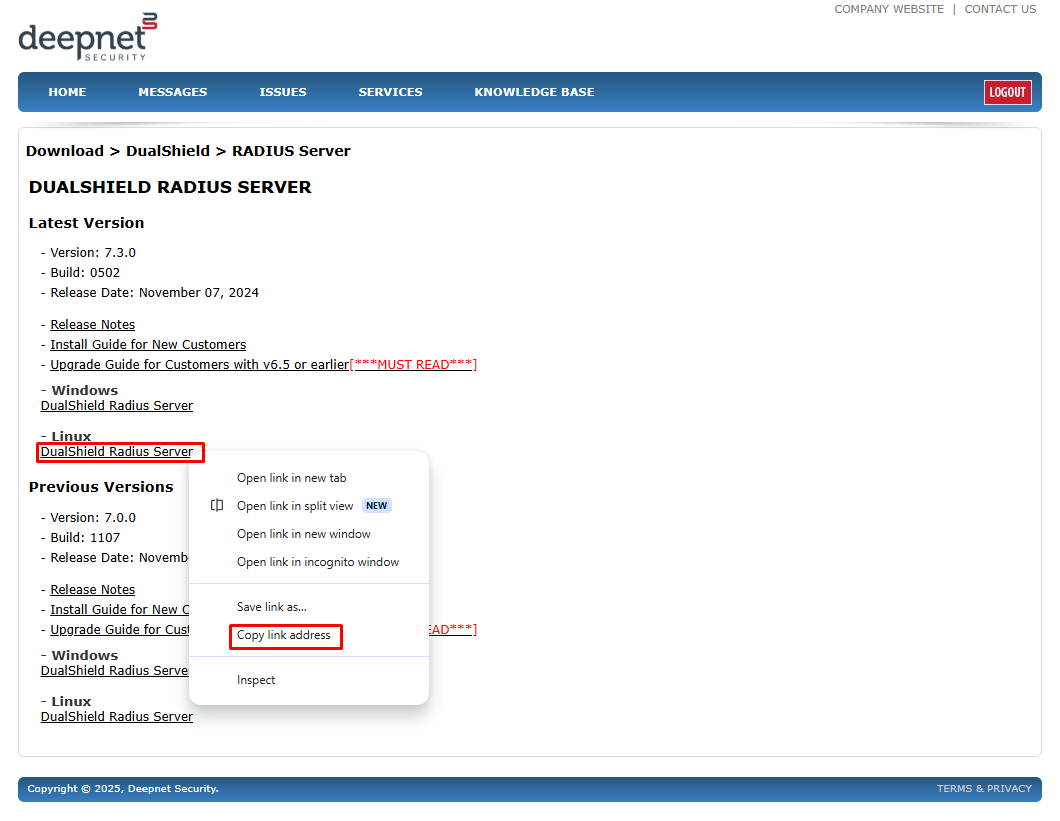
Paste the link into the wget command for example.
wget https://download.deepnetsecurity.com/dualshield6/Framework/DualShieldFrameworkUpgrade-5.6.0.1111.bin
Execute the command below to change and make the file executable
chmod a+x ./DualShieldFrameworkUpgrade-XXXX.YYYY.bin
in which XXXX is the version number and YYYY is the build number.
Finally, execute the command below to start the installation process
sudo ./DualShieldFrameworkUpgrade.bin -- -console
The installation process will begin:
Verifying archive integrity... All good.
Uncompressing DualShield RADIUS Server Installer......
64 bit OS detected
setup.sh is running from /tmp/selfgz44078
Command line arguments: -console

────────────────────────────────────────────────────────────────────────────────────────────────────────────────────────────────────────────────────────────────────────────────────────────────────────────────────────────────────────────────
Welcome
────────────────────────────────────────────────────────────────────────────────────────────────────────────────────────────────────────────────────────────────────────────────────────────────────────────────────────────────────────────────

Welcome to the installation of DualRadius 6.x!
This software is developed by:
 - Deepnet Security Ltd. <support@deepnetsecurity.com>
The homepage is at: https://www.deepnetsecurity.com/

Press 1 to continue, 2 to quit, 3 to redisplay
1
Accept the license agreement
8.Term & Termination:

This agreement is effective until terminated. This
agreement and the user's right to use the product
automatically terminates if the user fails to
comply with any material provision of this
agreement. Upon termination the user must all use
of the product and remove all copies of the
product from the user's computers and storage
equipment. In no circumstances does any such
termination result in a refund of the licenses fee
the user paid for the product.


Press 1 to accept, 2 to reject, 3 to redisplay
1
Select the target path:
────────────────────────────────────────────────────────────────────────────────────────────────────────────────────────────────────────────────────────────────────────────────────────────────────────────────────────────────────────────────
Target Path
────────────────────────────────────────────────────────────────────────────────────────────────────────────────────────────────────────────────────────────────────────────────────────────────────────────────────────────────────────────────

Select the installation path:  [/usr/local/dualradius]

------------------------------------------------------------
Message

The target directory will be created:
/usr/local/dualradius
------------------------------------------------------------
Enter O for OK, C to Cancel:
O
Use the default options
Press 1 to continue, 2 to quit, 3 to redisplay
1
-------------
Radius Server
-------------
Enter Y for Yes, N for No:
Y
Customize Not Selected
Done!

Press 1 to continue, 2 to quit, 3 to redisplay
1

────────────────────────────────────────────────────────────────────────────────────────────────────────────────────────────────────────────────────────────────────────────────────────────────────────────────────────────────────────────────
Select Installation Packages
────────────────────────────────────────────────────────────────────────────────────────────────────────────────────────────────────────────────────────────────────────────────────────────────────────────────────────────────────────────────

Select the packs you want to install:

------------------------------------------------------
  [x] Include optional pack 'DualShield Radius Server'
------------------------------------------------------
Enter Y for Yes, N for No:
Y
Done!

Press 1 to continue, 2 to quit, 3 to redisplay
You can enter new port numbers or just press return to use the defaults.
────────────────────────────────────────────────────────────────────────────────────────────────────────────────────────────────────────────────────────────────────────────────────────────────────────────────────────────────────────────────
User Data
────────────────────────────────────────────────────────────────────────────────────────────────────────────────────────────────────────────────────────────────────────────────────────────────────────────────────────────────────────────────

RADIUS Administration Port: [8090]


RADIUS Authentication Port: [1812]

RADIUS Accounting Port: [1813]


Press 1 to continue, 2 to quit, 3 to redisplay
1
The next part registers the DualShield Radius server install with your DualShield Authentication Server. For security reasons, you need to make sure agent registration is enabled on the Administration Console. (see Enable Agent Registration)
Specify the FQDN that matches your own Authentication Server
Register RADIUS Server Agent with the Authentication Server. Please login to the Management Console and enable the Agent Auto Registration feature before proceeding to the next step. The registration process might take a while after pressing the Next button.
Registration URL:[https://dualshield.your-corporate-domain.com:8071]?:
https://ubuntu.la.deepnetid.com:8071
Specify how you would like the Radius server agent name to appear on the Administration Console or just hit return to leave as default
Agent Name:        [ubuntu24-RADIUS]:?
DualShield-RADIUS
Check the IP of the machine you are installing Rdius Server onto and press Return
CSRPanel.machineiplist192.168.103.140[192.168.103.140]?:


Press 1 to continue, 2 to quit, 3 to redisplay
1
Installation will begin:
────────────────────────────────────────────────────────────────────────────────────────────────────────────────────────────────────────────────────────────────────────────────────────────────────────────────────────────────────────────────
Installation
────────────────────────────────────────────────────────────────────────────────────────────────────────────────────────────────────────────────────────────────────────────────────────────────────────────────────────────────────────────────

====================
Installation started
Framework: 5.1.4-deepnet-e6577 (IzPack)
Platform: ubuntu_linux,version=6.8.0-52-generic,arch=x64,symbolicName=null,javaVersion=1.8.0_432
[ Starting to unpack ]
[ Processing package: DualShield Radius Server (1/1) ]
Cleaning up the target folder ...
[ Unpacking finished ]
Installation finished

────────────────────────────────────────────────────────────────────────────────────────────────────────────────────────────────────────────────────────────────────────────────────────────────────────────────────────────────────────────────
Perform External Processes
────────────────────────────────────────────────────────────────────────────────────────────────────────────────────────────────────────────────────────────────────────────────────────────────────────────────────────────────────────────────

[ Starting processing ]
Starting process Get Running Path (1/4)
jobGetRunPath
Starting process Installing JRE/RADIUS Service (2/4)
start to extract the jre from /tmp/selfgz44202
Starting process Parse Agent Configuration File (3/4)
Retrieve the agent certificate
Starting process Install RADIUS Service(Linux) (4/4)
Finalize Radius Server Installation

────────────────────────────────────────────────────────────────────────────────────────────────────────────────────────────────────────────────────────────────────────────────────────────────────────────────────────────────────────────────
Installation Finished
────────────────────────────────────────────────────────────────────────────────────────────────────────────────────────────────────────────────────────────────────────────────────────────────────────────────────────────────────────────────

Installation was successful
Application installed on /usr/local/dualradius
[ Console installation done ]
Check the service has started.
systemctl status dualradius
If the service is not running then use the following command to start it:
systemctl start dualradius