...
| Section | ||||||||||||||||
|---|---|---|---|---|---|---|---|---|---|---|---|---|---|---|---|---|
| ||||||||||||||||
|
Configure SAML SSO:
...
| border | true |
|---|
| Column |
|---|
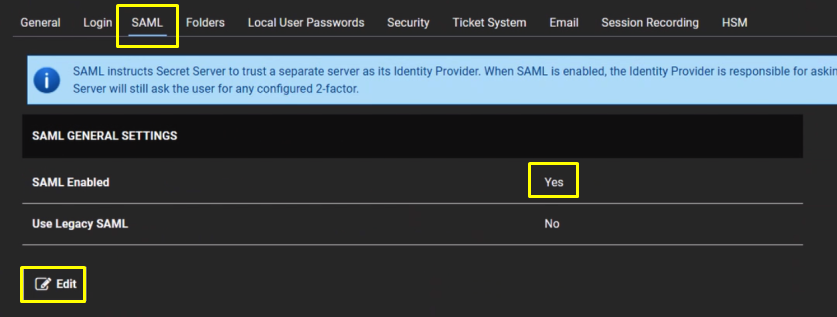
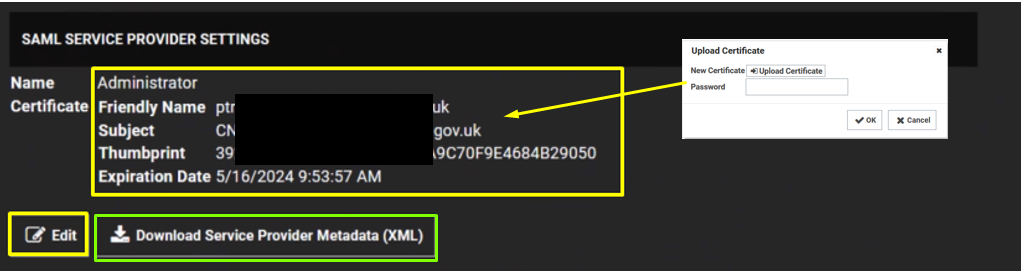
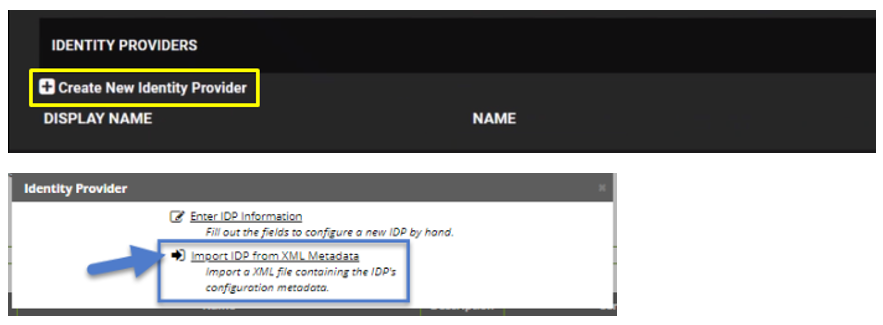
Navigate to Admin > Configuration. Click the SAML tab Click the Edit button in the SAML General Settings section. Click to select the SAML Enabled check box. Click the Save button. |
...
| width | 50% |
|---|
...
| bgColor | #f0f0f0 | |||||||||||||||
|---|---|---|---|---|---|---|---|---|---|---|---|---|---|---|---|---|
| borderWidth | 1px | |||||||||||||||
| ||||||||||||||||
| Section | ||||||||||||||||
| ||||||||||||||||
| ||||||||||||||||
| Section | ||||||||||||||||
| ||||||||||||||||
|