Static Password policy defines the password length, complexity, lifetime etc, and can be edited using the following procedure:
| Expand |
|---|
| title | Editing/Viewing the Static Password Policy Settings (Found in "Administration | Policies") |
|---|
|
| Panel |
|---|
| borderColor | grey |
|---|
| bgColor | #F8F8F8 |
|---|
| borderStyle | dashed |
|---|
| | Include Page |
|---|
| Editing the Static Password Policy |
|---|
| Editing the Static Password Policy |
|---|
|
|
|
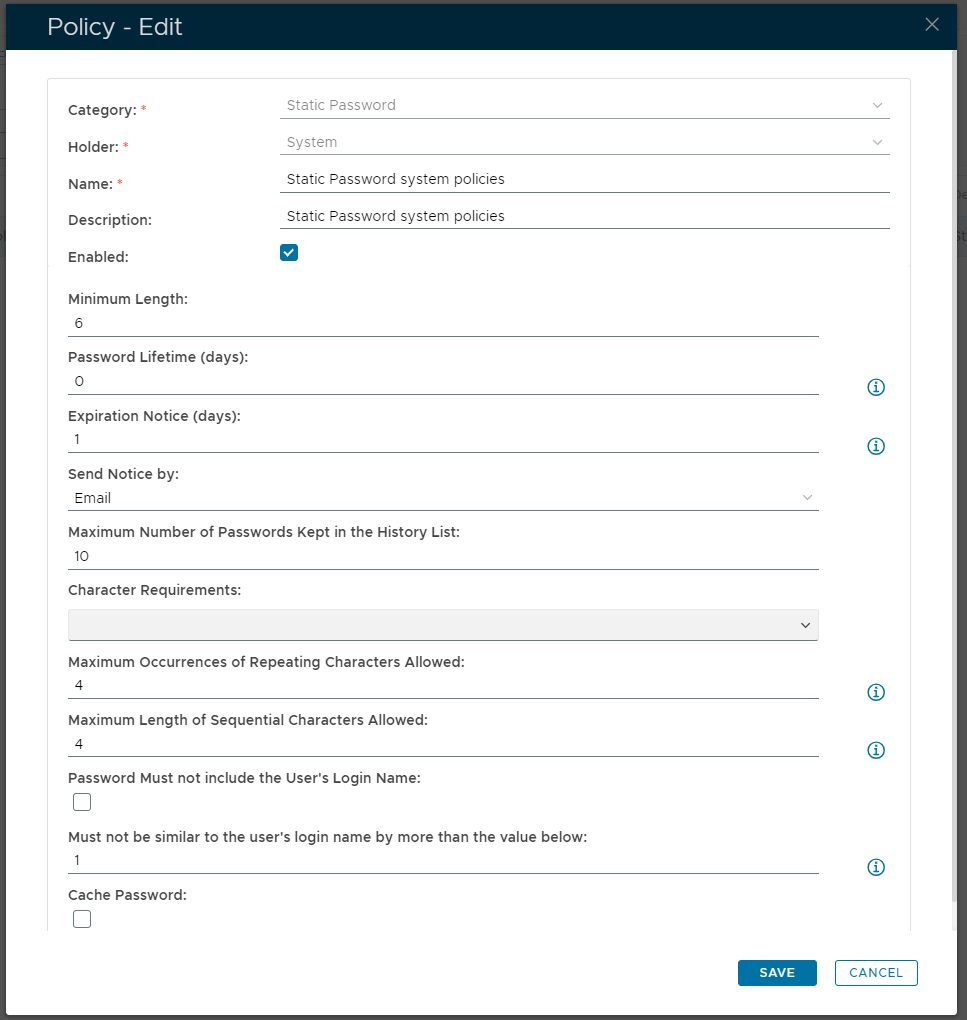
When editing the policy, a new window "Policy - Edit" will open that can be used to edit the policy settings;
| Section |
|---|
| Column |
|---|
| 
|
| Column |
|---|
|
| Expand |
|---|
|
| Panel |
|---|
| borderColor | grey |
|---|
| bgColor | #F8F8F8 |
|---|
| borderStyle | dashed |
|---|
| The category for this policy is "Static Password" (this property cannot be edited). |
|
| Expand |
|---|
|
| Panel |
|---|
| borderColor | grey |
|---|
| bgColor | #F8F8F8 |
|---|
| borderStyle | dashed |
|---|
| The holder of this policy is "System" (this property cannot be edited). |
|
| Expand |
|---|
|
| Panel |
|---|
| borderColor | grey |
|---|
| bgColor | #F8F8F8 |
|---|
| borderStyle | dashed |
|---|
| The name assigned to identify the Static Password system policy by the System Administrator. |
|
| Expand |
|---|
|
| Panel |
|---|
| borderColor | grey |
|---|
| bgColor | #F8F8F8 |
|---|
| borderStyle | dashed |
|---|
| The System Administrator may use this field to annotate this policy.
|
|
| Expand |
|---|
|
| Panel |
|---|
| borderColor | grey |
|---|
| bgColor | #F8F8F8 |
|---|
| borderStyle | dashed |
|---|
| This option allows the System Administrator to enable or disable this policy. |
|
| Expand |
|---|
|
| Panel |
|---|
| borderColor | grey |
|---|
| bgColor | #F8F8F8 |
|---|
| borderStyle | dashed |
|---|
| Minimum number of characters in the password.
|
|
| Expand |
|---|
| title | Password Lifetime (days): |
|---|
|
| Panel |
|---|
| borderColor | grey |
|---|
| bgColor | #F8F8F8 |
|---|
| borderStyle | dashed |
|---|
| How many days the password can be used before the password expires. |
|
| Expand |
|---|
| title | Expiration Waring (days): |
|---|
|
| Panel |
|---|
| borderColor | grey |
|---|
| bgColor | #F8F8F8 |
|---|
| borderStyle | dashed |
|---|
| This option determines how many days before password expiry the user will receive an expiry warning. |
|
| Expand |
|---|
|
| Panel |
|---|
| borderColor | grey |
|---|
| bgColor | #F8F8F8 |
|---|
| borderStyle | dashed |
|---|
| This option is used to specify how notifications of password expiry are to be sent to the users (either by SMS or email); 
|
|
| Expand |
|---|
| title | Maximum number of Passwords Kept in the History List: |
|---|
|
| Panel |
|---|
| borderColor | grey |
|---|
| bgColor | #F8F8F8 |
|---|
| borderStyle | dashed |
|---|
| The password list is used to ensure that new passwords are not on the password list (the most recently used passwords).
|
|
| Expand |
|---|
| title | Character Requirements: |
|---|
|
| Panel |
|---|
| borderColor | grey |
|---|
| bgColor | #F8F8F8 |
|---|
| borderStyle | dashed |
|---|
| This option determines the character requirements of the password. 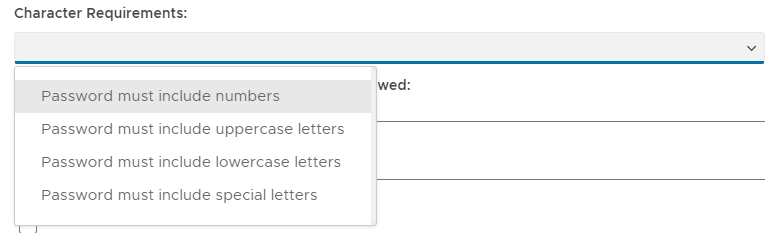
From the dropdown list of options the following options may be selected; Password must include numbers - the password must include at least one digit ("0" to "9"). Password must include letters - the password must include at least one letter ("a" to "z", or "A" to "Z"). Password must include lowercase letters - the password must include at least one letter ("a" to "z"). Password must include special characters - the password must include special characters (chosen from "~!@#$%^&*()_+|\=-`{}[]:"';<>?/.,").
|
|
| Expand |
|---|
| title | Maximum Pairs of Repeating Characters Allowed: |
|---|
|
| Panel |
|---|
| borderColor | grey |
|---|
| bgColor | #F8F8F8 |
|---|
| borderStyle | dashed |
|---|
| Specify how many how many times a pair of characters may repeat (default = 2). e.g. "ABCAB" will be 2 repeating pairs. |
|
| Expand |
|---|
| title | Maximum Length of Sequential Characters Allowed: |
|---|
|
| Panel |
|---|
| borderColor | grey |
|---|
| bgColor | #F8F8F8 |
|---|
| borderStyle | dashed |
|---|
| Specify how many ascending or descending character will be allowed (default = 3). e.g. "ALKSDFABCFKL" is 3 ascending sequential characters. |
|
| Expand |
|---|
| title | Password Must not include the User's Login Name |
|---|
|
| Panel |
|---|
| borderColor | grey |
|---|
| bgColor | #F8F8F8 |
|---|
| borderStyle | dashed |
|---|
| If this checkbox is selected the password cannot include the user's login name (default = false). |
|
| Expand |
|---|
| title | Must not be similar to the user's login name by more than the value below: |
|---|
|
| Panel |
|---|
| borderColor | grey |
|---|
| bgColor | #F8F8F8 |
|---|
| borderStyle | dashed |
|---|
| This option allows you to specify to what extent the password from includes the user's login name. |
|
| Expand |
|---|
|
| Panel |
|---|
| borderColor | grey |
|---|
| bgColor | #F8F8F8 |
|---|
| borderStyle | dashed |
|---|
| This option determines if the password can be stored in the browser's cache. |
|
|
|
Related Articles