Create a Web
logon procedureLogon Procedure
- Login to the DualShield Management Administration Console
- In the main menu, select navigate to “Authentication | Logon Procedure”Procedures”
- Click the “Create” “+ CREATE” button on the toolbar
- Enter a suitable “Name” and select , then select 'Type' as “Web SSO” as the type:
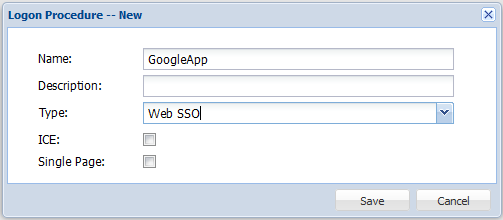 Image Removed
 Image Added
- Click “Save”the "SAVE" button
- Click the Context Menu context "..." icon of the newly create logon procedureLogon Procedure, then select “Logon Steps”
- In the popup windows, click the “Create” button on the toolbarSelect "+ ADD" in the toolbar on the right
- Select the authentication method, e.g. "One-Time Password"
- Click Then click "SaveSAVE" to apply
Create a Web
applicationApplication
- In the main menu, select “Authentication | Application”
- Click the “Create” “+ CREATE” button on the toolbar
- Enter an appropriate “Name”
- Select the internal “Realm” at the drop-down
- Select the newly created logon procedure
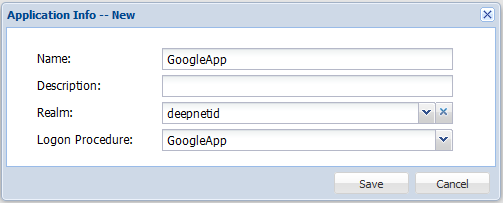 Image RemovedLogon Procedure, from the previous step.
 Image Added
- Click "SaveSAVE" to create the new Application
- Click the context "..." menu of the newly created applicationApplication, then select "AgentAgents"
 Image Removed
 Image Added
- Select the Agent named "Single Sign-on Server | SSO Server"
- Click "SaveSAVE" to confirm.
Register
the Google Appsa GoogleApps Service Provider
- In the main menu, select navigate to "SSO | Service Providers"
- Click the "Register+ CREATE" button, and select "Google Apps"
- Select "SSO Server", enter "Name" , and "Google Apps Domain"
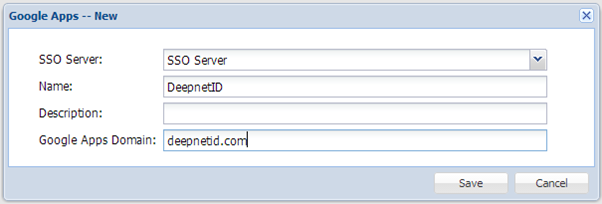 Image Removed
 - Click "Save"
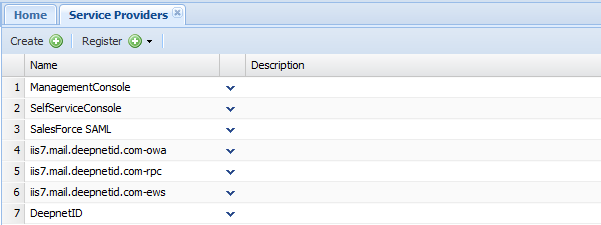 Image Modified
- Click the context "..." menu of "DeepnetID" in the Service Provider list, select Edit
Set "NameID Format" to "User Principle Name"
 Image Removed
 Image Added
Download the DualShield IdP Certificate
- In the main menu, select “SSO navigate to "SSO | SSO Servers”
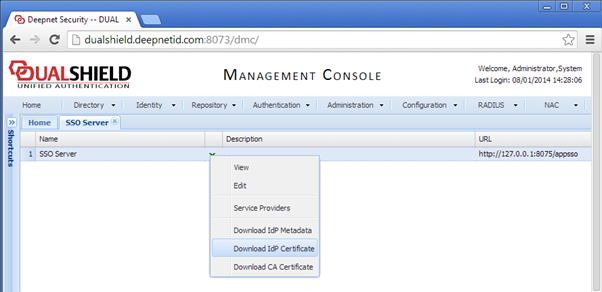 Image Removed
- Click “Download IdP Certificate” and save on local, to save the CER file to the local machine:
 Image Added
{"serverDuration": 67, "requestCorrelationId": "f8fac546683d5ec7"}