1) Follow Begin by following the instructions instructions on checking the expiry date, as below....
| Expand |
|---|
| title | How to check the expiration date of DualShield CA certificate |
|---|
|
| Include Page |
|---|
| How to check the expiration date of DualShield CA Certificate |
|---|
| How to check the expiration date of DualShield CA Certificate |
|---|
|
|
...However, instead of checking for the date, you will be checking for the owner...
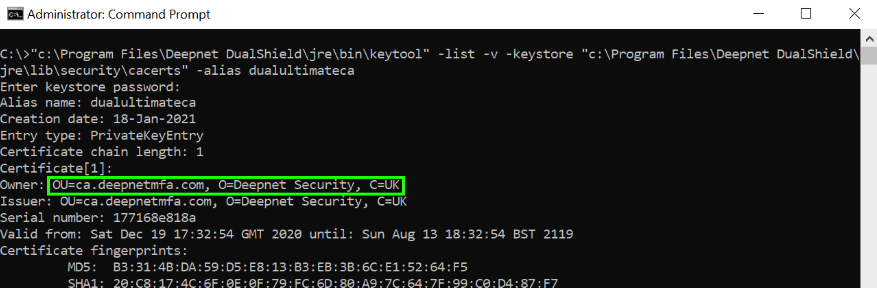 Image Added
2) Note down the owner details. In this example, it is: OU=ca.deepnetmfa.com, O=Deepnet Security, C=UK
3) Backup the current cacerts file:
Run Command Prompt in admin mode and run the following commands:
| Code Block |
|---|
|
cd C:\Program Files\Deepnet DualShield\jre |
| Code Block |
|---|
|
copy "lib\security\cacerts" "lib\security\cacerts.backup" |
4) Delete the old root CA:
| Code Block |
|---|
|
bin\keytool -delete -alias dualultimateca -keystore lib\security\cacerts -storepass changeit |
5) Generate a new root CA with a keysize of 2048, using the owner information you acquired in step 2:
| Code Block |
|---|
|
bin\keytool -genkeypair -alias dualultimateca -keyalg RSA -keysize 2048 -validity 36500 -dname "OU=ca.deepnetmfa.com, O=Deepnet Security, C=UK" -ext bc=ca:true -keystore lib\security\cacerts -storepass changeit -keypass changeit |