For versions of DualShield before version 6.5.5 customisation of the authentication method names for the administrator's console and the Single Sign-On Console were performed separately.
ADMINISTRATOR'S
The names used to represent the authentication methods can be customised (both the names presented during authentication, and the names displayed in the management console).
To customise these names you will need to make modifications to files stored in subfolders of the DualShield installation directory.
...
CONSOLE CUSTOMISATION
Customising the Authentication Method Names displayed in the DualShield Administrators Console (DAC) can be performed by editing a file found in a subfolder of the DualShield installation directory;
| Portal | Subfolder | File |
|---|---|---|
| DualShield Access Administrators Console (DAC) | \tomcat\dualapp\das5\WEB-INF\grails-app\i18n | “messages.properties” |
To customise the names of displayed for the authentication methods displayed in the management console you will need to examine the contents of this file and replace the existing prompts entered against the parameter for the specific authentication method that you want to customise (see table below for examples):
| Method Name | Parameter |
|---|---|
| One-Time Password | method.otp |
| On-Demand Password | method.odp |
| Grid Card | method.grid.card |
| Computer Fingerprint | method.computer.fingerprint |
| Computer DeviceID | method.computer.deviceid |
| Static Password | method.static.pass |
| Emergency Code | method.ecode |
| Question and Answer | method.qna |
Example
As an example to replace the default name for the authentication method "One-Time Password" you would edit the file "C:\Program Files\Deepnet DualShield\tomcat\dualapp\das5\WEB-INF\grails-app\i18n";
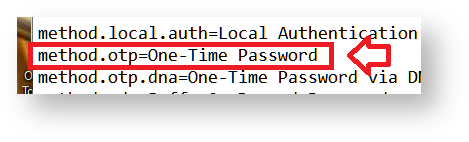
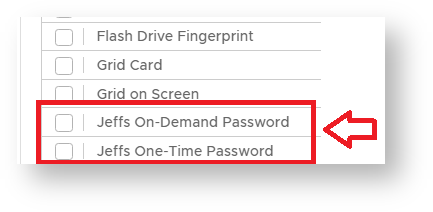
Replacing the text "One-Time Password" with your required customisation will cause the management console to replace the text when authentication methods are listed in the management console.
In the example below I have changed the displayed names for the authentication methods "On-Demand Password" and "One-Time Password";
SINGLE SIGN-ON CUSTOMISATION
Customising the Authentication Method Names during Authentication (Single-Sign-On);
...
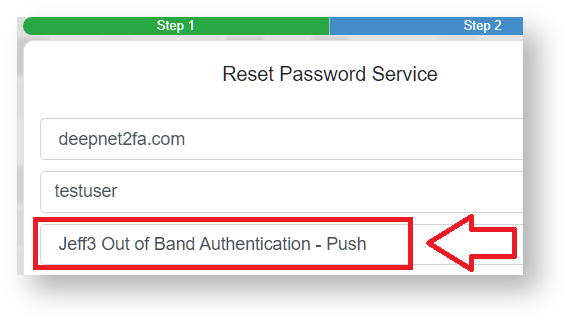
After this change has been made this authentication method will be shown during the logon process with the customised message;
It is worth pointing out that customisations made using this technique may be undone with future update of the authentication server software so it is advisable both to make backups of the affected files prior to any customisations, and to make notes on what customisations were made (so they can be re-implemented on updated versions if necessary).