...
Upload Mellon SP Metadata
In the DualShield Administration Console, select “SAML | “SSO > Service Provider”Providers”, then click the “Create” “+ CREATE” button on the toolbar.
Select “SSO “Single Sign-On Server” in the SSO Server drop down list, and select “SAML 2.0” in the Type drop down list:

Select the appropriate 'Application' created previously.
Enter a descriptive Name for this new Service Provider
Set the 'Type' as “SAML 2.0".
Copy the complete content of the previously exported Metadata “httpNow, copy the content of the “http_acme.org_apache.xml” file and paste it into the “Metadata” field, then paste this data in to the Service Provider Metadata. Clicking "CREATE METADATA", as follows:

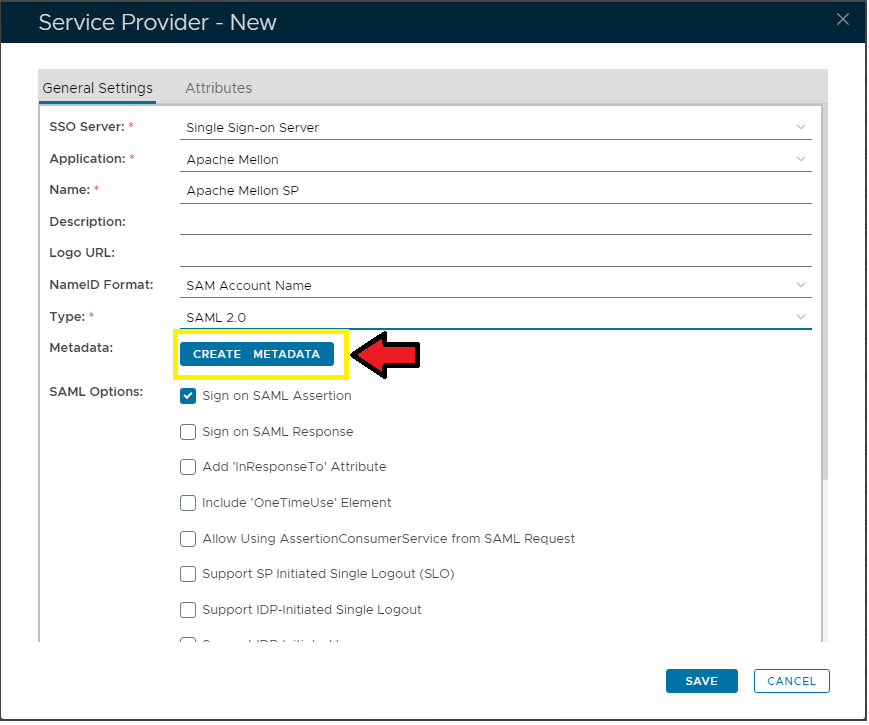
Click Finally click the "SaveSAVE" to save itbutton to confirm creation of this new Service Provider.
Download DualShield IdP Metadata
...
- Application Type: Web SSO
- Agent: SSO Server
- Logon Procedure Type: Web SSO

Once the application Application is successfully created, select "SSO | SSO Servers". In the server list, click the context "..." menu of the SSO "Single Sign-On Server", select then "Download IdP Metadata":
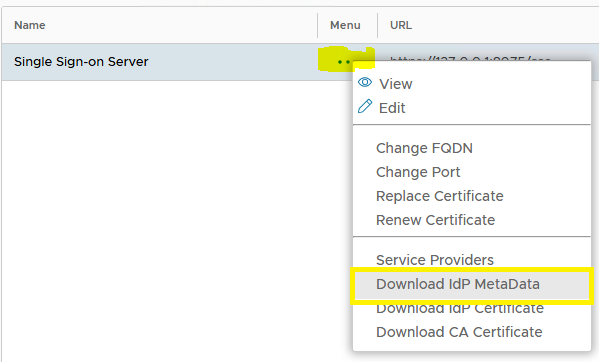

Select the application you've just created, e.g. Website ACME.ORG. Click "Save" to download and save the IdP Metadata.
...