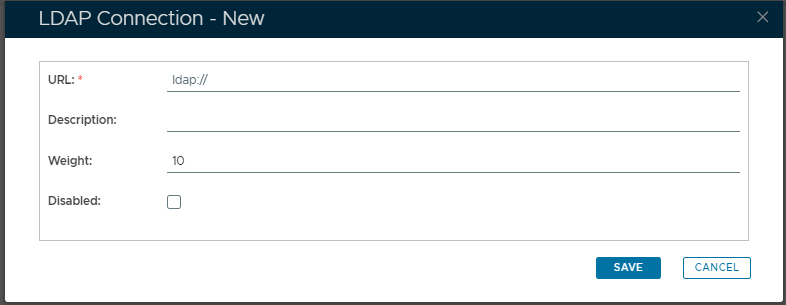
New AD/LDAP server connection can be added to the, log in to the the management console, navigate . Navigate to "Identity | Identity Sources", then left clicking on the context menu of the external directory and selecting "LDAP Connections";
...
| Section |
|---|
| Column |
|---|
| 
|
| Column |
|---|
|
| Expand |
|---|
|
| Panel |
|---|
| borderColor | grey |
|---|
| bgColor | #F8F8F8 |
|---|
| borderStyle | dashed |
|---|
| The address of the server to be added to the server cluster |
|
| Expand |
|---|
|
| Panel |
|---|
| borderColor | grey |
|---|
| bgColor | #F8F8F8 |
|---|
| borderStyle | dashed |
|---|
| Provide a brief description of the LDAP connection providing details of the source and purpose of the directory information together with any other information that helps explain the connection (include any limitation such as "restricted to management level users only"). . |
|
| Expand |
|---|
|
| Panel |
|---|
| borderColor | grey |
|---|
| bgColor | #F8F8F8 |
|---|
| borderStyle | dashed |
|---|
| Enter a value that will be used by the Round Robin load balancing mode to determine the proportion of connections that will be sent to this server (see "Further information on Load Weighting" below).
|
|
| Expand |
|---|
|
| Panel |
|---|
| borderColor | grey |
|---|
| bgColor | #F8F8F8 |
|---|
| borderStyle | dashed |
|---|
| Select this option if you want the server to be included in the cluster, but disabled. |
|
|
|
...