...
| Portal | Subfolder | File |
|---|---|---|
| DualShield Access Console (DAC) | \tomcat\dualapp\das5\WEB-INF\grails-app\i18n | “messages.properties” |
To customise the names of the authentication methods displayed in the management console you will need to examine the contents of this file and replace the existing prompts entered against the parameter for the specific authentication method that you want to customise (see table below for examples):
| Method Name | Parameter |
|---|---|
| One-Time Password | method.otp |
| On-Demand Password | method.odp |
| Grid Card | method.grid.card |
| Computer Fingerprint | method.computer.fingerprint |
| Computer DeviceID | method.computer.deviceid |
| Static Password | method.static.pass |
| Emergency Code | method.ecode |
| Question and Answer | method.qna |
As an example to replace the default name for the authentication method "One-Time Password" you would edit the file "C:\Program Files\Deepnet DualShield\tomcat\dualapp\das5\WEB-INF\grails-app\i18n";
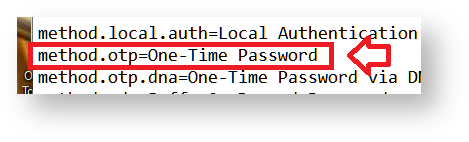
Replacing the text "One-Time Password" with your required customisation will cause the management console to replace the text when authentication methods are listed in the management console.
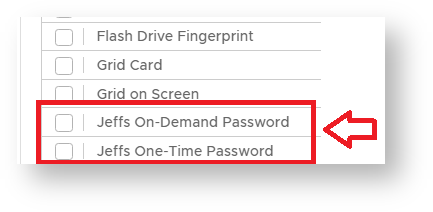
In the example below I have changed the displayed names for the authentication methods "On-Demand Password" and "One-Time Password";
SINGLE SIGN-ON CUSTOMISATION
...