...
| Section |
|---|
|
| Column |
|---|
Log in to the root FortiGate.
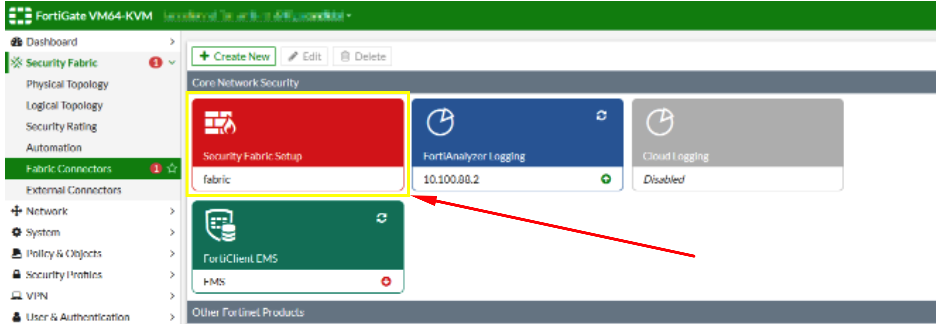
Go to Security Fabric > Fabric Connectors and double-click the Security Fabric Setup card.
|
| Column |
|---|
|
| Panel |
|---|
| borderColor | #9EBEE5 |
|---|
| bgColor | #f0f0f0 |
|---|
| borderWidth | 1px |
|---|
| 
|
|
|
Enter the details of the SAML identity provider:
| Section |
|---|
|
| Column |
|---|
In the Topology tree, hover over a FortiGate and click Configure.
|
The Entitity ID/ Issuer ID will match the Entity ID you specified in the DualShield Service Provider. There are two parts for specifying the Sign-In and Log-Out Page URLs The first part is that that you will use the SingleSignOnService and SingleLogoutService URLs you copied from the DualShield SSO Server Metadata (see previous section) respectively. The second part is that you will append these URLs with some extra information. e.g. Sign-in page URL | Code Block |
|---|
https://dualshield.yourdomain.com:8074/sso/Login/kvps/DASApplicationName/Ctera |
Log-out page URL | Code Block |
|---|
https://dualshield.yourdomain.com/sso/logout?DASApplicationName=Ctera |
| Column |
|---|
|
| Panel |
|---|
| borderColor | #9EBEE5 |
|---|
| bgColor | #f0f0f0 |
|---|
| borderWidth | 1px |
|---|
|  Image Removed Image Removed Image Added Image Added
|
|
|
Upload the Idp Certificate file
...