| Table of Contents |
|---|
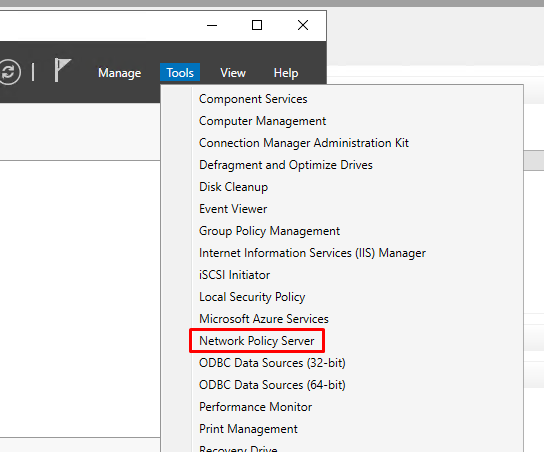
Launch Network Policy Server
- In Server Manager click "Tools"
- Select Network Policy Server
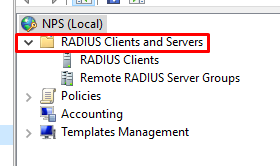
Create a RADIUS Client
- Expand "Radius Clients and Servers"
2. Right Click "Radius Clients" and select "New"
...
from the menu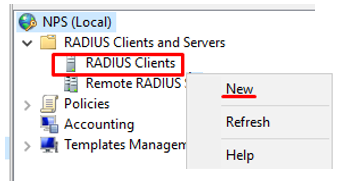
3. Enter a Friendly name, e.g, "RRAS"
4. Enter the RRAS’s IP in the IP address filed, e.g. "
...
127.0.
...
0.1
...
", if on the same machine,
5. Enter the Shared secret password
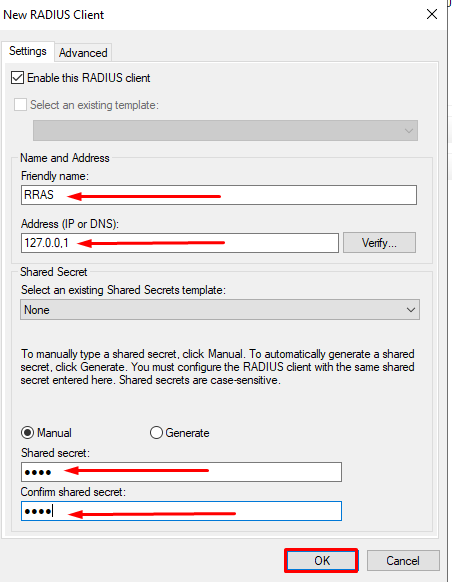
6. Click "OK"
Create a Remote RADIUS Server Group
- Right Click "New " on the Remote RADIUS Server Group Context MenuCreate the Remote RADIUS Server Group, " and select "New" from the menu
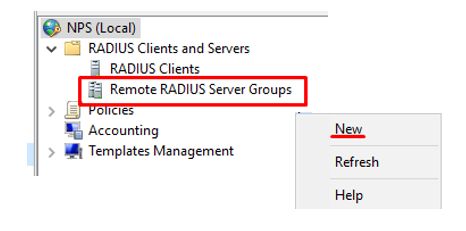
2. Enter a group name e.g. "DualShield
...
MFA"
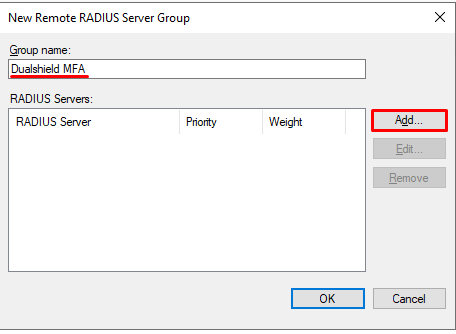
Enter the name or IP address of the DualShield Radius Server 
- Select "Authentication/Accounting" tab on the Radius Clients Context Menu, enter the Shared secret password
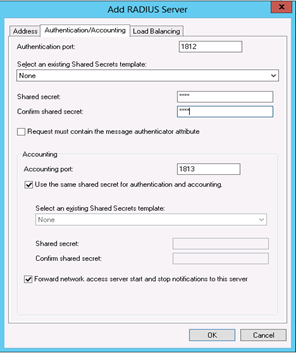
- Select "Load Balancing" tab, allocate the weight and click "OK"
...