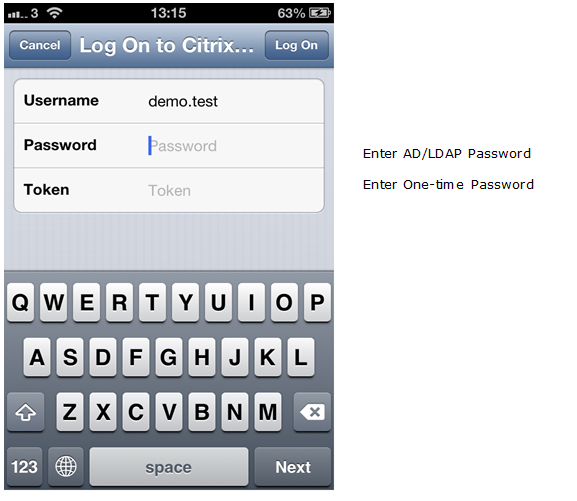
If you plan to deploy only the one"One-time Time password" based authentication in your user base using OTP tokens such as Deepnet SafeID, MobileID, then you can configure your Citrix NetScaler to work in the so-called One-Step Logon mode. In
Using One-Step Logon process, Netscaler will use your AD Active Directory as the primary authentication server and your DualShield as the secondary Secondary authentication server. Your AD will be responsible for verifying users’ AD passwords and your DualShield will be responsible for verifying users’ oneOne-time passwords Time password only.
| Table of Contents |
|---|
Edit Logon Procedure
In the DualShield Management Administration Console, edit the logon procedure Logon Procedure for your NetScaler application. You will only need one logon step and typically the logon step will have only require One Logon Step, typically “One-Time Password” as the authentication method:

Configure Citrix NetScaler
- Go Navigate in to the properties Properties of your NetScaler Gateway | Virtual Server and go to . Then select the Authentication tab.
On the Primary Authentication Policies, add the DualShield AD-Deepnetqa_Receiver policy as top priority and the LDAP non-receiver policy as secondary priority.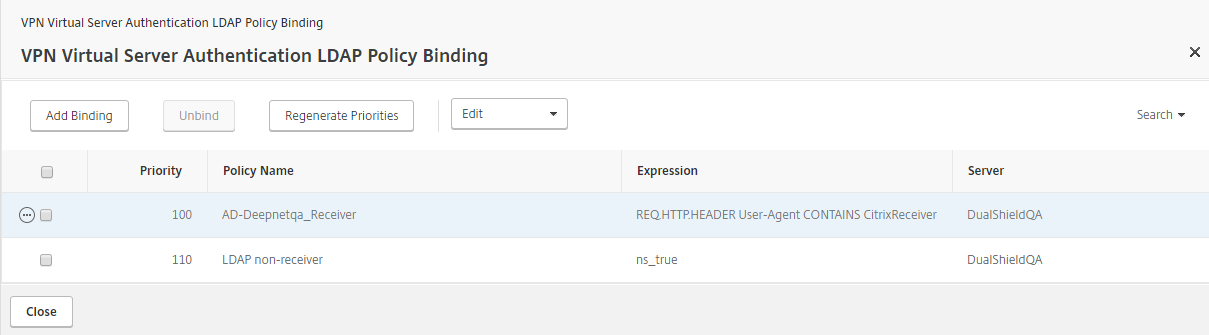
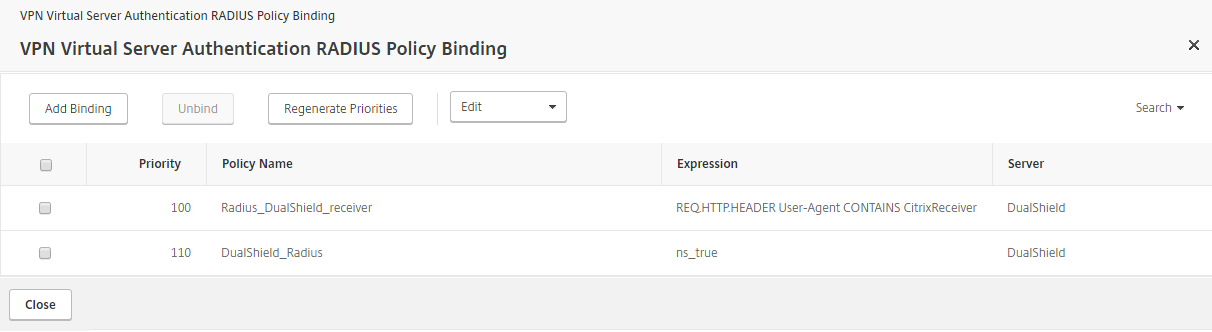
- On the Secondary Authentication Policies, add the DualShield Radius_DualShield_Receiver policy as top priority and the DualShield_Radius policy as secondary priority.
...
Test Logon in Citrix Receiver