When a token is not producing OTP codes that match those generated using an online TOTP generator (using the seed/secret and token period for your pre-programmed token), then it is possible that the built-in clock on the pre-programmed token has drifted from the actual time.
Time drift on a pre-programmed token is to be expected, and token clocks will typically drift by approximately 1 minute every 6 months since purchase (the amount of drift can vary, but this is a good rule of thumb).
How time drift affects tokens used for Azure AD
If your token has less than 10 minutes of drift, then it is still likely that the token can be registered for use with authentication servers (such as those used by Microsoft for Entra and Office 365) provided. you perform a manual activation of the token (see the "Activate Tokens" section of the following wiki guide);
Once the token has been manually activated, and provided the token is used more than once every few months, then any additional drift is likely to be accounted for (most servers follow the full RFC 6238 guidance that caters for addition drift on hardware tokens after registration).
Testing the Tokens using an online page
One method we can use to check for time drift on our hardware tokens is to use an online TOTP generator to validate the OTP codes produced by our tokens.
- When you purchase TOTP hardware tokens, they will arrive with seed data pre-programmed in to the token.
Before tokens are used with MFA services (such as Microsoft Entra), you will need to obtain the seed data (procedure below);
Once requested, the seed data will be sent to you in the form of a CSV file.
Open the file, then search for the Secret Key that matches the serial number of the token you are testing (Azure example below);

Testing OTP codes using an online TOTP generator
The seed data may be used to confirm the validity of the codes presented by the hardware tokens by using an online TOTP generator.
The Deepnet Security online TOTP code generator can be accessed at the URL below.https://www.deepnetsecurity.com/tools/totp-generator/
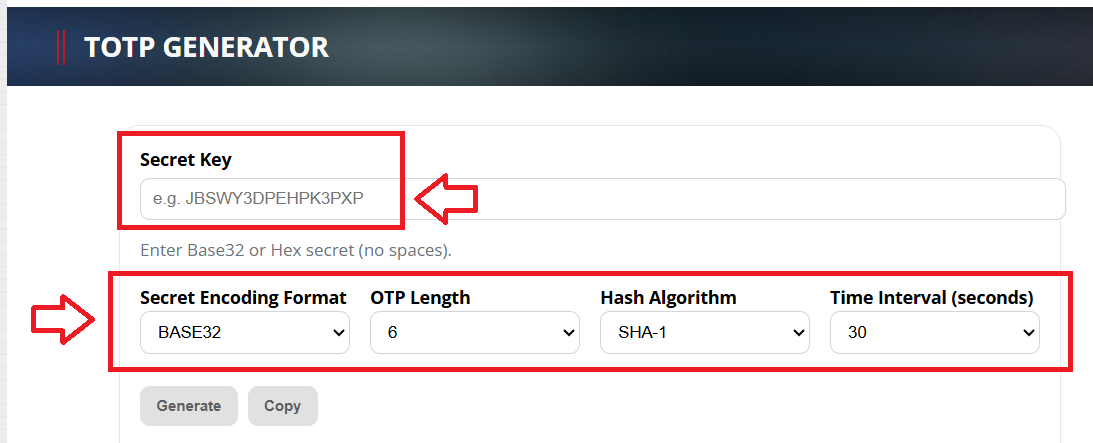
- At "Secret Key", fill in the secret key (seed) data that matches the serial number of the token you are testing
- At "Secret Encoding Format", select the format that matches the format in your CSV file (for azure this will be Base32)
- At "OTP Length", select "6 digits"
- At "Hash Algorithm", select "SHA-1"
- At "Time Interval", select either "30 seconds" or "60 seconds" (This depends upon use. Commonly, it is 30 seconds).
When you have supplied all the details above, click
 , and OTP codes will now start to be generated using the supplied seed data;
Related Articles
Determining the extent of drift using the "Check Clock Drift" tool
Whilst our online testing TOTP generator can be used to confirm if time drift exists on the token, if drift is detected, then we still need to identify how much the clock on the token has drifted.
Fortunately, we do have a tool that can be used for this task - the CHECK CLOCK DRIFT tool;

The following procedure provides instruction on how to check the extent of time drift on a token;
To use the tool navigate to https://support.deepnetsecurity.com/tools/otp/check-clock-drift.asp then supply the token details for the token to be tested then click

If there is no drift for the tested token you will see confirmation as per the following example;

If drift is detected you will be notified of the number of time windows of drift that were detected for the tested token;

Real World Example
If there is a small amount of time drift you should find that the code displayed on the token is also listed in the list of OTP codes shown on this window.
In this test we will identify the extent of drift on a SafeID Classic token with serial number "102601103200"
The following XML file was obtained for this token;
<?xml version="1.0"?>
<data>
<header>
<manufacturerCode>DN</manufacturerCode>
<productCode>ST</productCode>
<encrypt>NONE</encrypt>
<encode>HEX</encode>
<digits>6</digits>
<timeWindow>60</timeWindow>
<crypto>HmacSHA1</crypto>
</header>
<tokens>
<token>
<serial>102601103200</serial>
<seed>7952F56EC78D37D6225490ED102665C0131D058E</seed>
</token>
</tokens>
</data>After checking the serial number at the back of our token matches the serial number in the source file, we find that the seed for this token was supplied in hex format with a value of "7952F56EC78D37D6225490ED102665C0131D058E".
We now navigate to https://support.deepnetsecurity.com/tools/otp/check-clock-drift.asp, select the product "SafeID/Classic", select Secret Encode "HEX" and supply the current OTP code on our token;

After clicking on the
button we are then notified of any drift identified on that token.