The program can be found in the following local directory:
C:\Program Files\Deepnet DualShield\tools
NTRadPing can be configured to act as a RADIUS Client, establishing a connection with the installed RADIUS Server.Step 1: In DualShield Administration Console, register NTRadPing as a RADIUS client:
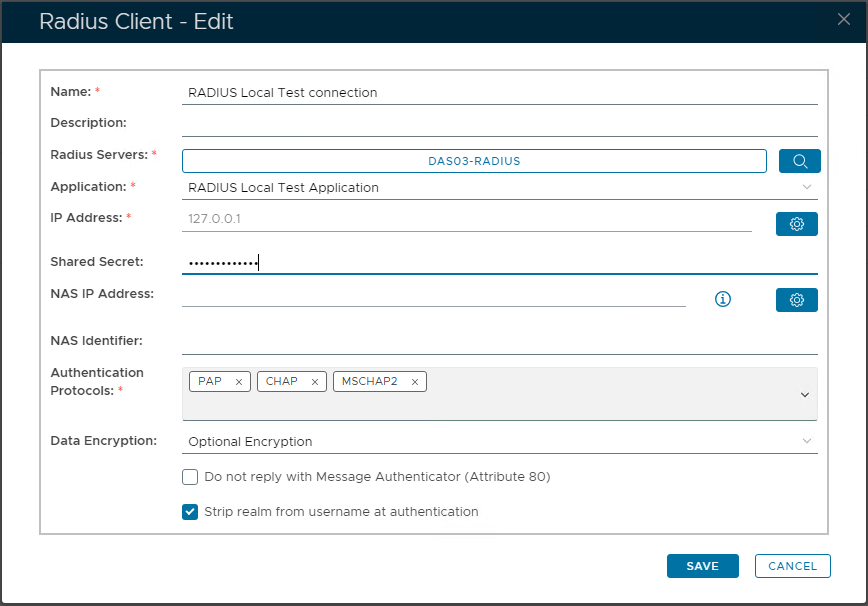
Step 2: Launch the NTRadPing Test utility. A window will appear as follows:
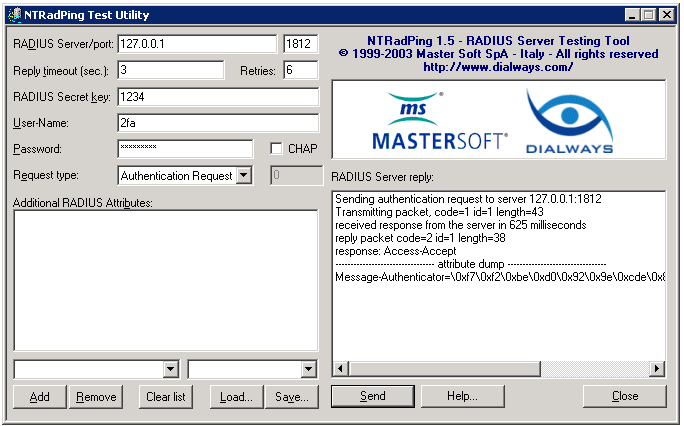
Set the Radius Server as the local loopback IP Address "127.0.0.1" (assuming the utility is being run on the same machine as the RADIUS Server).
Enter the "Secret Key" into the associated field, matching the Key added to the RADIUS Client, in DualShield console.
Enter a valid User account and Password that will be used for authenticating the session. This should be in the correct format, as per the RADIUS Application Login Procedure > Login Steps, defined in DualShield Server.
Once all credentials are correctly entered, select "SEND" button, to attempt to Login using the RADIUS test utility. The Results will appear in the status window on the right.
You can copy NTRadPing utility program to a different machine and run it remotely. To copy the utility, you need to copy 2 files:
- NTRadPing.exe
- RadDict.dat
Related Articles
There is no content with the specified labels