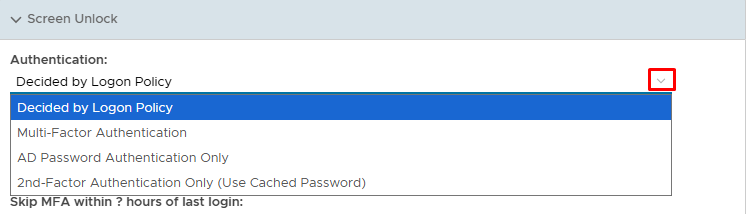
If a workstation or server is locked, you can choose whether to protect the unlocking of a workstation or server by choosing one of four methods
- AD Password Authenitcation Only
- Multi-Factor Authentication
- 2nd Factor only (AD Pasword is cached)
- Decided by the Logon Policy
By default the authentication method is decided by the logon policy, therefore if the logon policy dictates that MFA is required for signiong in from scratch, then MFA will also be required to unlock the screen. However not everybody likes to have to continually authenticate with a second factor, particularly if the end user has just stepped away from thier PC for two minutes, so this extra policy gives the flexibility.
To modify how you wish screen unlock authentication to behave, log into the Administration Console and go to Administratin>Policies
Search for the Computer Logon Client policy, edit the poilcy and expand the Screen Unlock tab
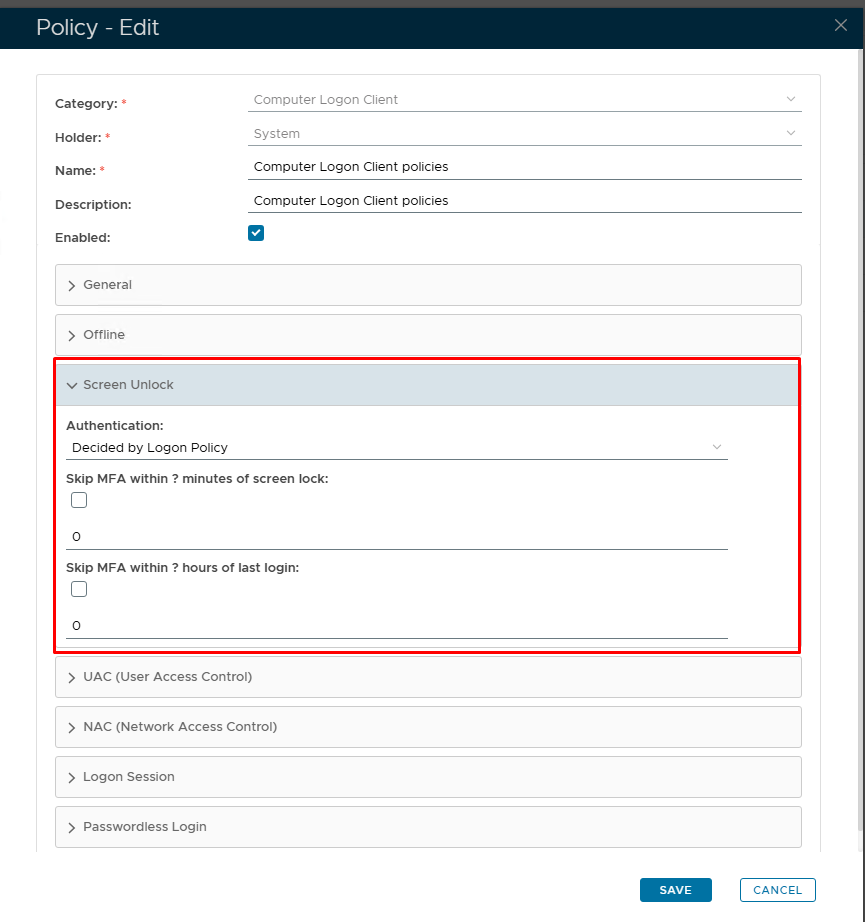
It is under here you that the authentication behaviour can be set. To modify this setting simply click the drop down arrow and select the type of authentication required for screen unlock, if you require it to be different to the Logon policy.
For flexibility we have added a coupe of Skip MFA options, if MFA is required, but only after a certain period of time. For example...
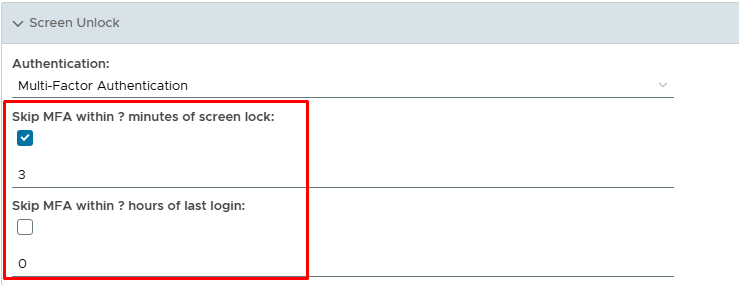
In the screenshot above, MFA is required but the option for Skip MFA within ? minutes of screen lock is enabled. Therefore the end user if unlocks the screen within 3 minutes of locking it, the MFA is skipped. Only after that 3 minutes, MFA is required. An example of where this may be useful is if the end user is about to go on thier break, they lock their PC, but then suddenly remember they forgot to send an email, thereefore if it is within those 3 minutes, they can quickly unlock just using thier AD password.
The second option is Skip MFA within ? hours of Logon. This option is useful if MFA is only required at the beginning of the day (when the user first logs in), but the end user maybe using a laptop which they take home at night, and therefore they just shut the lid to lock it, and then when they get home, MFA is required to unlock it, which gives further security, should something untoward happen to the laptop.