The Computer Logon Modern Authentication solution consists of 4 components:
- Computer Logon Client
- Authentication Service
- Policy Service
- Token Service
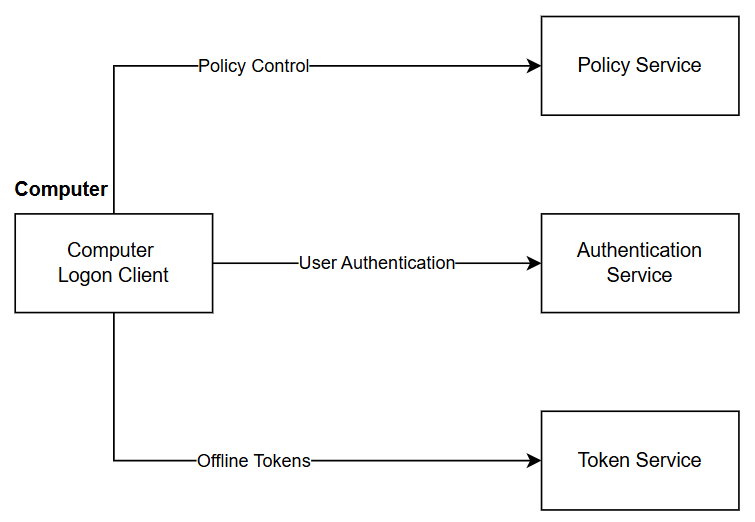
Computer Logon Client is a software application to be installed on all computers that need to be protected with multi-factor authentication (MFA).
Authentication Service is an MFA service used by the Computer Logon Client to authenticate users at computer login, screen unlock, and elevated user access. By design, the Computer Logon Client can be configured to use any MFA server that supports the OpenID Connect (OIDC) protocol, including:
- Microsoft Entra ID MFA
- Deepnet DualShield MFA
- Deepnet SafeID MFA
Policy Service is used by administrators to manage configurations, settings, and policies of the computer logon solution. The Computer Logon Client also connects to the Policy Service to obtain the settings and policies.
The Policy Service can be a part of an MFA server. For instance, the DualShield MFA server provides both the Authentication Service and the Policy Service.
If the MFA Server does not provide the Policy Service, then you need a separate Policy Service provider. For instance, Entra MFA does not provide the policy service for computer logon. If you plan to use Entra MFA as the authentication service in the computer logon solution, then you need to install the Deepnet Computer Logon Management Portal that provides both the policy service and token service
Token Service is used by administrators to manage tokens for offline MFA. The Computer Logon Client also connects to the Token Service to download the offline tokens.
The Token Service can be a part of an MFA server. For instance, the DualShield MFA server provides both the Authentication Service and Token Service. The Computer Logon MA solution can use one of the following Token Services:
- Deepnet DualShield MFA
- Deepnet Computer Logon Management Portal
- Deepnet SafeID Token Service
If the MFA Server does not provide the Token Service, then you need a separate Token Service provider. For instance, Entra MFA does not provide the Token Service for computer logon. If you plan to use Entra MFA as the authentication service in the computer logon solution, then you need a token service provider such as the Deepnet Computer Logon Management Portal or the Deepnet SafeID Token Service.