- In the DualShield Administration console, navigate to "SSO | Service Providers".
- Click the "+ CREATE" button on the right in the toolbar, to setup a new Provider:
SSO Server: At the drop-down, select "Single Sign-on Server"
Application: At the drop-down, select the Application created previously, for PowerDMS.
Name: Enter an appropriate name for this Service Provider.
Type: Set as "SAML 2.0 (Without Metadata)"
Entity ID: The value entered here must match that setup in the PowerDMS Portal.
ACS URL: This should also be set, as per the configuration in PowerDMS Portal.
NameID Format: Set this drop-down setting to "SAM Account Name"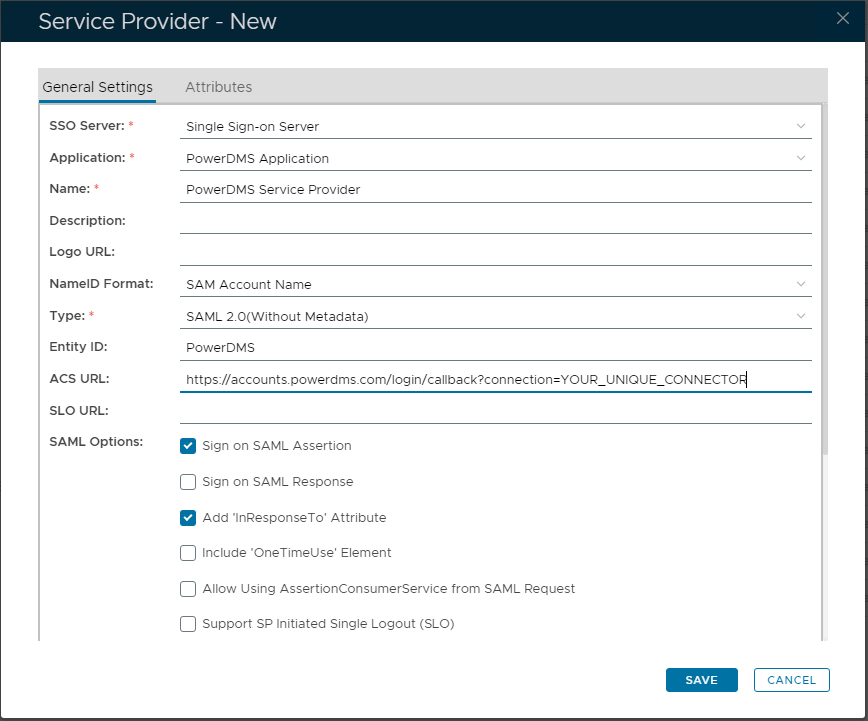
- Click "SAVE" to create the new Service Provider.
Overview
Content Tools