You are viewing an old version of this page. View the current version.

Compare with Current View Page History

« Previous Version 7 Next »

To use client certificate authentication, you have to:

Choose the agent certificate format that matches your client programming language. You can download the agent certificate from dualshield in the following formats:

PEM Format Certificate

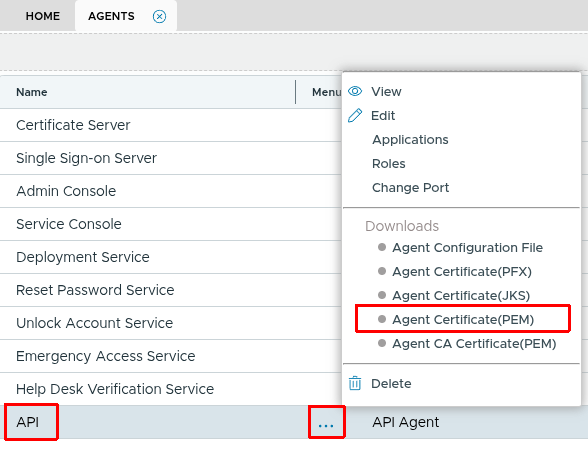
To download a PEM format certificate, in the Agents list, click the context menu of your agent and select "Downloads | Agent Certificate (PEM)". The certificate will be saved as "API.pem". This PEM certificate contains both the certificate and the private key.

If you are using some programming language, like python, you might want to extract the private key separately. You can use the OpenSSL tool:

openssl rsa -in API.pem -out apikey.pem

apikey.pem is the certificate's unencrypted private key.

PFX Format Certificate


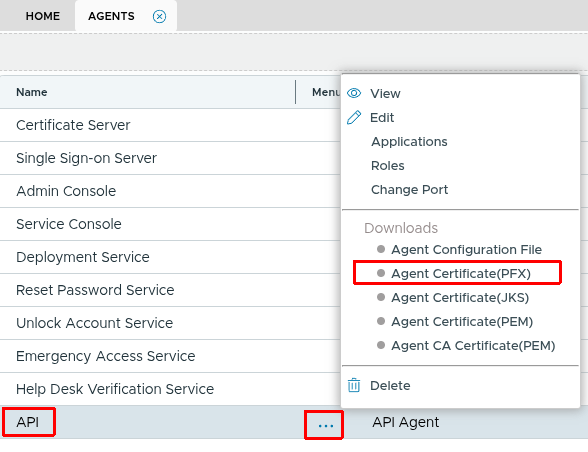
To download a PKCS12 format certificate, select "Downloads | Agent Certificate (PFX)". The certificate will be saved as "API.pfx". The agent password will be used to protect the pfx certificate.
JKS Format Certificate

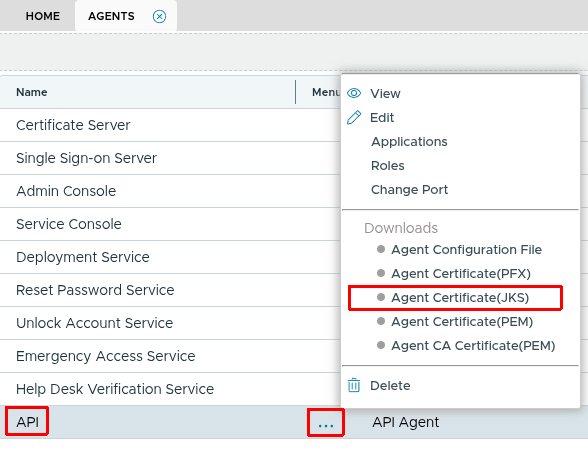
if your application code is in JAVA, you can download a JKS store directly by selecting "Downloads | Agent SSL Certificate (JKS)". The certificate will be saved as "API.jks".

Once downloaded the client certificate, you can use it in your client code:

Create a DualShield Class

class DualShield:

    headers = {"Content-Type": "application/json"}
    app_context = "/das5/rest/"

    def _init_(self, host, port, keyFile, certFile):
        self.keyFile = keyFile
        self.certFile = certFile
        self.conn = HTTPSConnection(host, port, keyFile, certFile)

    def execute(self, method, params):
        data = json.dumps(params)
        self.conn.request("POST", self.app_context + method, data, self.headers)
        response = self.conn.getresponse()
        data = response.read()
        return json.loads(data.decode('utf-8'))

    def close(self):
        self.conn.close()
        self.conn = None


Initialize DualShield Variables

host = 'dualshield.deepnetlabs.com'
port = 8071
keyFile = 'apikey.pem'
certFile = 'API.pem'
domainname='deepnetlabs.com'

Replace the values of these variable with your own.
host: the host name (FQDN) of your DualShield server
port: the port number of the DualShield authentication server
keyFile: Your agent's private key file
certFile: Your agent's certificate file
domainname: The name of the domain that your agent is connected to

Create a Test Class

class TestDualShield(unittest.TestCase):

    def setUp(self):
        self.auth=DualShield(host, port, keyFile, certFile)

    def tearDown(self):
        self.auth.close()


Check the Connection

Call the"Hello" method in DualShield to check the connection

    def test_1_hello(self):
        r=self.auth.execute("auth/hello", {})

Static Password Authentication

The authentication method for verifying Static Password is "SPASS"

    def test_2_staticpass(self):
        #logon with 'static password' credential
        username=raw_input('Please enter your login name:')
        password=raw_input('Please enter your AD password:')
        params = {
            'user':{'loginName':username, 'domain.name':domainname},
            'credential':{'method':'SPASS', 'password':password}
        }
        r=self.auth.execute("auth/verify", params)


One-Time Password Authentication

The authentication method for verifying Static Password is "OTP"

    def test_3_verifySafeID(self):
        otp=raw_input('Please enter you SafeIDotp:')
        params = {
            'user':{'loginName':username, 'domain.name':domainname},
            'credential':{'method':'OTP', 'otp':otp}
        }
        r=self.auth.execute("auth/verify", params)


Deliver On-Demand Password

To deliver an on-demand password to a user via email message (SMTP)

    def test_4_sendOTP(self):
        username=raw_input('Please enter your login name:')
        params = {
            'user':{'loginName':username, 'domain.name':domainname},
            'options':{'channel':'SMTP'}
        }
        r=self.auth.execute("auth/sendOTP", params)


On-Demand Password Authentication

The authentication method for verifying On-Demand Password is "OTPoD"

    def test_5_verifyODP(self):
        username=raw_input('Please enter your login name:')
        otp=raw_input('Please enter you otp:')
        params = {
            'user':{'loginName':username, 'domain.name':domainname},
            'credential':{'method':'OTPoD', 'otp':otp}
        }
        r=self.auth.execute("auth/verify", params)


  • No labels