- Created by James Zeng, last modified on May 18, 2026
Since DualShield 6.9.0.20240119, OAuth 2.0 can be used for agent authentication. To use OAuth 2.0 Authentication, you need to obtain the for following information from the agent:
- Client ID
- Client Secret
To obtain the credential for OAuth 2.0, in the Agents list, click the context menu of your agent and select "Edit", then switch to "OAuth 2.0" tab:
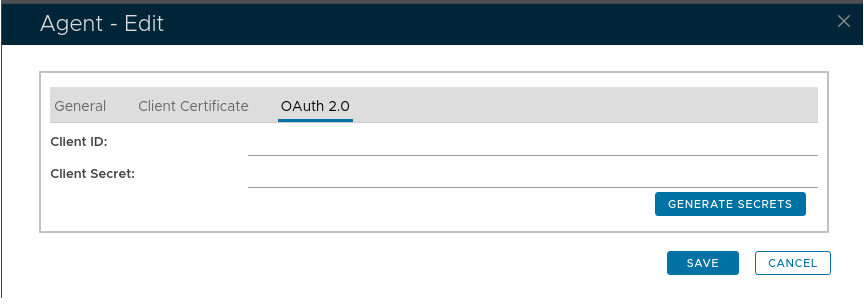
If the client id and client secret are blank, click "Generate Secrets" to generate them:
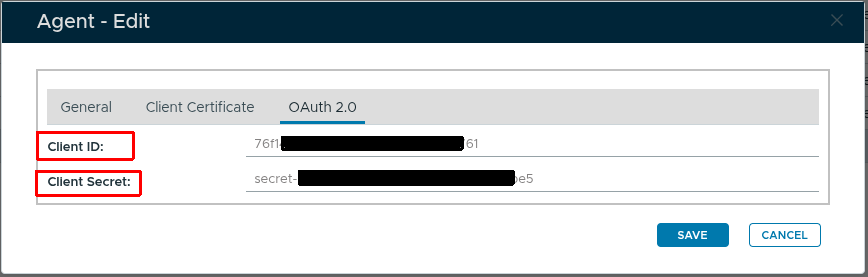
The values of "Client ID" and "Client Secret" can be used in your client code to perform the agent authentication.
Example Code:
import com.fasterxml.jackson.databind.JsonNode;
import com.fasterxml.jackson.databind.ObjectMapper;
import com.fasterxml.jackson.databind.node.ObjectNode;

import javax.net.ssl.*;
import java.net.URI;
import java.net.http.HttpClient;
import java.net.http.HttpRequest;
import java.net.http.HttpResponse;
import java.security.SecureRandom;
import java.security.cert.X509Certificate;
import java.time.Instant;

/**
 * Java DualShield API client using OAuth 2.0 Client Credentials Flow.
 *
 * The client fetches a Bearer token from /das5/rest/oauth/token on first use
 * and attaches it to all subsequent requests. The token is refreshed
 * automatically 60 seconds before it expires.
 *
 * Maven dependency:
 *   <dependency>
 *     <groupId>com.fasterxml.jackson.core</groupId>
 *     <artifactId>jackson-databind</artifactId>
 *     <version>2.17.0</version>
 *   </dependency>
 */
public class DualShieldClient {

    private static final String APP_CONTEXT = "/das5/rest/";

    private final String baseUrl;
    private final String clientId;
    private final String clientSecret;
    private final HttpClient httpClient;
    private final ObjectMapper mapper = new ObjectMapper();

    private String accessToken;
    private Instant tokenExpiry = Instant.EPOCH;

    public DualShieldClient(String host, int port, String clientId, String clientSecret)
            throws Exception {
        this.baseUrl = "https://" + host + ":" + port;
        this.clientId = clientId;
        this.clientSecret = clientSecret;

        // Accept self-signed server certs (adjust TrustManager for production)
        TrustManager[] trustAll = new TrustManager[]{
            new X509TrustManager() {
                public X509Certificate[] getAcceptedIssuers() { return new X509Certificate[0]; }
                public void checkClientTrusted(X509Certificate[] c, String t) {}
                public void checkServerTrusted(X509Certificate[] c, String t) {}
            }
        };

        SSLContext sslContext = SSLContext.getInstance("TLS");
        sslContext.init(null, trustAll, new SecureRandom());

        this.httpClient = HttpClient.newBuilder()
                .sslContext(sslContext)
                .build();
    }

    // -------------------------------------------------------------------------
    // Token management
    // -------------------------------------------------------------------------

    private void ensureValidToken() throws Exception {
        if (accessToken == null || Instant.now().isAfter(tokenExpiry.minusSeconds(60))) {
            fetchToken();
        }
    }

    private void fetchToken() throws Exception {
        ObjectNode body = mapper.createObjectNode();
        body.put("client_id", clientId);
        body.put("client_secret", clientSecret);

        HttpRequest request = HttpRequest.newBuilder()
                .uri(URI.create(baseUrl + APP_CONTEXT + "oauth/token"))
                .header("Content-Type", "application/json")
                .POST(HttpRequest.BodyPublishers.ofString(mapper.writeValueAsString(body)))
                .build();

        HttpResponse<String> response = httpClient.send(request, HttpResponse.BodyHandlers.ofString());
        JsonNode json = mapper.readTree(response.body());

        if (json.path("error").asInt() != 0) {
            throw new RuntimeException("OAuth token request failed: " + json.path("message").asText());
        }

        accessToken = json.path("access_token").asText();
        long expiresIn = json.path("expires_in").asLong();
        tokenExpiry = Instant.now().plusSeconds(expiresIn);
    }

    // -------------------------------------------------------------------------
    // HTTP execution
    // -------------------------------------------------------------------------

    public JsonNode execute(String method, ObjectNode body) throws Exception {
        ensureValidToken();

        HttpRequest request = HttpRequest.newBuilder()
                .uri(URI.create(baseUrl + APP_CONTEXT + method))
                .header("Content-Type", "application/json")
                .header("Authorization", "Bearer " + accessToken)
                .POST(HttpRequest.BodyPublishers.ofString(mapper.writeValueAsString(body)))
                .build();

        HttpResponse<String> response = httpClient.send(request, HttpResponse.BodyHandlers.ofString());
        return mapper.readTree(response.body());
    }

    private ObjectNode userNode(String username, String domain) {
        ObjectNode user = mapper.createObjectNode();
        user.put("loginName", username);
        user.put("domain.name", domain);
        return user;
    }

    // -------------------------------------------------------------------------
    // API methods
    // -------------------------------------------------------------------------

    /** Verify connectivity to the DualShield server. */
    public JsonNode hello() throws Exception {
        return execute("auth/hello", mapper.createObjectNode());
    }

    /** Verify a static password (SPASS). */
    public JsonNode verifySpass(String username, String domain, String password) throws Exception {
        ObjectNode body = mapper.createObjectNode();
        body.set("user", userNode(username, domain));
        ObjectNode credential = mapper.createObjectNode();
        credential.put("method", "SPASS");
        credential.put("password", password);
        body.set("credential", credential);
        return execute("auth/verify", body);
    }

    /** Verify a one-time password (OTP, e.g. SafeID). */
    public JsonNode verifyOtp(String username, String domain, String otp) throws Exception {
        ObjectNode body = mapper.createObjectNode();
        body.set("user", userNode(username, domain));
        ObjectNode credential = mapper.createObjectNode();
        credential.put("method", "OTP");
        credential.put("password", otp);
        body.set("credential", credential);
        return execute("auth/verify", body);
    }

    /** Deliver an on-demand OTP via SMS. */
    public JsonNode sendOtp(String username, String domain) throws Exception {
        ObjectNode body = mapper.createObjectNode();
        body.set("user", userNode(username, domain));
        ObjectNode credential = mapper.createObjectNode();
        credential.put("method", "OTPoD");
        body.set("credential", credential);
        // set SMS as the delivery channel
        ObjectNode options = mapper.createObjectNode();
        options.put("channel", "SMS");
        body.set("options", options);
        return execute("auth/sendOTP", body);
    }

    /** Verify an on-demand OTP (OTPoD). */
    public JsonNode verifyOtpod(String username, String domain, String otp) throws Exception {
        ObjectNode body = mapper.createObjectNode();
        body.set("user", userNode(username, domain));
        ObjectNode credential = mapper.createObjectNode();
        credential.put("method", "OTPoD");
        credential.put("password", otp);
        body.set("credential", credential);
        return execute("auth/verify", body);
    }

    // -------------------------------------------------------------------------
    // Example usage
    // -------------------------------------------------------------------------

    public static void main(String[] args) throws Exception {
        String host         = "your-dualshield-server.example.com";
        int    port         = 8071;
        String clientId     = "example-76f14240e7fc42c09867f2ef96f61761";
        String clientSecret = "example-secret-503d45911d8f42e3bc85999f77c8ebe5";
        String domain       = "YourDomain";
        String username     = "testuser";

        DualShieldClient client = new DualShieldClient(host, port, clientId, clientSecret);

        // 1. Hello
        System.out.println("hello:   " + client.hello().toPrettyString());

        // 2. Static password
        System.out.println("spass:   " + client.verifySpass(username, domain, "s3cr3t").toPrettyString());

        // 3. OTP (SafeID)
        System.out.println("otp:     " + client.verifyOtp(username, domain, "123456").toPrettyString());

        // 4. On-demand OTP – send first, then verify
        System.out.println("sendOTP: " + client.sendOtp(username, domain).toPrettyString());
        System.out.print("Enter the OTP you received: ");
        String otpod = new java.util.Scanner(System.in).nextLine();
        System.out.println("otpod:   " + client.verifyOtpod(username, domain, otpod).toPrettyString());
    }
}
"""
DualShield API client using OAuth 2.0 Client Credentials Flow.

The client fetches a Bearer token from /das5/rest/oauth/token on first use
and attaches it to all subsequent requests. The token is refreshed
automatically 60 seconds before it expires.

Requires: pip install requests
"""

import time
import requests
import urllib3

# Suppress InsecureRequestWarning for self-signed server certs
urllib3.disable_warnings(urllib3.exceptions.InsecureRequestWarning)

APP_CONTEXT = "/das5/rest/"


class DualShieldClient:

    def __init__(self, host: str, port: int, client_id: str, client_secret: str):
        self.base_url = f"https://{host}:{port}"
        self.client_id = client_id
        self.client_secret = client_secret
        self.headers = {"Content-Type": "application/json"}
        self._access_token: str | None = None
        self._token_expiry: float = 0.0  # Unix timestamp

    # -------------------------------------------------------------------------
    # Token management
    # -------------------------------------------------------------------------

    def _ensure_valid_token(self):
        if self._access_token is None or time.time() > self._token_expiry - 60:
            self._fetch_token()

    def _fetch_token(self):
        body = {"client_id": self.client_id, "client_secret": self.client_secret}
        response = requests.post(
            self.base_url + APP_CONTEXT + "oauth/token",
            json=body,
            headers=self.headers,
            verify=False,
        )
        response.raise_for_status()
        data = response.json()

        if data.get("error", 0) != 0:
            raise RuntimeError(f"OAuth token request failed: {data.get('message')}")

        self._access_token = data["access_token"]
        self._token_expiry = time.time() + data["expires_in"]

    # -------------------------------------------------------------------------
    # HTTP execution
    # -------------------------------------------------------------------------

    def execute(self, method: str, body: dict) -> dict:
        self._ensure_valid_token()
        auth_headers = {**self.headers, "Authorization": f"Bearer {self._access_token}"}
        response = requests.post(
            self.base_url + APP_CONTEXT + method,
            json=body,
            headers=auth_headers,
            verify=False,
        )
        response.raise_for_status()
        return response.json()

    @staticmethod
    def _user(username: str, domain: str) -> dict:
        return {"loginName": username, "domain.name": domain}

    # -------------------------------------------------------------------------
    # API methods
    # -------------------------------------------------------------------------

    def hello(self) -> dict:
        return self.execute("auth/hello", {})

    def verify_spass(self, username: str, domain: str, password: str) -> dict:
        return self.execute("auth/verify", {
            "user": self._user(username, domain),
            "credential": {"method": "SPASS", "password": password},
        })

    def verify_otp(self, username: str, domain: str, otp: str) -> dict:
        return self.execute("auth/verify", {
            "user": self._user(username, domain),
            "credential": {"method": "OTP", "password": otp},
        })

    def send_otp(self, username: str, domain: str) -> dict:
        return self.execute("auth/sendOTP", {
            "user": self._user(username, domain),
            "credential": {"method": "OTPoD"},
            "options": {"channel": "SMS"},
        })

    def verify_otpod(self, username: str, domain: str, otp: str) -> dict:
        return self.execute("auth/verify", {
            "user": self._user(username, domain),
            "credential": {"method": "OTPoD", "password": otp},
        })


# -------------------------------------------------------------------------
# Example usage
# -------------------------------------------------------------------------

if __name__ == "__main__":
    import json

    host          = "your-dualshield-server.example.com"
    port          = 8071
    client_id     = "example-dea0b139e7bb45bda7054b39b00e021e"
    client_secret = "example-secret-f07505e427f547418a7adeb394a69d29"
    domain        = "YourDomain"
    username      = "testuser"

    client = DualShieldClient(host, port, client_id, client_secret)

    # 1. Hello
    print("hello:   ", json.dumps(client.hello(), indent=2))

    # 2. Static password
    print("spass:   ", json.dumps(client.verify_spass(username, domain, "s3cr3t"), indent=2))

    # 3. OTP (SafeID)
    print("otp:     ", json.dumps(client.verify_otp(username, domain, "123456"), indent=2))

    # 4. On-demand OTP – send first, then verify
    print("sendOTP: ", json.dumps(client.send_otp(username, domain), indent=2))
    otp = input("Enter the OTP you received: ")
    print("otpod:   ", json.dumps(client.verify_otpod(username, domain, otp), indent=2))
- No labels