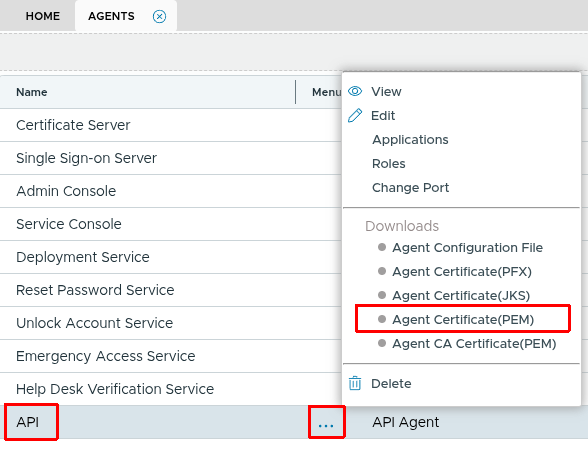
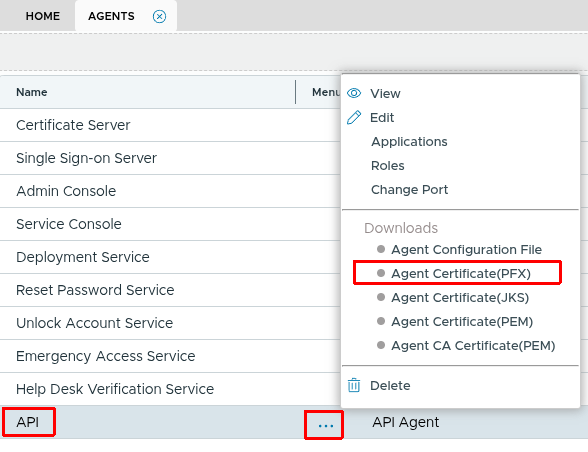
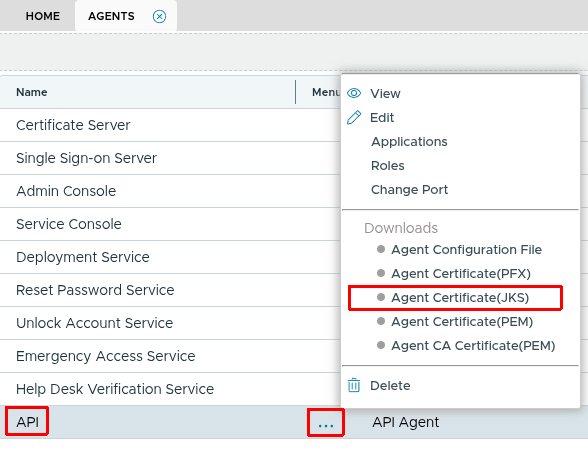
import com.fasterxml.jackson.databind.JsonNode;
import com.fasterxml.jackson.databind.ObjectMapper;
import com.fasterxml.jackson.databind.node.ObjectNode;

import javax.net.ssl.*;
import java.io.FileInputStream;
import java.net.URI;
import java.net.http.HttpClient;
import java.net.http.HttpRequest;
import java.net.http.HttpResponse;
import java.security.KeyStore;
import java.security.SecureRandom;
import java.security.cert.X509Certificate;

/**
 * Java example DualShield API client.
 *
 * Maven dependency:
 *   <dependency>
 *     <groupId>com.fasterxml.jackson.core</groupId>
 *     <artifactId>jackson-databind</artifactId>
 *     <version>2.17.0</version>
 *   </dependency>
 */
public class DualShieldClient {

    private static final String APP_CONTEXT = "/das5/rest/";

    private final String baseUrl;
    private final HttpClient httpClient;
    private final ObjectMapper mapper = new ObjectMapper();

    public DualShieldClient(String host, int port, String keystorePath, String keystorePassword)
            throws Exception {
        this.baseUrl = "https://" + host + ":" + port;

        KeyStore keyStore = KeyStore.getInstance("PKCS12");
        try (FileInputStream fis = new FileInputStream(keystorePath)) {
            keyStore.load(fis, keystorePassword.toCharArray());
        }

        KeyManagerFactory kmf = KeyManagerFactory.getInstance(KeyManagerFactory.getDefaultAlgorithm());
        kmf.init(keyStore, keystorePassword.toCharArray());

        // Accept self-signed server certs (adjust for production)
        TrustManager[] trustAll = new TrustManager[]{
            new X509TrustManager() {
                public X509Certificate[] getAcceptedIssuers() { return new X509Certificate[0]; }
                public void checkClientTrusted(X509Certificate[] c, String t) {}
                public void checkServerTrusted(X509Certificate[] c, String t) {}
            }
        };

        SSLContext sslContext = SSLContext.getInstance("TLS");
        sslContext.init(kmf.getKeyManagers(), trustAll, new SecureRandom());

        this.httpClient = HttpClient.newBuilder()
                .sslContext(sslContext)
                .build();
    }

    public JsonNode execute(String method, ObjectNode body) throws Exception {
        HttpRequest request = HttpRequest.newBuilder()
                .uri(URI.create(baseUrl + APP_CONTEXT + method))
                .header("Content-Type", "application/json")
                .POST(HttpRequest.BodyPublishers.ofString(mapper.writeValueAsString(body)))
                .build();

        HttpResponse<String> response = httpClient.send(request, HttpResponse.BodyHandlers.ofString());
        return mapper.readTree(response.body());
    }

    private ObjectNode userNode(String username, String domain) {
        ObjectNode user = mapper.createObjectNode();
        user.put("loginName", username);
        user.put("domain.name", domain);
        return user;
    }

    // -------------------------------------------------------------------------
    // API methods
    // -------------------------------------------------------------------------

    /** Verify connectivity to the DualShield server. */
    public JsonNode hello() throws Exception {
        return execute("auth/hello", mapper.createObjectNode());
    }

    /** Verify a static password (SPASS). */
    public JsonNode verifySpass(String username, String domain, String password) throws Exception {
        ObjectNode body = mapper.createObjectNode();
        body.set("user", userNode(username, domain));
        ObjectNode credential = mapper.createObjectNode();
        credential.put("method", "SPASS");
        credential.put("password", password);
        body.set("credential", credential);
        return execute("auth/verify", body);
    }

    /** Verify a one-time password (OTP, e.g. SafeID). */
    public JsonNode verifyOtp(String username, String domain, String otp) throws Exception {
        ObjectNode body = mapper.createObjectNode();
        body.set("user", userNode(username, domain));
        ObjectNode credential = mapper.createObjectNode();
        credential.put("method", "OTP");
        credential.put("password", otp);
        body.set("credential", credential);
        return execute("auth/verify", body);
    }

    /** Deliver an on-demand OTP via SMS. */
    public JsonNode sendOtp(String username, String domain) throws Exception {
        ObjectNode body = mapper.createObjectNode();
        body.set("user", userNode(username, domain));
        ObjectNode credential = mapper.createObjectNode();
        credential.put("method", "OTPoD");
        body.set("credential", credential);
        // set SMS as the delivery channel
        ObjectNode options = mapper.createObjectNode();
        options.put("channel", "SMS");
        body.set("options", options);
        return execute("auth/sendOTP", body);
    }

    /** Verify an on-demand OTP (OTPoD). */
    public JsonNode verifyOtpod(String username, String domain, String otp) throws Exception {
        ObjectNode body = mapper.createObjectNode();
        body.set("user", userNode(username, domain));
        ObjectNode credential = mapper.createObjectNode();
        credential.put("method", "OTPoD");
        credential.put("password", otp);
        body.set("credential", credential);
        return execute("auth/verify", body);
    }

    // -------------------------------------------------------------------------
    // Example usage
    // -------------------------------------------------------------------------

    public static void main(String[] args) throws Exception {
        String host       = "your-dualshield-server.example.com";
        int    port       = 8071;
        String keystore   = "/path/to/agent.p12";
        String password   = "changeit";
        String domain     = "YourDomain";
        String username   = "testuser";

        DualShieldClient client = new DualShieldClient(host, port, keystore, password);

        // 1. Hello
        System.out.println("hello:  " + client.hello().toPrettyString());

        // 2. Static password
        System.out.println("spass:  " + client.verifySpass(username, domain, "s3cr3t").toPrettyString());

        // 3. OTP (SafeID)
        System.out.println("otp:    " + client.verifyOtp(username, domain, "123456").toPrettyString());

        // 4. On-demand OTP – send first, then verify
        System.out.println("sendOTP: " + client.sendOtp(username, domain).toPrettyString());
        System.out.print("Enter the OTP you received: ");
        String otpod = new java.util.Scanner(System.in).nextLine();
        System.out.println("otpod:  " + client.verifyOtpod(username, domain, otpod).toPrettyString());
    }
}