When a user attempts to login to access a protected service using OOBA, the DualShield server will push a login request to the user via the mobile data network.
The Deepnet MobileID app on the user’s phone receives the login request and prompts user to accept or deny by simply pressing the button on the app's screen.
The OOBA Push Policy settings specify timing and authentication options in a section "OOBA-PUSH" of the Mobile ID Policy;
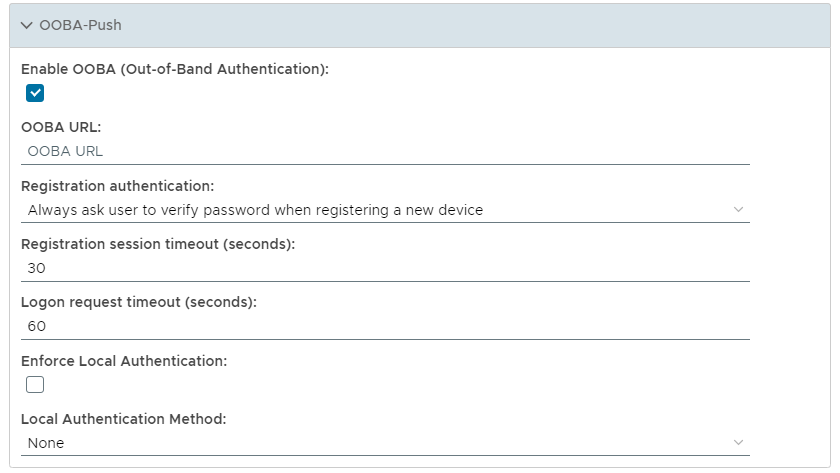

This option allows the system administrator to either force the user to verify their password when registering a new device, or only ask the user to verify if the link session timed out.
- Always ask user to verify password when registering a new device
When a user attempts to register a device for OOBA, password authentication is required. - Only ask user to verify if the link session timed out
When the registration link has timed out, password authentication is required.

This method will determine if a local authentication method is to be used when authenticating (local authentication is performed after receiving the push message).
- None
No additional Authentication is performed other than sending back a OOBA Push response. - PIN (OS)
Operating system based PIN is required before the OOBA Push message can be confirmed. - Fingerprint (OS)
Operating system based fingerprint authentication is required before the OOBA Push message can be confirmed (currently only apple fingerpirnt is supported). - Fingerprint (OS) Only
Operating system based fingerprint authentication is used when confirming OOBA Push messages (currently only apple fingerpirnt is supported) - PIN (APP)
The MobileID app based PIN is required before the OOBA Push message can confirmed.