...
| Section |
|---|
|
| Column |
|---|
Click Create to create the forth fourth attribute...
| Option | Value |
|---|
| Location: | HTTP Body | | Name: | uid | | Format: | unspecified | | Maps to: | userPrincipleName | | Return in Response: | Enabled |
|
| Column |
|---|
|
| Panel |
|---|
| borderColor | #9EBEE5 |
|---|
| bgColor | #f0f0f0 |
|---|
| borderWidth | 1px |
|---|
| 
|
|
|
...
| Section |
|---|
|
| Column |
|---|
Click Create to create the fourth fifth attribute...
| Option | Value |
|---|
| Location: | HTTP Body | | Name: | aid | | Format: | unspecified | | Fixed Value: * | xxxxxxxx-xxxx-xxxx-xxxx-xxxxxxxxxxxx | | Return in Response: | Enabled |
*Replace xxxxxxxx-xxxx-xxxx-xxxx-xxxxxxxxxxxx with the Company ID value from iManage Share. |
| Column |
|---|
|
| Panel |
|---|
| borderColor | #9EBEE5 |
|---|
| bgColor | #f0f0f0 |
|---|
| borderWidth | 1px |
|---|
| 
|
|
|
...
| Section |
|---|
|
| Section |
|---|
|
| Column |
|---|
|
| Panel |
|---|
| borderColor | #9EBEE5 |
|---|
| bgColor | #f0f0f0 |
|---|
| borderWidth | 1px |
|---|
| 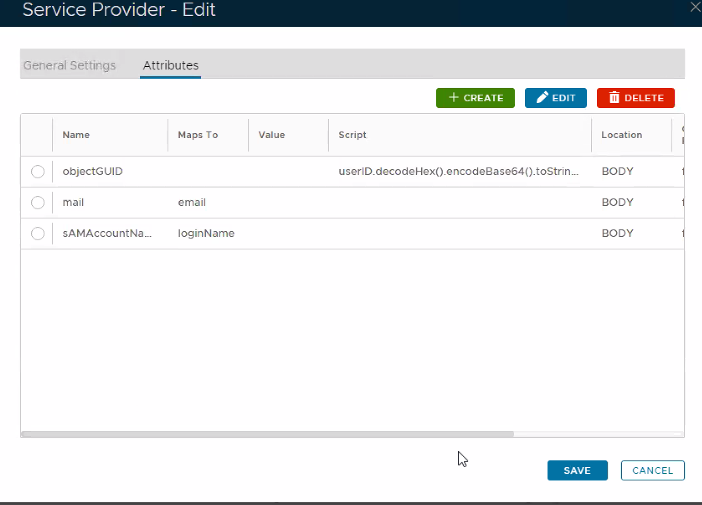 Image Removed Image Removed
|
|
|
|
Click Save and Save again.
 Image Added Image Added
|
|
|
|
Download the IDP Metadata file.
...
| Section |
|---|
|
| Column |
|---|
Select the drop-down menu corresponding to the SSO server you will be using and click on Download IDP MetadataCertificate. |
| Column |
|---|
|
| Panel |
|---|
| borderColor | #9EBEE5 |
|---|
| bgColor | #f0f0f0 |
|---|
| borderWidth | 1px |
|---|
| 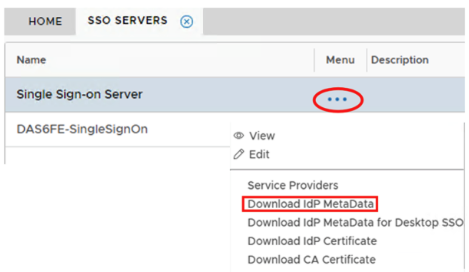 Image Removed Image Removed Image Added Image Added
|
|
|