Because the Server/workstation is not joined to the domain the type of logon will be 'local logon' Therefore we need to make sure the local logons will be protected even if the machine is moved into a separate location and no longer connected to the network(offline logon).
| Section |
|---|
|
| Column |
|---|
On the Administration Console go to Shortcuts>Check Policies |
| Column |
|---|
|
| Panel |
|---|
| borderColor | #9EBEE5 |
|---|
| bgColor | #f0f0f0 |
|---|
| borderWidth | 1px |
|---|
| 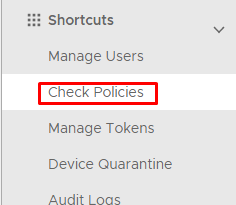 Image Added Image Added
|
|
|
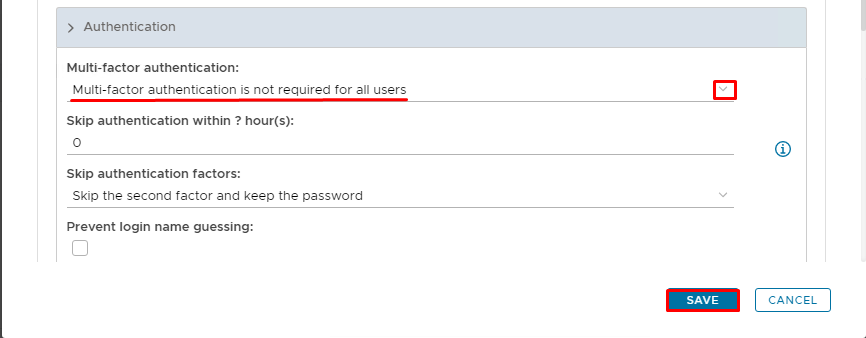
First, create a domain-held policy Logon Policy to ensure MFA is required for all users on the StandAlone machine
...
| Section |
|---|
|
| Column |
|---|
Expand Authentication and select MFA is not required for all users from the drop down, |
| Column |
|---|
|
| Panel |
|---|
| borderColor | #9EBEE5 |
|---|
| bgColor | #f0f0f0 |
|---|
| borderWidth | 1px |
|---|
| 
|
|
|
Save the new Logon policy.
Now create the offline policies that will be needed once you remove the machine from the network.
| Section |
|---|
|
| Column |
|---|
Click on  Image Added on the top right. Image Added on the top right. Set these Values in the Policy - New Window | Option | Value |
|---|
| Category: | | | Holder: | | | Domain: | Enter the virtual domain name | | Name: | Enter a user-friendly name | | Enabled: | True |
|
| Column |
|---|
|
| Panel |
|---|
| borderColor | #9EBEE5 |
|---|
| bgColor | #f0f0f0 |
|---|
| borderWidth | 1px |
|---|
| 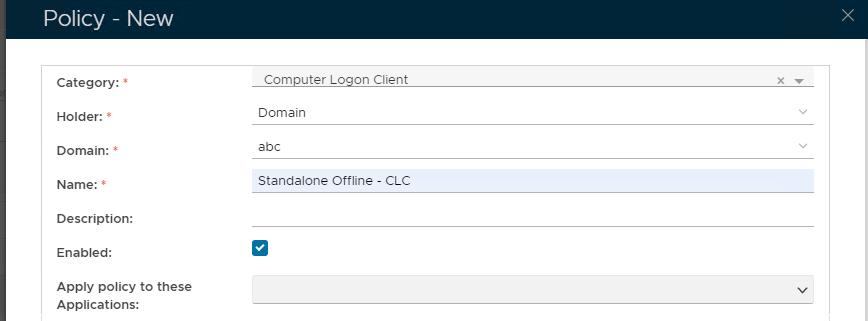 Image Added Image Added
|
|
|
| Section |
|---|
|
| Column |
|---|
Expand General and check Enable MFA on local computer logon |
| Column |
|---|
|
| Panel |
|---|
| borderColor | #9EBEE5 |
|---|
| bgColor | #f0f0f0 |
|---|
| borderWidth | 1px |
|---|
| 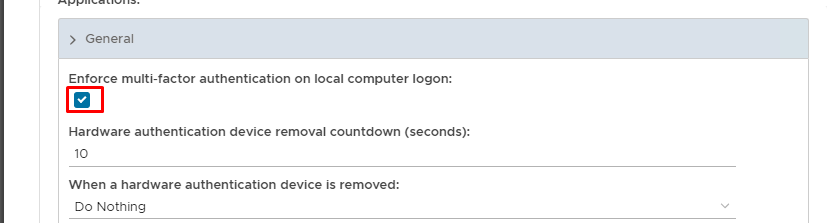 Image Added Image Added
|
|
|
| Section |
|---|
|
| Column |
|---|
Scroll down the policy and expand Offline Logon Check Enforce MFA on Local Computer Logon and Download Offline Tokens AutomaticallyOn the Administration Console go to Shortcuts>Check Policies |
| Column |
|---|
|
| Panel |
|---|
| borderColor | #9EBEE5 |
|---|
| bgColor | #f0f0f0 |
|---|
| borderWidth | 1px |
|---|
| Image Removed | 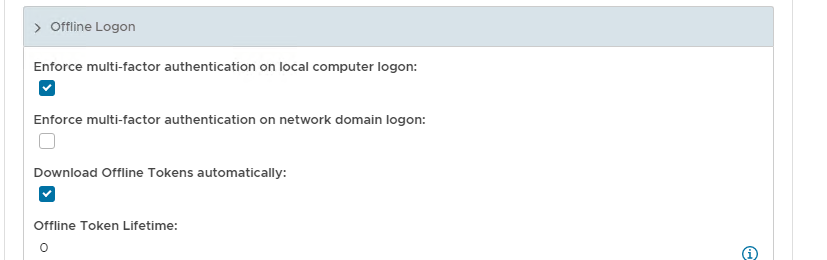 Image Added Image Added
|
|
|
Save the new Computer Logon Client policy
Create an additional Computer Client Logon Policy which will exempt the Administrator account from MFA logon.
| Section |
|---|
|
| Column |
|---|
Click on on the top right. Set these Values in the Policy - New Window | Option | Value |
|---|
| Category: | | | Holder: | | | Domain: | Enter the virtual domain name | | User: | Enter the name of the account you wish to exempt (e.g Administrator) | | Name: | Enter a user-friendly name | | Enabled: | True |
|
| Column |
|---|
|
| Panel |
|---|
| borderColor | #9EBEE5 |
|---|
| bgColor | #f0f0f0 |
|---|
| borderWidth | 1px |
|---|
| Image Removed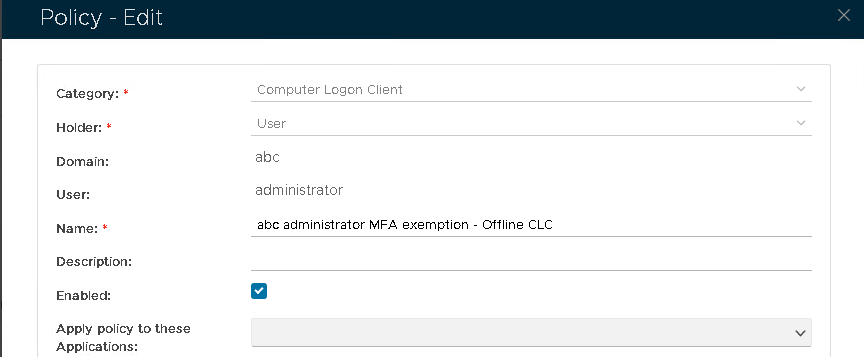 Image Added Image Added |
|
|
| Section |
|---|
|
| Column |
|---|
Expand General and check Enable MFA on local computer logon. Leave all checkboxes blank. |
| Column |
|---|
|
| Panel |
|---|
| borderColor | #9EBEE5 |
|---|
| bgColor | #f0f0f0 |
|---|
| borderWidth | 1px |
|---|
| Image Removed Image Added Image Added |
|
|
| Section |
|---|
|
| Column |
|---|
Scroll down the policy and expand Offline LogonCheck Enforce MFA on Local Computer Logon and Download Offline Tokens Automatically Leave all checkboxes blank. |
| Column |
|---|
|
| Panel |
|---|
| borderColor | #9EBEE5 |
|---|
| bgColor | #f0f0f0 |
|---|
| borderWidth | 1px |
|---|
| Image Removed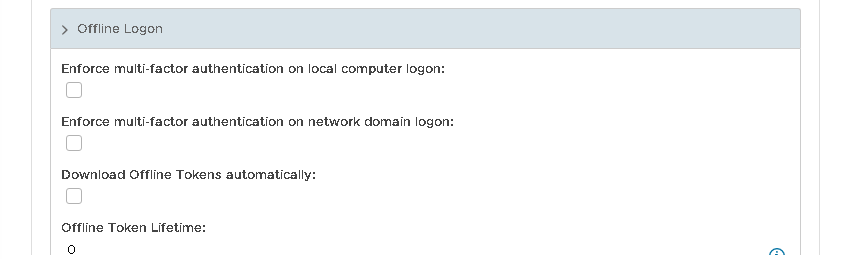 Image Added Image Added |
|
|
Save the new Computer Logon Client policy
...
Save the new Windows Offline policy
Create an additional Windows Offline Policy which will exempt the Administrator account from MFA logon.
| Section |
|---|
|
| Column |
|---|
Click on Image Added on the top right. Set these Values in the Policy - New Window | Option | Value |
|---|
| Category: | | | Holder: | | | Domain: | Enter the virtual domain name | | User: | Enter the name of the account you wish to exempt (e.g Administrator) | | Name: | Enter a user-friendly name | | Enabled: | True |
Leave all the enforce MFA checkboxes blank. |
| Column |
|---|
|
| Panel |
|---|
| borderColor | #9EBEE5 |
|---|
| bgColor | #f0f0f0 |
|---|
| borderWidth | 1px |
|---|
|  Image Added Image Added
|
|
|