...
| Expand | ||
|---|---|---|
| ||
The general way for an administrator to configure is to add or remove cipher suites in the registry editor. The path to do this is "HKEY_LOCAL_MACHINE\SOFTWARE\Deepnet Security\DUAP\WIN" and configure ciphers for the multi-string REG_SZ values "TLS12Ciphers and TLS13Ciphers".
Supported Ci[phers are as follows: Code Block | The supported OpenSSL ciphers can be seen in https://docs.openssl.org/1.1.1/man1/ciphers/#tls-v12-cipher-suites Seperate the Ciphers with a colon ":". Windows Logon Agent Version 6.9.0125 build 1112 upwards already includes stong ciphers such as TLS_AES_256_GCM_SHA384:TLS_AES_128_GCM_SHA256:TLS_CHACHA20_POLY1305_SHA256, howver if additional ciphers are required, these can be created in the registry, as per example above. 256 bits AES256-GCM-SHA384 Accepted TLSv1.2 128 bits AES128-GCM-SHA256 |
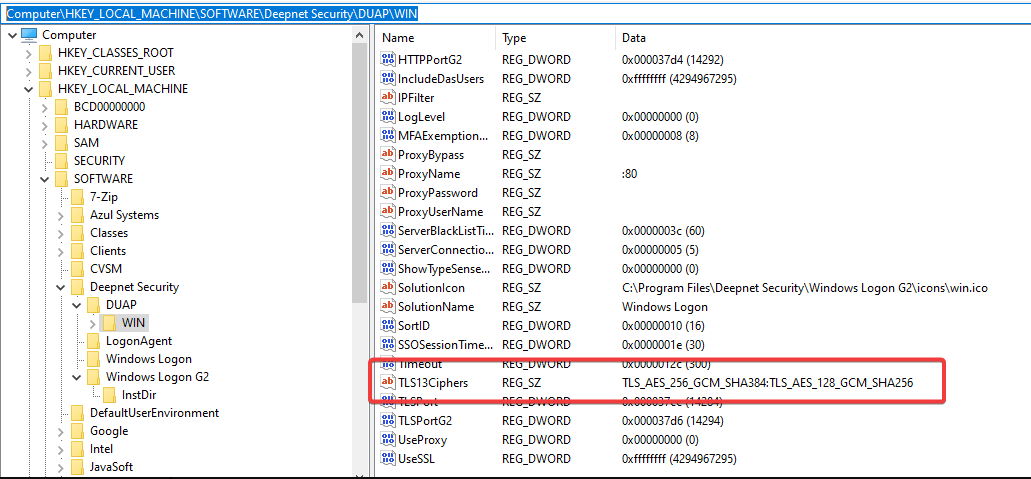
After changing the settings, the agent service needs to be restarted.
...