During a device's lifetime, for extra security, you can set the policy so that the token will need to be periodically reactivated by the user.
There are 3 options related to device renewal.
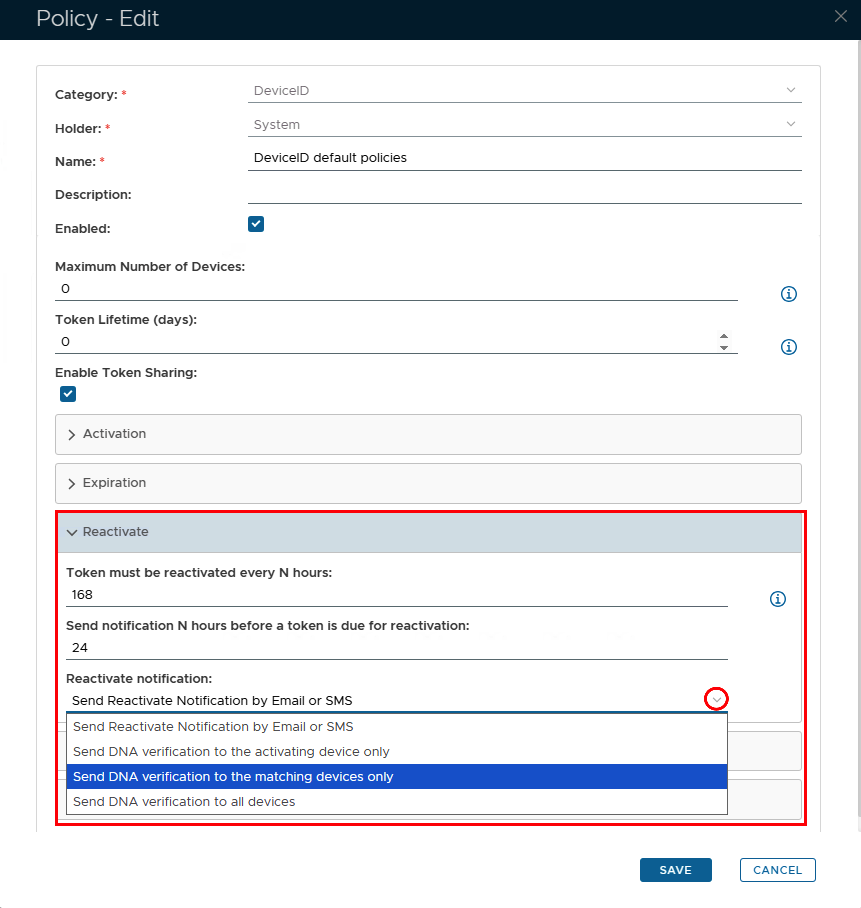
Set Reactivate in the DeviceID Policy
| Section |
|---|
|
| Column |
|---|
| 
|
| Column |
|---|
| Option | Value | Explanation |
|---|
| Token must be reactivated every N hours: | Any number | This option specifies the time period (in hours) that a token should be reactivated (0 = reactivation is not required) | | Send notification N hours before a token is due for reactivation | A number lower than the value above | The end user will receive a notification at the number of hours specified, before the DeviceID token is due to expire | | Reactivation notification | Select an option via the dropdown arrow | The methods of how the DeviceID reactivation notification will be delivered to the user |
|
|
Set up Token Reactivate Notification Service
If you have enabled the token reactivation option in the DeviceID policy, then you must also set up the task called "Token Reactivate Notification Service"
| Expand |
|---|
| title | Set up Token Reactivate Notification Service |
|---|
|
| Include Page |
|---|
| Token Reactivate Notification Service |
|---|
| Token Reactivate Notification Service |
|---|
|
|