...
For RPM based Linux, e.g. CentOS, RedHat
| Expand |
|---|
1.1 install perl module | Code Block |
|---|
| yumsudo dnf install -y perl-Module-Install.noarch |
1.2 install libaio | Code Block |
|---|
| yum install -y libaio |
1.3 install fonts | Code Block |
|---|
| yum install fontconfig dejavu-sans-fonts dejavu-serif-fonts libxcrypt-compat |
|
For Debian based Linux, e.g. Ubuntu:
| Expand |
|---|
1.1 install libaio |
|---|
| Code Block |
|---|
| sudo apt-get update
sudo apt-get install libaio1 fontconfig fonts-dejavu |
|
2. Add FQDN of your DualShield server into the local hosts file:
Replace "dualshield.acme.org" with the actual FQDN of your DualShield server.
For Ubuntu 24.04
| Expand |
|---|
| Code Block |
|---|
|
| language | bash |
|---|
| | echo "127.0.0.1 dualshield.acme.org" >> /etc/hosts |
or,
| Code Block |
|---|
|
echo "127.0.0.1 dualshield.acme.org" | sudo tee -a /etc/hosts |
sudo apt-get update
curl -O http://launchpadlibrarian.net/646633572/libaio1_0.3.113-4_amd64.deb
sudo dpkg -i libaio1_0.3.113-4_amd64.deb
sudo apt-get install libaio1 fontconfig fonts-dejavu |
|
2. Add FQDN of your DualShield server into the local hosts file:
Replace "dualshield.acme.org" with the actual FQDN of your DualShield server.3. Execute the commands below to change and make the file executable
| Code Block |
|---|
|
chmod a+x ./setupdualshield-xxxx--yyyy.bin |
in which xxx is the version number and yyyy is the build number.
4. Finally, execute the commands below to start the installation process
...
echo "127.0.0.1 dualshield.acme.org" | sudo tee -a /etc/hosts |
3. Copy the link address for the latest version of DualShield server from our support page... https://support.deepnetsecurity.com/visit.asp?pg=download/dualshield/auth-server
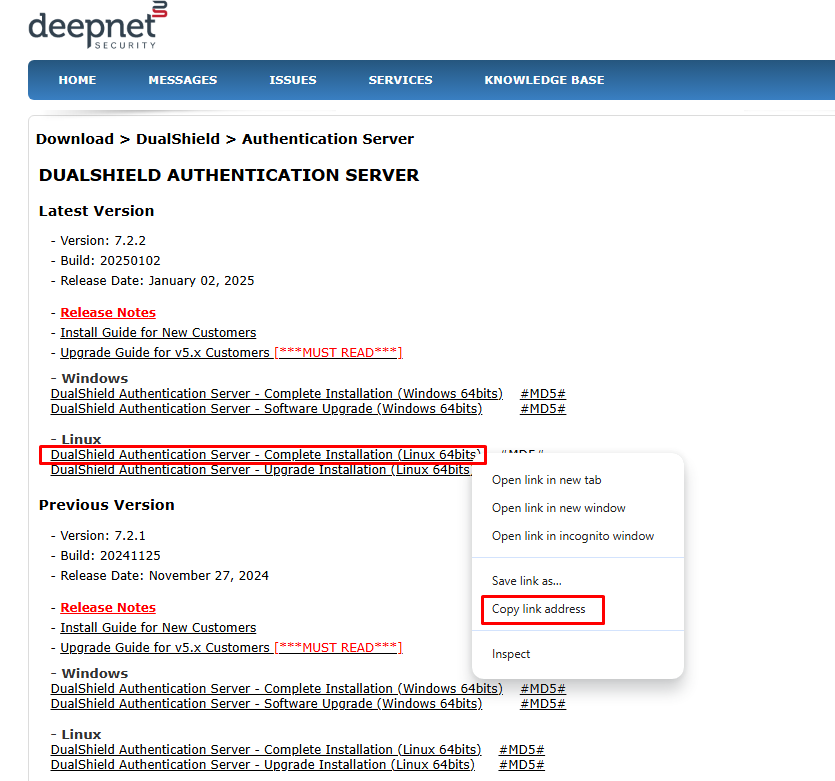 Image Added
4. Paste the link into the wget command for example.
| Code Block |
|---|
|
wget https://download.deepnetsecurity.com/dualshield6/Auth-Server/setupdualshield64-7.2.2.20250102.bin |
5. Execute the command below to change and make the file executable
...
| Code Block |
|---|
|
Verifyingchmod archivea+x integrity./setupdualshield-XXXX.YYYY.bin |
in which XXX is the version number and YYYY is the build number.
6. Finally, execute the command below to start the installation process
| Code Block |
|---|
|
sudo ./setupdualshield-XXXX.YYYY.bin -- -console |
| Code Block |
|---|
|
Verifying archive integrity... All good.
Uncompressing DualShield Installer......
64 bit OS detected
Command line arguments: -console
InstallerListener is being executed!
Select your language
0 . All good.
Uncompressing DualShield Installer......
64 bit OS detected
Command line arguments: -console
Select your language
0 [x] eng
1  [ ] deu
2  [ ] fra
3  [ ] spa
4 [ ] chn
Input selection:
0 |
| Code Block |
|---|
| language | bash |
|---|
| theme | DJango |
|---|
| title | Welcome Page |
|---|
|
────────────────────────────────────────────────────────────────────────────────────────────────────────────
Welcome
────────────────────────────────────────────────────────────────────────────────────────────────────────────

Welcome to the installation of Deepnet DualShield 6.x!
This software is developed by:
- Deepnet Security Ltd. <support@deepnetsecurity.com>
The homepage is at: http://www.deepnetsecurity.com/

Press 1 to continue, 2 to quit, 3 to redisplay |
...
| Code Block |
|---|
|
────────────────────────────────────────────────────────────────────────────────────────────────────────────
Target Path
────────────────────────────────────────────────────────────────────────────────────────────────────────────
Select the installation path: [/opt/dualshield]

------------------------------------------------------
Message

The target directory will be created:
/opt/dualshield
------------------------------------------------------
Enter O for OK, C to Cancel:
O

Press 1 to continue, 2 to quit, 3 to redisplay |
7. If you only intend to setup and all in one system, that includes all the backend plus front end components choose Y
| Code Block |
|---|
|
---
All
---
Enter Y for Yes, N for No:
Y

Backend Not Selected
Frontend Not Selected
Done!

Press 1 to continue, 2 to quit, 3 to redisplay |
...
| Code Block |
|---|
|
────────────────────────────────────────────────────────────────────────────────────────────────────────────
Select Installation Packages
────────────────────────────────────────────────────────────────────────────────────────────────────────────

Select the packs you want to install:

-----------------------------------------------
  [x] Pack 'DualShield Authentication Server' required
  [x] IncludePack optional'Admin pack 'Legacy SSO Server'
-----------------------------------------------
Enter Y for Yes, N for No:
Y

------------------------------------------------------
[x] Include optional pack 'Legacy Management Server'
------------------------------------------------------
Enter Y for Yes, N for No:
Y

--------------------------------------------------------
[x] Include optional pack 'Legacy Self-Service Server'
--------------------------------------------------------
Enter Y for Yes, N for No:
Y

Console' required
  [x] Pack 'SSO Server' required
  [x] Pack 'Service Console' required
  [x] Pack 'Deployment Service' required
  [x] Pack 'Emergency Access Service' required
  [x] Pack 'Reset Password Service' required
  [x] Pack 'Help Desk Verification Service' required
  [x] Pack 'Unlock Account Service' required
  [x] Pack 'Certificate Server' required
Done!
 === Selected Packs: ===
  [x] Pack 'DualShieldDeepnet Authentication Server'
  required
[x] Pack 'Deepnet Admin Console'
  required
[x] Pack 'SSODeepnet Single Sign-on Server'
  required
[x] Pack 'Deepnet Service Console'
 required
 [x] Pack 'Deepnet Deployment Service'
 required
 [x] Pack 'Deepnet Emergency Access Service'
  required
[x] Pack 'Deepnet Reset Password Service'
  [x] Pack ' required
Help Desk Verification Service'
  [x] Pack 'Deepnet Unlock Account Service' required
Done!

=== Selected Packs: ===
[x] Pack 'Deepnet Legacy Single Sign-on Certificate Server'
  [x] Pack 'DeepnetJDBC LegacyDrivers'
 Management Server'
[x] Pack 'MySQL'Deepnet
 Legacy Self[x] ServicePack Server'Common'
  [x] Pack 'Documents'Deepnet
 Authentication Server'
[x] Pack 'Deepnet Admin Console'
[x] Pack 'Deepnet Single Sign-on Server'
[x] Pack 'Deepnet Service Console'
[x] Pack 'Deepnet Deployment Service'
[x] Pack 'Deepnet Emergency Access Service'
[x] Pack 'Deepnet Reset Password Service'
[x] Pack 'Deepnet Unlock Account Service'
[x] Pack 'JDBC Drivers'
[x] Pack 'MySQL'
[x] Pack 'Common'
[x] Pack 'Documents'
[x] Pack 'Utility'
You can choose Redisplay to modify the list.'Utility'
 You can choose Redisplay to modify the list.

Press 1 to continue, 2 to quit, 3 to redisplay |
8. You can decide here if you would like to use the dedicated ports from 8070 to 8076 or specify a custom port such as 443
| Code Block |
|---|
|
────────────────────────────────────────────────────────────────────────────────────────────────────────────────────────────────────────────────────────────────────────────────────────────────────────────────────────────────────────────────
User Data
────────────────────────────────────────────────────────────────────────────────────────────────────────────────────────────────────────────────────────────────────────────────────────────────────────────────────────────────────────────────

Configure ports for DualShield components

Port Options:
0  [x] Each portal has a dedicated port starting from 8070
1  [ ] Use same port for all portals
Input selection:
1
Port Number: [443]


Press 1 to continue, 2 to quit, 3 to redisplay |
9. In the next step, make sure that you enter the correct FQDN of your DualShield server. This should be the same FQDN that you have added to the local hosts file in a previous step
| Code Block |
|---|
|
Server FQDN:[dualshield.your-corporate-domain.com]?:
dualshield.acme.org

Use SSL to access DualShield[Y/n]?
Y
Create a self-signed certificate[Y/n]?
Y
DSSLConsolePanel
useCommonPortValue: false
commonPortValue: 443
useCommonPort: false
commonPort: 443

Press 1 to continue, 2 to quit, 3 to redisplay |
...
| Code Block |
|---|
|
────────────────────────────────────────────────────────────────────────────────────────────────────────────
User Data
────────────────────────────────────────────────────────────────────────────────────────────────────────────

Tuning JVM switches for performance

JvmMx(MB): [20003072]

JvmMs(MB): [512]


Press 1 to continue, 2 to quit, 3 to redisplay |
...
| Expand |
|---|
| title | For connection to another type of database, such as MS SQL... |
|---|
|
(Use your own server address/server port/login credentials) | Code Block |
|---|
| Install a copy of MySQL server[Y/n]?
n
Database Type: [mysql]/mssql/oracle/db2:
mssql
Server Address:[localhost]?:
192.168.103.114
Server Port: [1433]?:
1433
User Name: [root]?:
WIN-MPHS2LI8PVK\Administrator
Password: [changeit]?:
***********
Encrypt it[Y/n]?
Y
Database Name: [dualshield]?:
create a new database with the above name[Y/n]?
Y
Data Encryption Strength (128/[256]/512)?:
256
Press 1 to continue, 2 to quit, 3 to redisplay
1 |
|
...