...
Step 1: Program your tokens with a random secretsrandom secrets
SafeID programmable tokens, such as SafeID/Pro, SafeID/Diamond are actually pre-programmed by the vendor. You can use them as pre-programmed tokens and skip to Step 2. Otherwise, if you want to reprogram them, then take this step.
| Expand | ||||||
|---|---|---|---|---|---|---|
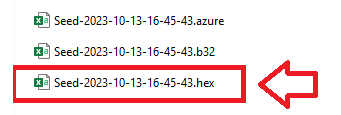
Once you have programmed the tokens open subfolder where the seed data files are stored, then open the seed file with the ".hex" extension with a text editor (such as notepad);
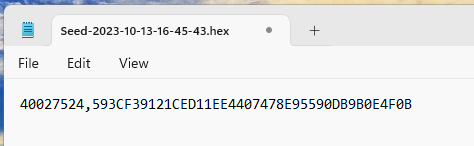
Please Note: the seed files are only populated upon termination of the programming app so please exit the app prior to editing the files The seed file should now look like the following;
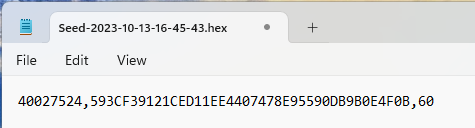
By default the programming tool does not add a time setting into the seed file, but if this is not specified then Duo will assume 30 second windows. If you chose to program the tokens with 60 second time windows then please append each line with a ",60" (see example below);
You are now ready to save and upload this seed file to Duo |
Step 2: Once you have programmed your tokentokens, then you can upload the tokens in the same way you upload as uploading pre-programmed tokens
| Expand | ||||||
|---|---|---|---|---|---|---|
|