| Include Page |
|---|
| Access Control by Time |
|---|
| Access Control by Time |
|---|
|
The Access Control policy defines the days and hours in which a user will be allowed (or denied) access to a specified application.
The policy can be found by navigating to "Administration | Policies", then scrolling down to the policy "Access Control - system policies";
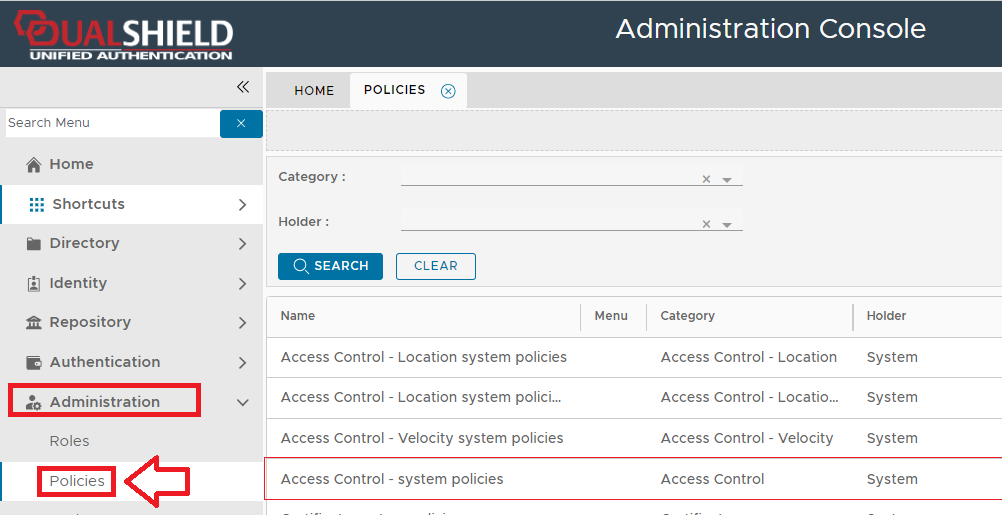 Image Removed
The static password policy settings can be edited by using the context menu option "Edit";
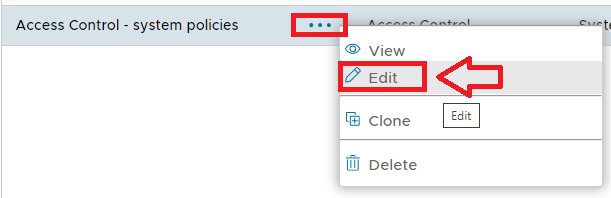 Image Removed
A new window will now open titled "Policy - Edit" that can be used to view and edit the policy settings for this policy;
...
| Column |
|---|
|
 Image Removed Image Removed
|
...
...
| Panel |
|---|
| borderColor | grey |
|---|
| bgColor | #F8F8F8 |
|---|
| borderStyle | dashed |
|---|
|
The category for this policy is "Access Control" (this property cannot be edited). |
...
| Panel |
|---|
| borderColor | grey |
|---|
| bgColor | #F8F8F8 |
|---|
| borderStyle | dashed |
|---|
|
The holder of this policy is "System" (this property cannot be edited). |
...
| Panel |
|---|
| borderColor | grey |
|---|
| bgColor | #F8F8F8 |
|---|
| borderStyle | dashed |
|---|
|
The name assigned to identify the Access Control system policy by the System Administrator. |
...
| Panel |
|---|
| borderColor | grey |
|---|
| bgColor | #F8F8F8 |
|---|
| borderStyle | dashed |
|---|
|
The System Administrator may use this field to annotate this policy.
|
...
| Panel |
|---|
| borderColor | grey |
|---|
| bgColor | #F8F8F8 |
|---|
| borderStyle | dashed |
|---|
|
This option allows the System Administrator to enable or disable this policy. |
...
| Panel |
|---|
| borderColor | grey |
|---|
| bgColor | #F8F8F8 |
|---|
| borderStyle | dashed |
|---|
|
 Image Removed Image Removed
This option allows the system administrator to determine if access is allow or denied. |
...
| Panel |
|---|
| borderColor | grey |
|---|
| bgColor | #F8F8F8 |
|---|
| borderStyle | dashed |
|---|
|
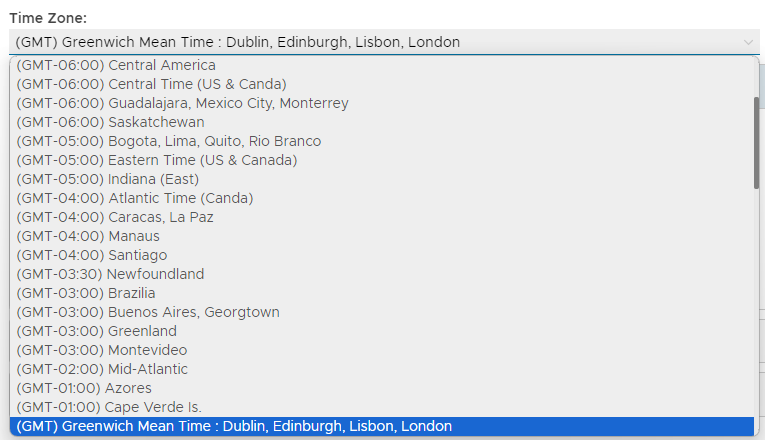 Image Removed Image Removed
This option allows allows the system administrator to select the time zone for access control. |
The expandable sections provide time details for up to three separate time windows as follows;
TIME PERIOD 1
...
| Column |
|---|
|
 Image Removed Image Removed
|
...
...
| Panel |
|---|
| borderColor | grey |
|---|
| bgColor | #F8F8F8 |
|---|
| borderStyle | dashed |
|---|
|
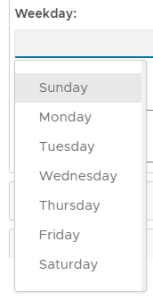 Image Removed Image Removed
This option allows you to specify which days access is to be granted (or denied). |
...
| Panel |
|---|
| borderColor | grey |
|---|
| bgColor | #F8F8F8 |
|---|
| borderStyle | dashed |
|---|
|
This option allows you to specify a time from for time period 1.
|
...
| Panel |
|---|
| borderColor | grey |
|---|
| bgColor | #F8F8F8 |
|---|
| borderStyle | dashed |
|---|
|
This option allows you to specify a time to for time period 1. |
TIME PERIOD 2
...
| Column |
|---|
|
Image Removed |
...
...
| Panel |
|---|
| borderColor | grey |
|---|
| bgColor | #F8F8F8 |
|---|
| borderStyle | dashed |
|---|
|
Image Removed This option allows you to specify which days access is to be granted (or denied). |
...
| Panel |
|---|
| borderColor | grey |
|---|
| bgColor | #F8F8F8 |
|---|
| borderStyle | dashed |
|---|
|
This option allows you to specify a time from for time period 2.
|
...
| Panel |
|---|
| borderColor | grey |
|---|
| bgColor | #F8F8F8 |
|---|
| borderStyle | dashed |
|---|
|
This option allows you to specify a time to for time period 2. |
TIME PERIOD 3
...
| Column |
|---|
|
Image Removed |
...
...
| Panel |
|---|
| borderColor | grey |
|---|
| bgColor | #F8F8F8 |
|---|
| borderStyle | dashed |
|---|
|
Image Removed This option allows you to specify which days access is to be granted (or denied). |
...
| Panel |
|---|
| borderColor | grey |
|---|
| bgColor | #F8F8F8 |
|---|
| borderStyle | dashed |
|---|
|
This option allows you to specify a time from for time period 3.
|
...
...
| borderColor | grey |
|---|
| bgColor | #F8F8F8 |
|---|
| borderStyle | dashed |
|---|
...