To install DualShield from a Linux console, follow the steps below:
1. Install dependencies
In some editions of Linux OS, you might need to install the following dependencies first.
For RPM based Linux, e.g. CentOS, RedHat
...
| Expand |
|---|
| yum -y perl-Module-Install.noarch |
|
1.2 install libaio
...
...
libaio fontconfig dejavu-sans-fonts dejavu-serif-fonts libxcrypt-compat |
|
For Debian based Linux, e.g. Ubuntu:
...
...
...
| sudo apt-get update
sudo apt-get install libaio1 |
|
...
For Ubuntu 24.04
| Expand |
|---|
| Code Block |
|---|
| sudo apt-get update
curl -O http://launchpadlibrarian.net/646633572/libaio1_0.3.113-4_amd64.deb
sudo dpkg -i libaio1_0.3.113-4_amd64.deb
sudo apt-get install libaio1 fontconfig fonts-dejavu |
|
2. Add FQDN of your DualShield server into the local hosts file:
Replace "dualshield.acme.org" with the actual FQDN of your DualShield server.
2. Add FQDN of your DualShield server into the local hosts file:
Replace "dualshield.acme.org" with the actual FQDN of your DualShield server.
| Code Block |
|---|
|
echo "127.0.0.1 dualshield.acme.org" >> /etc/hosts |
or,
| Code Block |
|---|
|
echo "127.0.0.1 dualshield.acme.org" | sudo tee -a /etc/hosts |
3. Execute the commands below:
| Code Block |
|---|
|
chmod a+x ./setupdualshield-xxxx--yyyy.bin
./setupdualshield-xxxx--yyyy.bin -- -console |
in which xxx is the version number and yyyy is the build number.
|
echo "127.0.0.1 dualshield.acme.org" | sudo tee -a /etc/hosts |
3. Copy the link address for the latest version of DualShield server from our support page... https://support.deepnetsecurity.com/visit.asp?pg=download/dualshield/auth-server
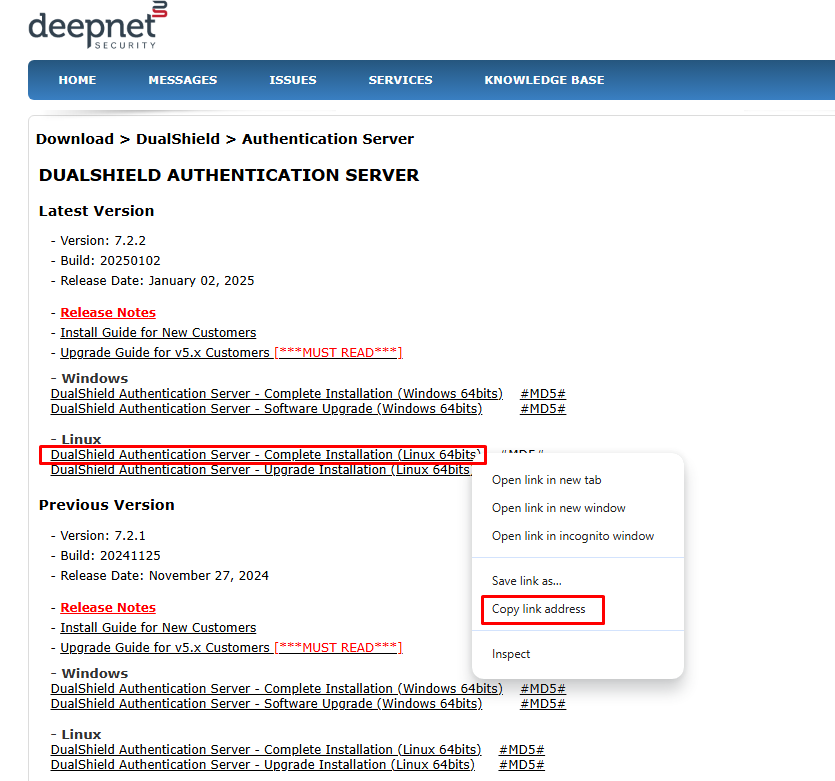 Image Added
4. Paste the link into the wget command for example.
| Code Block |
|---|
|
wget https://download.deepnetsecurity.com/dualshield6/Auth-Server/setupdualshield64-7.2.2.20250102.bin |
5. Execute the command below to change and make the file executable
| Code Block |
|---|
|
chmod a+x ./setupdualshield-XXXX.YYYY.bin |
in which XXX is the version number and YYYY is the build number.
6. Finally, execute the command below to start the installation process
| Code Block |
|---|
|
sudo ./setupdualshield-XXXX.YYYY.bin -- -console |
| Code Block |
|---|
|
Verifying archive integrity... All good.
Uncompressing DualShield Installer......
64 bit OS detected
Command |
| Code Block |
|---|
|
Verifying archive integrity... All good.
Uncompressing DualShield Installer......
64 bit OS detected
Command line arguments: -console
InstallerListener is being executed!
Select your language
0  [x] eng
1  [ ] deu
2  [ ] fra
3  [ ] spa
4 [ ] chn
Input selection:Input selection:
0 |
| Code Block |
|---|
| language | bash |
|---|
| theme | DJango |
|---|
| title | Welcome Page |
|---|
|
────────────────────────────────────────────────────────────────────────────────────────────────────────────
Welcome
────────────────────────────────────────────────────────────────────────────────────────────────────────────

Welcome to the installation of Deepnet DualShield 6.x!
This software is developed by:
- Deepnet Security Ltd. <support@deepnetsecurity.com>
The homepage is at: http://www.deepnetsecurity.com/

Press 1 to continue, 2 to quit, 3 to redisplay |
| Code Block |
|---|
| language | bash |
|---|
| theme | DJango |
|---|
| title | Agreement Page |
|---|
|
8.Term & Termination:

This agreement is effective until terminated. This
agreement and the user's right to use the product
automatically terminates if the user fails to
comply with any material provision of this
agreement. Upon termination the user must all use
of the product and remove all copies of the
product from the user's computers and storage
equipment. In no circumstances does any such
termination result in a refund of the licenses fee
the user paid for the product.


Press 1 to accept, 2 to reject, 3 to redisplay |
| Code Block |
|---|
|
────────────────────────────────────────────────────────────────────────────────────────────────────────────
Target Path
────────────────────────────────────────────────────────────────────────────────────────────────────────────
Select the installation path: [/opt/dualshield]

------------------------------------------------------
Message

The target directory will be created:
/opt/dualshield
------------------------------------------------------
Enter O for OK, C to Cancel:

O

Press 1 to continue, 2 to quit, 3 to redisplay |
7. If you only intend to setup and all in one system, that includes all the backend plus front end components choose Y
| Code Block |
|---|
|
---
All
---
Enter Y for Yes, N for No:
Y

Backend Not Selected
Frontend Not Selected
Done!

Press 1 to continue, 2 to quit, 3 to redisplay |
| Code Block |
|---|
|
────────────────────────────────────────────────────────────────────────────────────────────────────────────
Select Installation Packages
────────────────────────────────────────────────────────────────────────────────────────────────────────────

Select the packsthe packs you want to install:

-----------------------------------------------
  [x] Include optional pack 'Legacy Pack 'DualShield Authentication Server' required
  [x] Pack 'Admin Console' required
  [x] Pack 'SSO Server'
-----------------------------------------------
Enter Y for Yes, N for No:

Y
------------------------------------------------------
[x] Include optional pack 'Legacy Management Server'
------------------------------------------------------
Enter Y for Yes, N for No:
Y
--------------------------------------------------------
[x] Include optional pack 'Legacy Self-Service Server'
--------------------------------------------------------
Enter Y for Yes, N for No:

Y
[x] Pack 'DualShield Authentication Server' required
[x] Pack 'Admin Console' required
[x] Pack 'SSO Server' required
[x] Pack 'Service Console' required
[x] Pack 'Deployment Service' required
[x] Pack 'Emergency Access Service' required
[x] Pack 'Reset Password Service' required
[x] Pack 'Unlock Account Service' required
Done!
=== Selected Packs: ===
[x] Pack 'Deepnet Legacy Single Sign-on Server'
[x] Pack 'Deepnet Legacy Management Server'
[x] Pack 'Deepnet Legacy Self Service Server'
[x] Pack 'Deepnet Authentication Server'
[x] Pack 'Deepnet Admin Console'
[x] Pack 'Deepnet Single Sign-on Server'
[x] Pack 'Deepnet Service Console'
[x] Pack 'Deepnet Deployment Service'
[x] Pack 'Deepnet Emergency Access Service'
[x] Pack 'Deepnet Reset Password Service'
[x] Pack 'Deepnet Unlock Account Service'
[x] Pack 'JDBC Drivers'
[x] Pack 'MySQL'
[x] Pack 'Common'
[x] Pack 'Documents'
[x] Pack 'Utility'
You can choose Redisplay to modify the list. required
  [x] Pack 'Service Console' required
  [x] Pack 'Deployment Service' required
  [x] Pack 'Emergency Access Service' required
  [x] Pack 'Reset Password Service' required
  [x] Pack 'Help Desk Verification Service' required
  [x] Pack 'Unlock Account Service' required
  [x] Pack 'Certificate Server' required
Done!
 === Selected Packs: ===
  [x] Pack 'Deepnet Authentication Server'
  [x] Pack 'Deepnet Admin Console'
  [x] Pack 'Deepnet Single Sign-on Server'
  [x] Pack 'Deepnet Service Console'
  [x] Pack 'Deepnet Deployment Service'
  [x] Pack 'Deepnet Emergency Access Service'
  [x] Pack 'Deepnet Reset Password Service'
  [x] Pack 'Help Desk Verification Service'
  [x] Pack 'Deepnet Unlock Account Service'
  [x] Pack 'Deepnet Certificate Server'
  [x] Pack 'JDBC Drivers'
  [x] Pack 'MySQL'
  [x] Pack 'Common'
  [x] Pack 'Documents'
  [x] Pack 'Utility'
 You can choose Redisplay to modify the list.

Press 1 to continue, 2 to quit, 3 to redisplay |
8. You can decide here if you would like to use the dedicated ports from 8070 to 8076 or specify a custom port such as 443
| Code Block |
|---|
|
────────────────────────────────────────────────────────────────────────────────────────────────────────────────────────────────────────────────────────────────────────────────────────────────────────────────────────────────────────────────
User Data
────────────────────────────────────────────────────────────────────────────────────────────────────────────────────────────────────────────────────────────────────────────────────────────────────────────────────────────────────────────────

Configure ports for DualShield components

Port Options:
0  [x] Each portal has a dedicated port starting from 8070
1  [ ] Use same port for all portals
Input selection:
1
Port Number: [443]


Press 1 to continue, 2 to quit, 3 to redisplay |
9. In the next step, make sure that you enter the correct FQDN of your DualShield server. This should be the same FQDN that you have added to the local hosts file in a previous step
| Code Block |
|---|
|
Server FQDN:[dualshield.your-corporate-domain.com]?:
dualshield.acme.org

Use SSL to access DualShield[Y/n]?
Y
Create a self-signed certificate[Y/n]?
Y
DSSLConsolePanel
useCommonPortValue: false
commonPortValue: 443
useCommonPort: false
commonPort: 443

Press 1 to continue, 2 to quit, 3 to redisplay |
...
| Code Block |
|---|
|
────────────────────────────────────────────────────────────────────────────────────────────────────────────
User Data
────────────────────────────────────────────────────────────────────────────────────────────────────────────

Tuning JVM switches for performance

JvmMx(MB): [3072]

JvmMs(MB): [512]
Server FQDN:[dualshield.your-corporate-domain.com]?:
dualshield.acme.org

Use SSL to access DualShield[Y/n]?
Y
Create a self-signed certificate[Y/n]?
Y

Press 1 to continue, 2 to quit, 3 to redisplay |
| Code Block |
|---|
|
────────────────────────────────────────────────────────────────────────────────────────────────────────────
User Data
────────────────────────────────────────────────────────────────────────────────────────────────────────────

Tuning JVM switches for performance

JvmMx(MB): [2000]

JvmMs(MB): [512]
Please select one of the following database encryption schemes:
0 [ ] No Encryption
1 [x] Software Encryption
2 [ ] Hardware Encryption(Customize)
Input selection:
1

Press 1 to continue, 2 to quit, 3 to redisplay |
| Code Block |
|---|
|
Install a copy of MySQL server[Y/n]?
Y

Server Address:[localhost]?:
Server Port: (3306)?:
User Name: [root]?:
Password: [changeit]?:
Encrypt it[Y/n]?
Database Name: [dualshield]?:
create a new database with the above name[Y/n]?
Data Encryption Strength[128/256/512]?:
256────────────────────────────────────────────────────────────────────────────────────────────────────────────
User Data
────────────────────────────────────────────────────────────────────────────────────────────────────────────

Please select one of the following database encryption schemes:
0 [ ] No Encryption
1 [x] Software Encryption
2 [ ] Hardware Encryption(Customize)
Input selection:


Press 1 to continue, 2 to quit, 3 to redisplay |
| Code Block |
|---|
to quit, 3 to redisplay |
| Expand |
|---|
| title | For connection to another type of database, such as MS SQL... |
|---|
|
(Use your own server address/server port/login credentials) | language | bash | Install a copy of MySQL server[Y/n]? |
Y
n
Database Type:  [mysql]/mssql/oracle/db2:
mssql
Server Address:[localhost]?:
192.168.103.114
Server Port: |
(3306) [1433]?:
1433
User Name: [root]?:
WIN-MPHS2LI8PVK\Administrator
Password: [changeit]?:
***********
Encrypt it[Y/n]?
Y
Database Name: [dualshield]?:
create a new database with the above name[Y/n]?
Y
Data Encryption Strength |
[])?:
256
Press 1 to continue, 2 to quit, 3 to redisplay
1 |
|
|---|
| Code Block |
|---|
|
────────────────────────────────────────────────────────────────────────────────────────────────────────────
Installation
────────────────────────────────────────────────────────────────────────────────────────────────────────────

====================
Installation started
Framework: 1.8.0_60 (Azul Systems, Inc.)
Platform: fedora_linux,version=5.5.5-200.fc31.x86_64,arch=x64,symbolicName=null,javaVersion=1.8.0_222
[ Starting to unpack ]
[ Processing package: Legacy SSO Server (1/16) ]
[ Processing package: Legacy Management Server (2/16) ]
Cleaning up the target folder ...
[ Processing package: Legacy Self-Service Server (3/16) ]
[ Processing package: DualShield Authentication Server (4/16) ]
[ Processing package: Admin Console (5/16) ]
[ Processing package: SSO Server (6/16) ]
[ Processing package: Service Console (7/16) ]
[ Processing package: Deployment Service (8/16) ]
[ Processing package: Emergency Access Service (9/16) ]
[ Processing package: Reset Password Service (10/16) ]
[ Processing package: Unlock Account Service (11/16) ]
[ Processing package: (12/16) ]
[ Processing package: (13/16) ]
[ Processing package: (14/16) ]
[ Processing package: (15/16) ]
[ Processing package: (16/16) ]
[ Unpacking finished ]
Installation finished |
| Code Block |
|---|
|
────────────────────────────────────────────────────────────────────────────────────────────────────────────
Perform External Processes
────────────────────────────────────────────────────────────────────────────────────────────────────────────

[ Starting processing ]
Starting process Database Encryption Mechanism (1/11)
Starting process Installing MYSQL(Linux) (2/11)
=================================================
BATCH SCRIPT FOR ACTIVATING SERVER
By Mingfa Ma (mingfa@deepnetsecurity.com)
=================================================
Unpacking MySQL Archieve . . .
64bit OS
Initialize MySQL data directory

Preparing dualsql daemon working after reboot
Starting MySQL. [ OK ]
Starting process Get Running Path (3/11)
jobGetRunPath
Starting process Installing JRE (4/11)
usermod: no changes
Starting process Add FQDN to HOSTS file(Linux) (5/11)
Add to /etc/hosts file
dualshield.deepnetsecurity.com
Starting process Create Database and its Keystore (6/11)
Start to create a keystore for encryption of database
Finish to create a keystore for encryption of database
Start to set username/password for newly installed MySQL
Mon Mar 09 15:27:02 GMT 2020 WARN: Establishing SSL connection without server's identity verification is not recommended. According to MySQL 5.5.45+, 5.6.26+ and 5.7.6+ requirements SSL connection must be established by default if explicit option isn't set. For compliance with existing applications not using SSL the verifyServerCertificate property is set to 'false'. You need either to explicitly disable SSL by setting useSSL=false, or set useSSL=true and provide truststore for server certificate verification.
Finish to set username/password for newly installed MySQL
Start to create an exclusive database for DualShield
Mon Mar 09 15:27:02 GMT 2020 WARN: Establishing SSL connection without server's identity verification is not recommended. According to MySQL 5.5.45+, 5.6.26+ and 5.7.6+ requirements SSL connection must be established by default if explicit option isn't set. For compliance with existing applications not using SSL the verifyServerCertificate property is set to 'false'. You need either to explicitly disable SSL by setting useSSL=false, or set useSSL=true and provide truststore for server certificate verification.
Finish to create an exclusive database for DualShield
Starting process Generating DualShiled CA (7/11)
Start to create Dualshiled CA
Finish to create Dualshiled CA
Starting process Generating Management Console Agent Certificate (8/11)
Start to Create Certificate
Finish to Create Certificate
Starting process Generating Web SSL Certificate (9/11)
Starting process Generating IDP Certificate (10/11)
Start Deepnet IDP Cert Helper
Starting process Configuring Authentication Server(Linux) (11/11)
Finalize Authentication Server Installation

──────────────────────────────────────────────────────────────────────────────────────────────────────────────────────────
Installation Finished
──────────────────────────────────────────────────────────────────────────────────────────────────────────────────────────

Installation was successful
Application installed on /opt/dualshield
[ Console installation done ] |
| Code Block |
|---|
|
(base) [root@luna-pcroot@ubunto dualshield]# systemctl status dualshield
● dualshield.service - SYSV: A very fast and reliable DualShiled Server.
Loaded: loaded (/etc/rc.d/init.d/dualshield; generated)
Active: active (exited) since Mon 2020-03-09 15:29:00 GMT; 2s ago
Docs: man:systemd-sysv-generator(8)
Process: 1069357 ExecStart=/etc/rc.d/init.d/dualshield start (code=exited, status=0/SUCCESS)
|