...
| Section |
|---|
|
| Column |
|---|
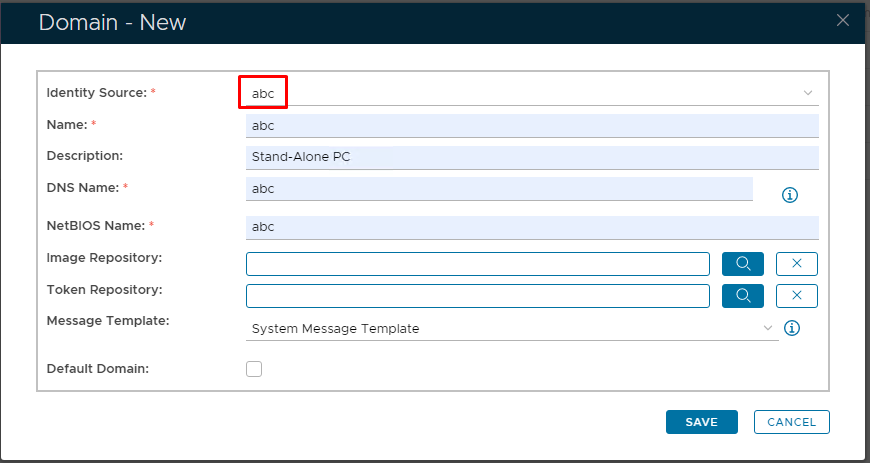
Go to Directory>Domains Click on  on the top right. on the top right. In the 'Domain-New' Dialogue box, select the Identity Source that you have just created from the drop-down It is recommended to You must match the Name, DNS Name and NetBIOS Name with the hostname of the Stand-alone machine Click Save |
| Column |
|---|
|
| Panel |
|---|
| borderColor | #9EBEE5 |
|---|
| bgColor | #f0f0f0 |
|---|
| borderWidth | 1px |
|---|
| 
|
|
|
...
| Section |
|---|
|
| Column |
|---|
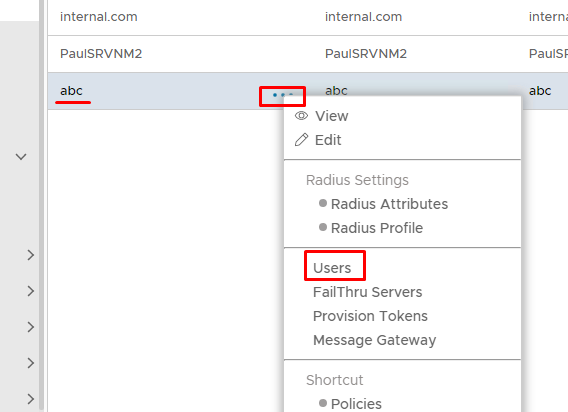
The Virtual domain will now be listed under Domains. Remember to add this new domain to the realm associated in your Computer/Windows Logon App configuration (see Change domains in a realm) Click on the corresponding ellipses and select Users from the menu |
| Column |
|---|
|
| Panel |
|---|
| borderColor | #9EBEE5 |
|---|
| bgColor | #f0f0f0 |
|---|
| borderWidth | 1px |
|---|
|  |
|
|
...
| Section |
|---|
|
| Column |
|---|
Please Note: This will not work if the native Windows Cred UI is set so end users can click on the account names that appear on the bottom, left-hand side. Therefore the default Windows Cred UI must ask for a username and password, like so... |
| Column |
|---|
|
| Panel |
|---|
| borderColor | #9EBEE5 |
|---|
| bgColor | #f0f0f0 |
|---|
| borderWidth | 1px |
|---|
| 
|
|
|
| Section |
|---|
|
| Column |
|---|
|
| Panel |
|---|
| borderColor | #9EBEE5 |
|---|
| bgColor | #f0f0f0 |
|---|
| borderWidth | 1px |
|---|
| |
|
|
...
Image Removed
If you need to enforce this, please follow this guide before continuing.
https://winaero.com/how-to-make-windows-10-ask-for-user-name-and-password-during-log-on/
In particular, you need to enable this setting under Local Security Settings...
...
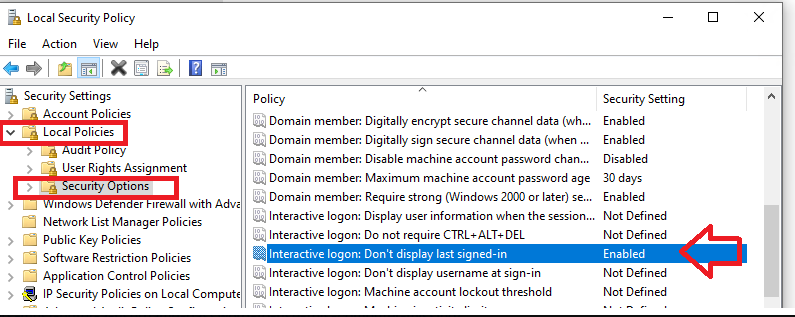 Image Modified Image Modified
|
|
|