OAuth2.0 is now support supported from Version version 6.8.0125.0512 of the Windows Logon agent. The process is as follows:
...
Keep this window open and launch Windows Logon Manager on the machine which you installed the Windows Logon Agent on. (see see Configure Windows Logon Agent)
Version 6.8.0125.051 upwards has notion to Use OAuth an option to use OAuth 2.0. Select this Option and click on Configure
...
Copy out the Client ID and Secret from the Agent Edit screen on the Admin console and paste into the OAuth Configuration box.
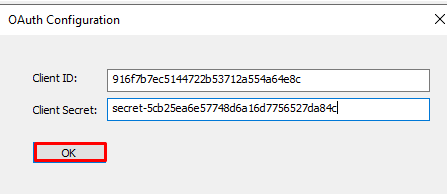
Click OK
If you have multiple Windows Logon Agents installed, you will need to repeat the same steps for each one.