...
This guide assumes that logon to the end user's computer is already protected by the Windows Logon Client. Therefore all that is
The first step required is a modification to the Windows Logon registry key on the client computer, to control the behavior of the network drive mapping (NDM)
The key that needs to be changed is:
...
Computer\HKEY_LOCAL_MACHINE\SOFTWARE\Deepnet
...
Security\Windows Logon
All that is needed is to add an extra DWORD value called MFAforNDM with the value of 1;
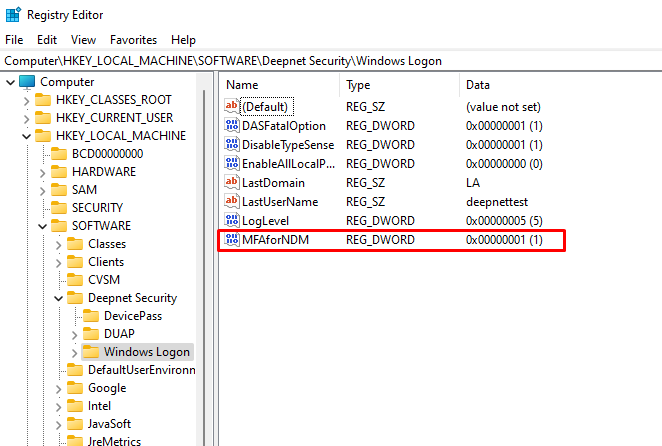
This change can be deployed through GPO: https://www.techcrafters.com/portal/en/kb/articles/how-to-add-edit-deploy-and-import-registry-keys-through-gpo#How_to_Add_Edit_a_Registry_Key_via_Group_Policy_Objects
The second step required is to access the DualShield Administration Console and modify the UAC settings found within the Computer Logon Client policy. Although strictly speaking UAC does not protect network drive mappings nor are you using Computer Logon software, some of the features in this policy do apply to the behavior of Windows Logon, therefore UAC authentication must be set to Multi-Factor Authentication for this to work..
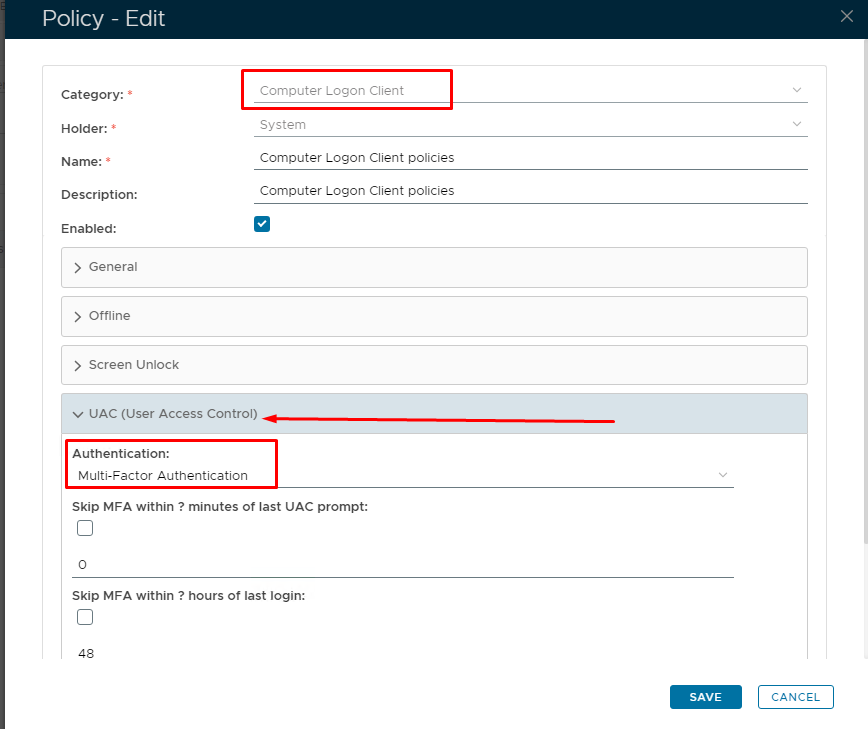
You will most likely need to restart the client PC for this change to take effect.