Create Local accounts on the Stand Alone PC
| Section |
|---|
|
| Column |
|---|
Make a note of the host name of the computer. In this case it is 'ABC' |
| Column |
|---|
|
| Panel |
|---|
| borderColor | #9EBEE5 |
|---|
| bgColor | #f0f0f0 |
|---|
| borderWidth | 1px |
|---|
|  Image Added Image Added 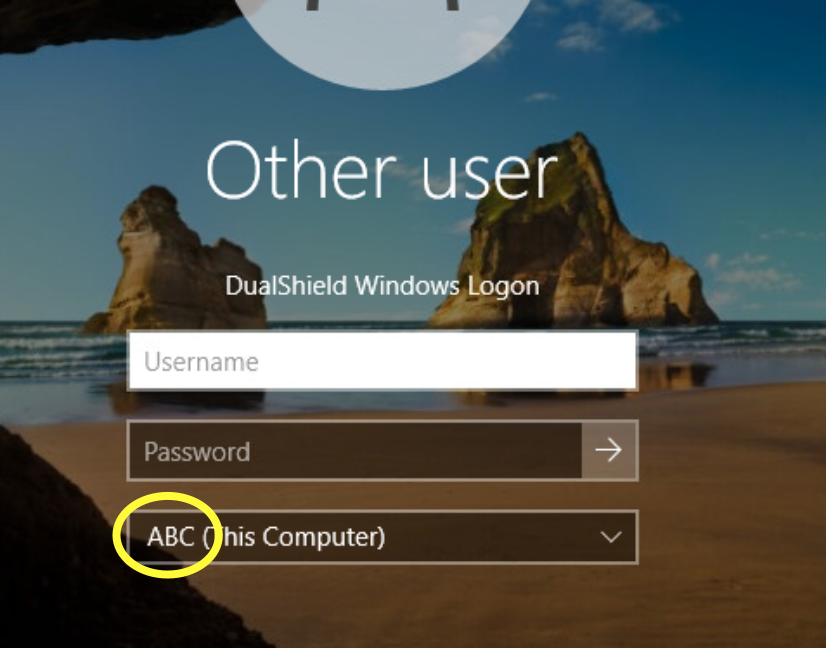 Image Added Image Added
|
|
|
| Section |
|---|
|
| Column |
|---|
Create some local user accounts and make sure the Administrator account is active.
|
| Column |
|---|
|
| Panel |
|---|
| borderColor | #9EBEE5 |
|---|
| bgColor | #f0f0f0 |
|---|
| borderWidth | 1px |
|---|
|  Image Added Image Added
|
|
|
Create a Virtual Domain (This is required as the Stand-alone machines' host name will act as it's own domain.)
| Section |
|---|
|
| Column |
|---|
Login to the DualShield Administration Console and go to Identity>Identity Sources Click on  Image Added on the top right. Image Added on the top right. It is recommended to specify the hostname of the Non-Domain joined machine as the friendly name of this identity source. Also, make sure the Type is set to SQL Click Finish |
| Column |
|---|
|
| Panel |
|---|
| borderColor | #9EBEE5 |
|---|
| bgColor | #f0f0f0 |
|---|
| borderWidth | 1px |
|---|
|  Image Added Image Added
|
|
|
| Section |
|---|
|
| Column |
|---|
Go to Directory>Domains Click on Image Added on the top right. In the 'Domain-New' Dialogue box, select the Identity Source that you have just created from the drop-down It is recommended to match the Name, DNS Name and NetBIOS Name with the hostname of the Stand-alone machine Click Save |
| Column |
|---|
|
| Panel |
|---|
| borderColor | #9EBEE5 |
|---|
| bgColor | #f0f0f0 |
|---|
| borderWidth | 1px |
|---|
| 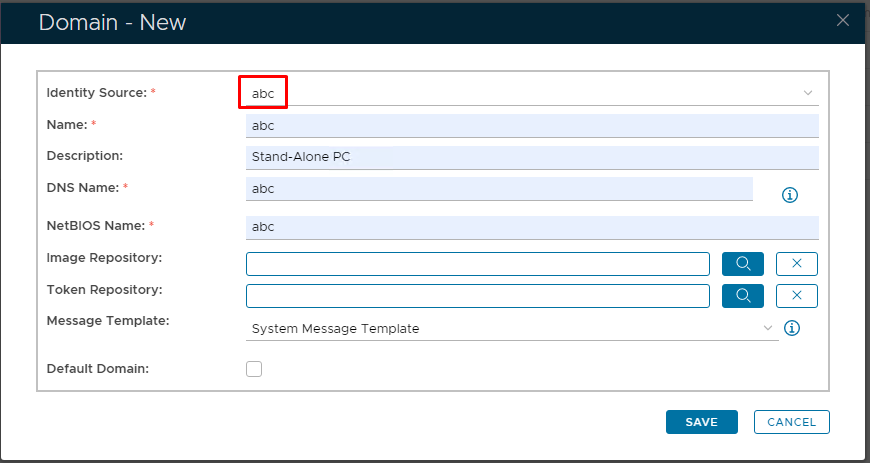 Image Added Image Added
|
|
|
| Section |
|---|
|
| Column |
|---|
The Virtual domain will now be listed under Domains. Click on the corresponding ellipses and select Users from the menu |
| Column |
|---|
|
| Panel |
|---|
| borderColor | #9EBEE5 |
|---|
| bgColor | #f0f0f0 |
|---|
| borderWidth | 1px |
|---|
| 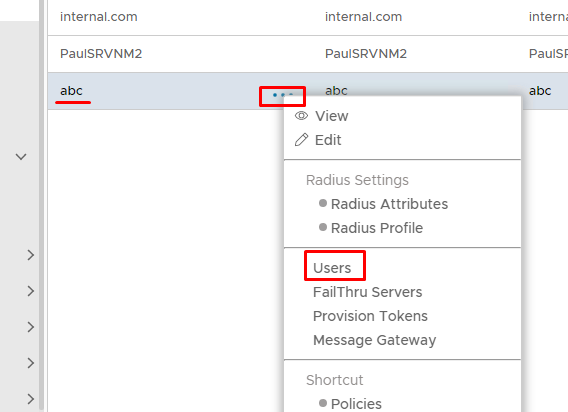 Image Added Image Added |
|
|
Create Virtual Users.
| Section |
|---|
|
| Column |
|---|
You will now need to create Virtual user accounts that match the local user accounts on the PC Click on Image Added on the top right. Make sure the account details match including the password. Click Save
|
| Column |
|---|
|
| Panel |
|---|
| borderColor | #9EBEE5 |
|---|
| bgColor | #f0f0f0 |
|---|
| borderWidth | 1px |
|---|
|  Image Added Image Added
|
|
|
| Section |
|---|
|
| Column |
|---|
Repeat the process until the list of Virtual Users match the list of local users on the PC
|
| Column |
|---|
|
| Panel |
|---|
| borderColor | #9EBEE5 |
|---|
| bgColor | #f0f0f0 |
|---|
| borderWidth | 1px |
|---|
|  Image Added Image Added 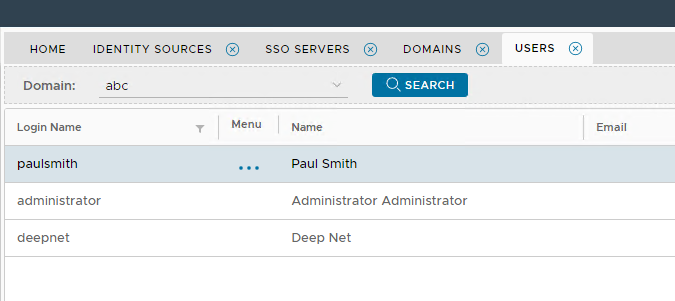 Image Added Image Added
|
|
|
Now please move on to the next stages..