...
| Section |
|---|
|
| Column |
|---|
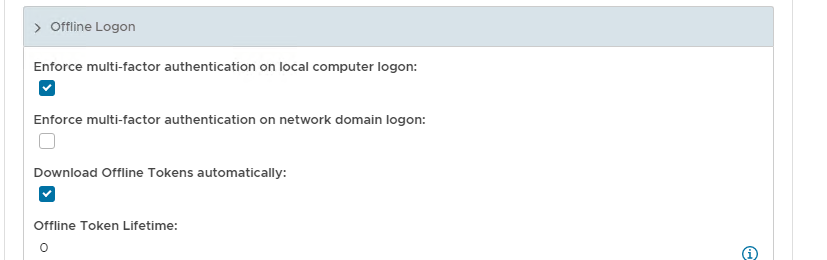
Scroll down the policy and expand Offline Logon Check Enforce MFA on Local Computer Logon and Download Offline Tokens Automatically |
| Column |
|---|
|
| Panel |
|---|
| borderColor | #9EBEE5 |
|---|
| bgColor | #f0f0f0 |
|---|
| borderWidth | 1px |
|---|
| 
|
|
|
Save the new Computer Logon Client policy
| Section |
|---|
|
| Column |
|---|
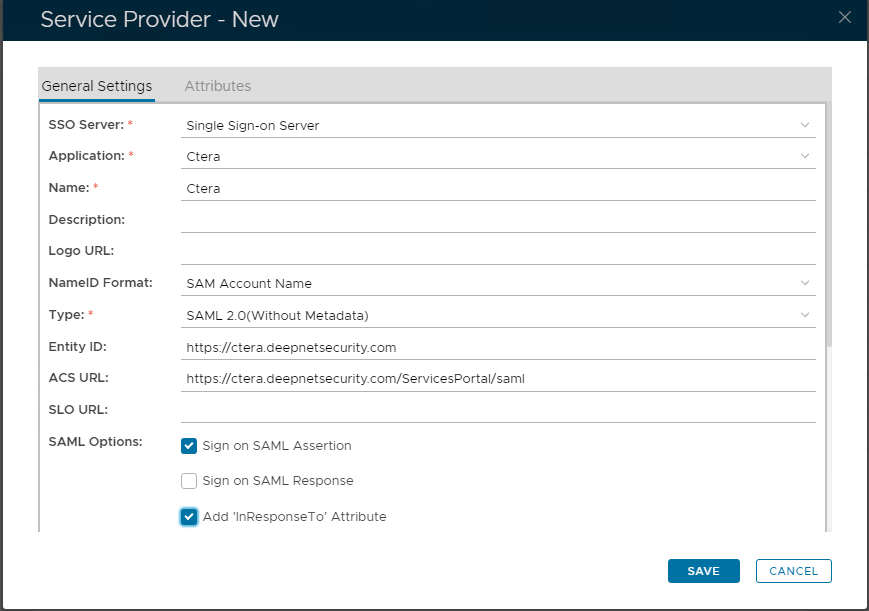
Click on  Image Added on the top right. Image Added on the top right. Set these Values in the Policy - New Window Now fill out Entity ID and ACS URL. Check Enforce MFA on Local Computer Logon and Download Offline Tokens Automatically
|
| Column |
|---|
|
| Panel |
|---|
| borderColor | #9EBEE5 |
|---|
| bgColor | #f0f0f0 |
|---|
| borderWidth | 1px |
|---|
|  Image Removed Image Removed Image Added Image Added
|
|
|
| Section |
|---|
|
| Column |
|---|
The completed Service Provider dialogue box will look like this: |
| Column |
|---|
|
| Panel |
|---|
| borderColor | #9EBEE5 |
|---|
| bgColor | #f0f0f0 |
|---|
| borderWidth | 1px |
|---|
| 
|
|
|
...