...
| Section |
|---|
|
| Column |
|---|
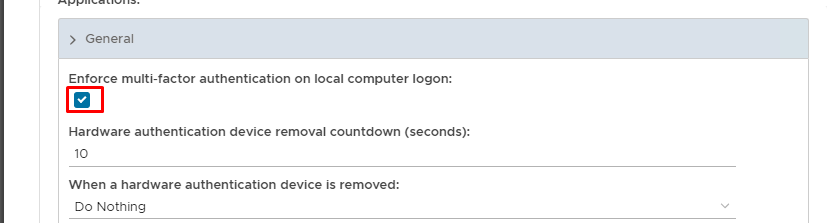
Expand General and check Enable MFA on local computer logon |
| Column |
|---|
|
| Panel |
|---|
| borderColor | #9EBEE5 |
|---|
| bgColor | #f0f0f0 |
|---|
| borderWidth | 1px |
|---|
| 
|
|
|
Click on  Image Removed on the top right.
| Section |
|---|
|
| Column |
|---|
Scroll down the policy and expand Offline Logon Check Enforce MFA on Local Computer Logon and Download Offline Tokens AutomaticallyFill in the details as per screenshot on right and make sure you select SAML 2.0(Without Metadata) as Type. |
| Column |
|---|
|
| Panel |
|---|
| borderColor | #9EBEE5 |
|---|
| bgColor | #f0f0f0 |
|---|
| borderWidth | 1px |
|---|
| 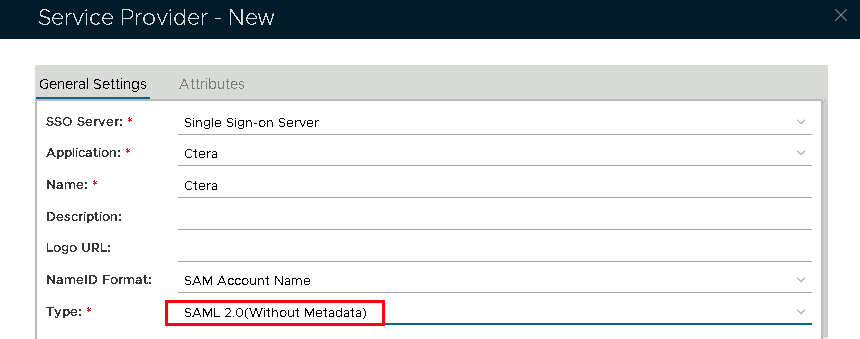 Image Removed Image Removed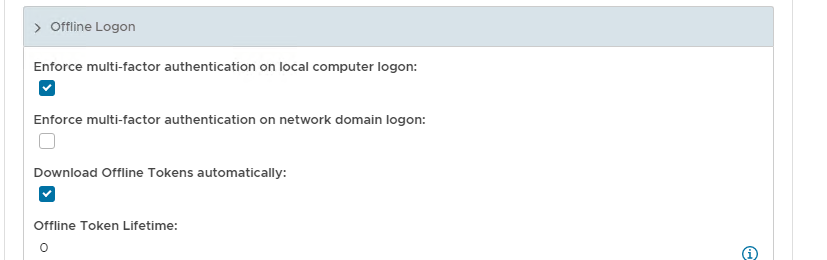 Image Added Image Added
|
|
|
| Section |
|---|
|
| Column |
|---|
Now fill out Entity ID and ACS URL. | Option | Value |
|---|
| Entity ID: | | | ACS URL: | |
|
| Column |
|---|
|
| Panel |
|---|
| borderColor | #9EBEE5 |
|---|
| bgColor | #f0f0f0 |
|---|
| borderWidth | 1px |
|---|
| 
|
|
|
...