...
Create a RADIUS application
- In the main menu, select “Authentication | Applications”
- Click the “Create” button on the toolbar
- Enter “Name”
- Select “Realm”
- Select the logon procedure that was just created
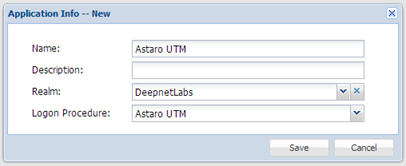

- Click “Save”
- Click the context menu of the newly created application, select “Agent”

8. Select the DualShield Radius server, e.g. ”Local Radius Server”

9. Click “Save”
10. Click the context menu of the newly created application, select “Self Test”
Register the Astaro Security Gateway UTM as a Radius client
- In the main menu, select “RADIUS | Clients”
- Click the “Register” button on the toolbar
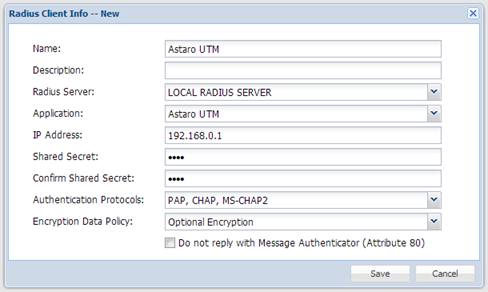
- Select the application that was created in the previous steps
- Enter Astaro Security Gateway UTM’s IP in the IP address
- Enter the Shared Secret which will be used in Astaro Security Gateway UTM.
- Click “Save”