...
| Section |
|---|
|
| Column |
|---|
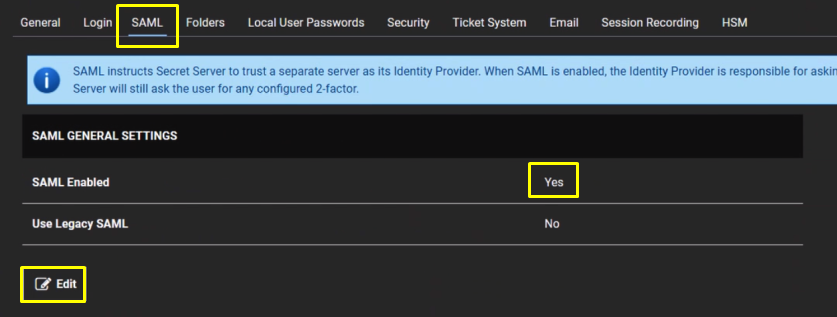
Navigate to Admin > Configuration. Click the SAML tab Click the Edit button in the SAML General Settings section. Click to select the SAML Enabled check box. Click the Save button. |
| Column |
|---|
|
| Panel |
|---|
| borderColor | #9EBEE5 |
|---|
| bgColor | #f0f0f0 |
|---|
| borderWidth | 1px |
|---|
|  |
|
|
You will also need to download the IdP Certificate
| Section |
|---|
|
| Column |
|---|
Click the Edit button in the SAML Service Providers section. Type a name for your service provider, in the Name text box. Click the Select Certificate link. The Upload Certificate popup appears:Upload the exported CER file. |
| Column |
|---|
|
| Panel |
|---|
| borderColor | #9EBEE5 |
|---|
| bgColor | #f0f0f0 |
|---|
| borderWidth | 1px |
|---|
| 
|
|
|
...