...
| Section |
|---|
|
| Column |
|---|
Select the Device you wish to move and click on Configure Device
|
| Column |
|---|
|
| Panel |
|---|
| borderColor | #9EBEE5 |
|---|
| bgColor | #FFFFFF |
|---|
| borderWidth | 1px |
|---|
| 
|
|
|
| Section |
|---|
|
| Column |
|---|
In Client Settings go to Authentication>Settings Profile Click on the Device Setting Override the select the Authentification Profile you wish to use for this device.
Click Apply
|
| Column |
|---|
|
| Panel |
|---|
| borderColor | #9EBEE5 |
|---|
| bgColor | #FFFFFF |
|---|
| borderWidth | 1px |
|---|
|  Image Added Image Added
|
|
|
| Section |
|---|
|
| Column |
|---|
To move a device into a specific authentication group go to Connections>Connected Devices
|
| Column |
|---|
|
| Panel |
|---|
| borderColor | #9EBEE5 |
|---|
| bgColor | #FFFFFF |
|---|
| borderWidth | 1px |
|---|
| 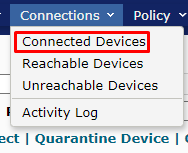 Image Added Image Added
|
|
|
| Section |
|---|
|
| Column |
|---|
Select the Device you wish to move and click on Configure Device
|
| Column |
|---|
|
| Panel |
|---|
| borderColor | #9EBEE5 |
|---|
| bgColor | #FFFFFF |
|---|
| borderWidth | 1px |
|---|
| Image Added |
|
|
| Section |
|---|
|
| Column |
|---|
For this to work the devices must have been connected at least once so they are listed under Connected Devices
|
| Column |
|---|
|
| Panel |
|---|
| borderColor | #9EBEE5 |
|---|
| bgColor | #FFFFFF |
|---|
| borderWidth | 1px |
|---|
|  Image Added Image Added
|
|
|
Authentication Profile
Creating an Authentication Profile is already explained at the beginning of the section titled Mobility Server
| Section |
|---|
|
| Column |
|---|
To move a device into a specific authentication group go to Connections>Connected Devices
|
| Column |
|---|
|
| Panel |
|---|
| borderColor | #9EBEE5 |
|---|
| bgColor | #FFFFFF |
|---|
| borderWidth | 1px |
|---|
| Image Added |
|
|
| Section |
|---|
|
| Column |
|---|
Select the Device you wish to move and click on Configure Device
|
| Column |
|---|
|
| Panel |
|---|
| borderColor | #9EBEE5 |
|---|
| bgColor | #FFFFFF |
|---|
| borderWidth | 1px |
|---|
| Image Added |
|
|