...
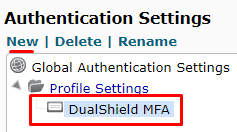
Option - You may set up a separate Authentication authentication profile or use the global settings.
| Section |
|---|
|
| Column |
|---|
To create a separate Profile simply click New on the top left and give the profile a name, at the prompt. You can then select the profile you wish to use, here.
|
| Column |
|---|
|
| Panel |
|---|
| borderColor | #9EBEE5 |
|---|
| bgColor | #FFFFFF |
|---|
| borderWidth | 1px |
|---|
| 
|
|
|
...
| Section |
|---|
|
| Column |
|---|
There are three options that need to be set in Authentication settings | Authentication Protocol | | Retransmit Interval | | Radius Server |
|
| Column |
|---|
|
| Panel |
|---|
| borderColor | #9EBEE5 |
|---|
| bgColor | #FFFFFF |
|---|
| borderWidth | 1px |
|---|
|  Image Removed Image Removed Image Added Image Added
|
|
|
In the Logon Steps Dialogue box, click the  button.
...